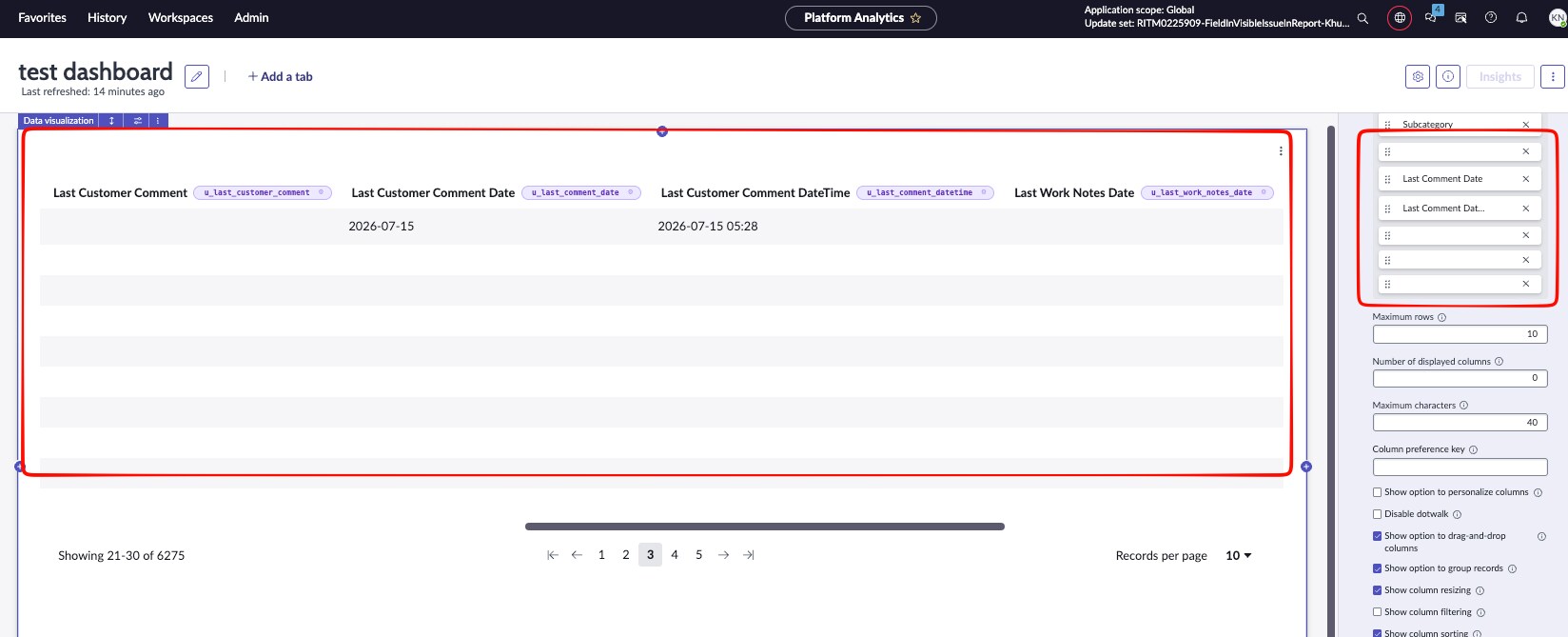
Not able to view the data and field name in case report

- Mark as New
- Bookmark
- Subscribe
- Mute
- Subscribe to RSS Feed
- Permalink
- Report Inappropriate Content
09-17-2026 12:18 AM
We created a new custom field on the sn_customerservice_case (Case) table, but the field name and its data are not visible when adding it to a report / Data Visualization widget. The column appears blank in the field picker, and no data is displayed even though the field has values on the record.
What we've checked so far:
- Field exists in sys_dictionary for the correct table
- No obvious UI policy hiding it on the form
What could cause a field's name/data to not render in reports even though it's selectable in the column picker? Could this be an application scope issue, an ACL restriction, or a caching problem? Any pointers on where to look would be appreciated.


- Mark as New
- Bookmark
- Subscribe
- Mute
- Subscribe to RSS Feed
- Permalink
- Report Inappropriate Content
09-17-2026 04:45 AM
did you try to re-create the field again?
Ankur
✨ Certified Technical Architect || ✨ 10x ServiceNow MVP || ✨ ServiceNow Community Leader