PA Dashboards missing after Upgrade from Yokohama to Australia

- Mark as New
- Bookmark
- Subscribe
- Mute
- Subscribe to RSS Feed
- Permalink
- Report Inappropriate Content
07-06-2026 02:55 AM
Hello,
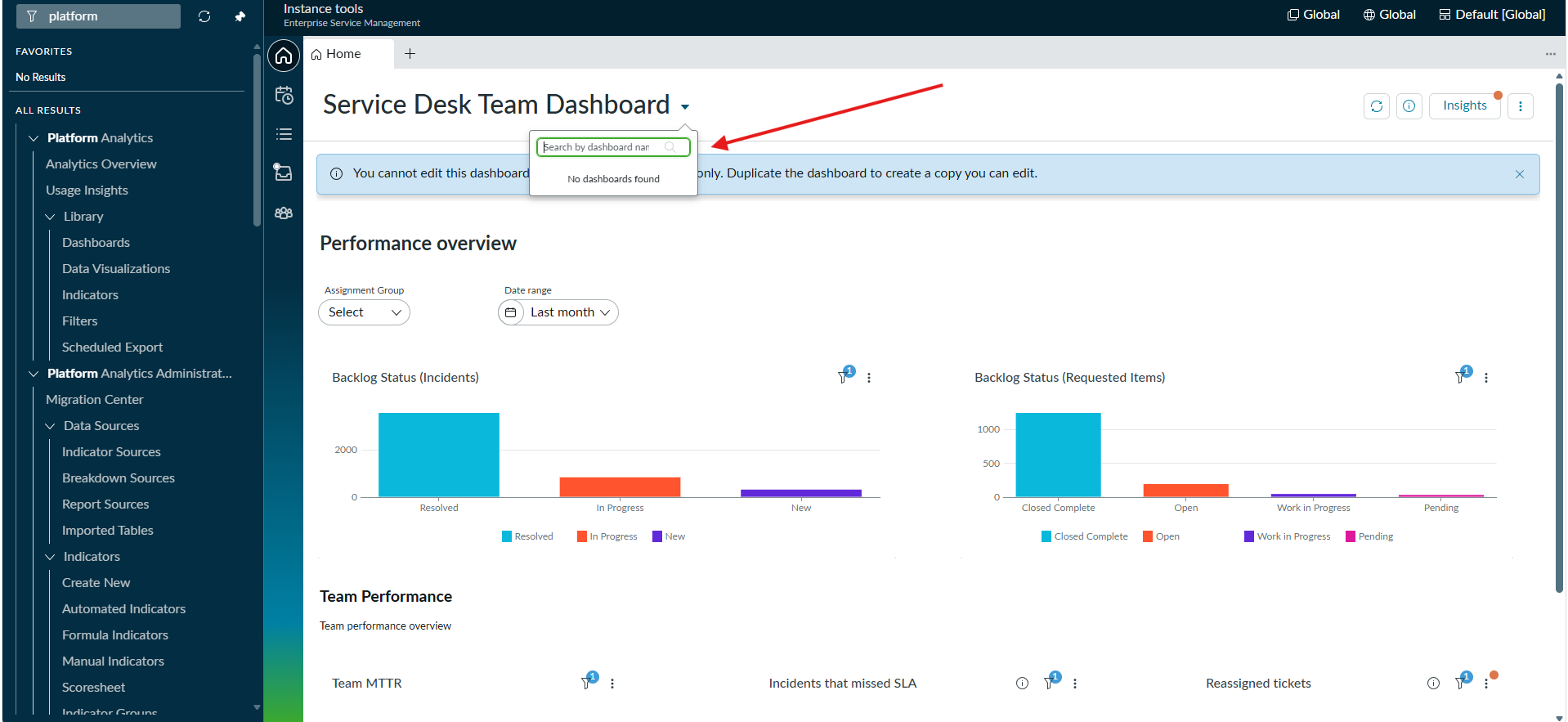
After upgrade from Yokohama to Australia no Dashboards are visible in Platform Analytics, but they are still in pa_dashboards.list
It also does not shown at SOW. See attachments
Any idea?, how to resove this issue?
Regards
- Labels:
-
Dashboard
-
Performance Analytics


- Mark as New
- Bookmark
- Subscribe
- Mute
- Subscribe to RSS Feed
- Permalink
- Report Inappropriate Content
07-06-2026 03:35 AM
Hi
Did you migrate all the reports and dashboards to PA?
Also try repair /upgrade the PAR plugin .
https://www.servicenow.com/docs/r/now-intelligence/data-migration.html
https://www.servicenow.com/docs/r/now-intelligence/data-migration-perform-partial.html
https://www.youtube.com/watch?v=OA2mWEIEhuI
Regards
Dr Atul G. - Learn N Grow Together ServiceNow Techno - Functional Trainer
LinkedIn: https://www.linkedin.com/in/dratulgrover
YouTube: https://www.youtube.com/@LearnNGrowTogetherwithAtulG
******************************************************************************************


- Mark as New
- Bookmark
- Subscribe
- Mute
- Subscribe to RSS Feed
- Permalink
- Report Inappropriate Content
07-06-2026 03:39 AM
Hi @savaliya
Its a known issue as per https://www.servicenow.com/docs/r/release-notes/australia-all-other-fixes.html
| Analytics Data API | PRB1967291 | After an upgrade, Platform Analytics reports and dashboards aren't able to viewed by users |
| Analytics Data API | PRB1967291 | After an upgrade, Platform Analytics reports and dashboards aren't able to viewed by users |
Refer: KB1578131 Platform Analytics Migration Center guidelines and troubleshooting
Probable fix: Migrate your Core UI dashboards, reports, and analytics assets to Platform Analytics using the Migration Center. steps are given in KB.
Migrate to Platform Analytics.
Refer this KB: KB1578131 Platform Analytics Migration Center guidelines and troubleshooting
https://www.youtube.com/watch?v=OA2mWEIEhuI
Platform Analytics Migration Center
Analytics, Intelligence, and Reporting release notes
https://www.frox.ch/en/newsroom/blog-articles/servicenow-platform-analytics-reports-dashboard/
Refer this article: Important Update on Legacy Reporting and Analytics with Australia Release
Overview: There has been some confusion about the status of customer instances following the upgrade to the Australia release. Specifically, there are concerns that customers might lose access to their dashboards and reports from the legacy reporting system. This system is also known by other names such as Core UI reporting, Responsive Canvas dashboards, or simply the legacy dashboards.
Based on customer feedback requesting additional transition time, we have extended this timeline — new legacy content creation will remain available through the end of 2027, regardless of release family. While you may continue to create legacy content, it is unsupported starting with Australia.
Regards
Tanushree Maiti
ServiceNow Technical Architect
LinkedIn: https://www.linkedin.com/in/tanushreemaiti

- Mark as New
- Bookmark
- Subscribe
- Mute
- Subscribe to RSS Feed
- Permalink
- Report Inappropriate Content
07-06-2026 06:02 AM
@savaliya You could also try upgrading to Australia Patch 3, where this should be fixed, and see if your Core UI dashboards reappear (as per the good Doctor's suggestion to upgrade your plugins).