- Mark as New
- Bookmark
- Subscribe
- Mute
- Subscribe to RSS Feed
- Permalink
- Report Inappropriate Content
03-28-2019 04:40 AM
Hi,
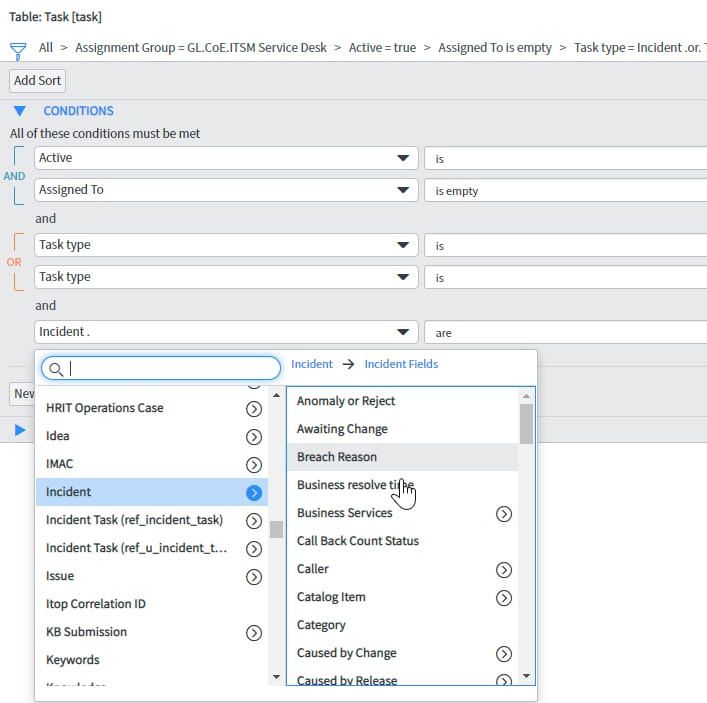
I would like to Report on the Task table so I can display Incidents and Requests. Is there a way to display fields both from the Incident and Requested Item tables?
Also, is there a way to use add conditions from the Incident and Request tables? I can't see 'Show related fields' options or an option for 'Incident [+]' or 'Requested Item [+]' option in the Conditions menu. Am I missing a System property?
Solved! Go to Solution.
- Labels:
-
Reporting
- Mark as New
- Bookmark
- Subscribe
- Mute
- Subscribe to RSS Feed
- Permalink
- Report Inappropriate Content
03-28-2019 04:59 AM
Thanks Slawek. I found the problem I was not seeing the extended table fields. It was a System Property that was disabled.
To enable the extended table fields
- Navigate to System Properties > UI Properties.
- Locate the property Allow base table lists (task, cmdb_ci, etc.) to include extended table fields (incident_state, os_version, etc.), and allow filtering on extended table fields (glide.ui.list.allow_extended_fields).
- Select the check box to enable extended fields on base table lists. Clear the check box to disable the feature.
- Click Save.

- Mark as New
- Bookmark
- Subscribe
- Mute
- Subscribe to RSS Feed
- Permalink
- Report Inappropriate Content
03-28-2019 04:51 AM


- Mark as New
- Bookmark
- Subscribe
- Mute
- Subscribe to RSS Feed
- Permalink
- Report Inappropriate Content
03-28-2019 04:59 AM
Thanks Slawek. I found the problem I was not seeing the extended table fields. It was a System Property that was disabled.
To enable the extended table fields
- Navigate to System Properties > UI Properties.
- Locate the property Allow base table lists (task, cmdb_ci, etc.) to include extended table fields (incident_state, os_version, etc.), and allow filtering on extended table fields (glide.ui.list.allow_extended_fields).
- Select the check box to enable extended fields on base table lists. Clear the check box to disable the feature.
- Click Save.