- Mark as New
- Bookmark
- Subscribe
- Mute
- Subscribe to RSS Feed
- Permalink
- Report Inappropriate Content
09-20-2017 02:25 PM
Good afternoon community,
I am configuring a scheduled data collection job in PA, to collect during the day results, and have the job running every 15 minutes to keep a particular dashboard up to date. I am trying to have this run only during business hours based on a schedule. The job runs fine if I uncheck the conditional box, so the job itself seems ok. The script itself however, I am guessing, must be failing. We are on Geneva, and it seems the script debugger is not active on this version, so I am looking for some help on where I am getting this incorrect. I am a js noob, so tweaking code I find and learning as I go.
function checkSchedule() {
var sched = new GlideSchedule('fdbab3b76fc91600220bbc775b3ee4e8','US/Eastern');
var schedTime = new GlideDateTime(); //get current dateTime in GMT
if (sched.isInSchedule(schedTime,'US/Eastern'))
return yes;
else
return no;
}
According to the job log, this job runs but with ZERO edits. If I uncheck the conditional box, thus bypassing the script, it runs as expected. Where am I messing the script above up? FYI, this schedule is all day on weekdays, so it SHOULD be coming back as true, and running the script.
Thanks!
Jeff
Solved! Go to Solution.
- Labels:
-
Performance Analytics

- Mark as New
- Bookmark
- Subscribe
- Mute
- Subscribe to RSS Feed
- Permalink
- Report Inappropriate Content
09-20-2017 02:53 PM
You defined the function, you should call it by adding the line after the script:
checkSchedule();
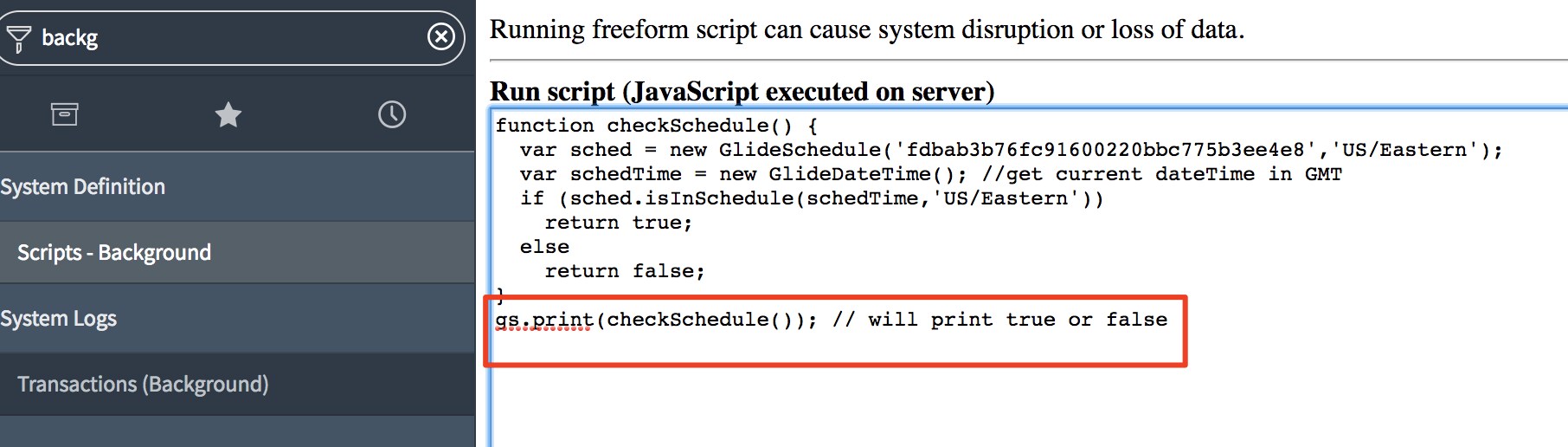
If its not working you can test it by running it in a background script and print the result

- Mark as New
- Bookmark
- Subscribe
- Mute
- Subscribe to RSS Feed
- Permalink
- Report Inappropriate Content
09-20-2017 02:37 PM
I have not tested but you should return true/false, not yes/no
And are you calling the function you are creating?
function checkSchedule() {
   var sched = new GlideSchedule('fdbab3b76fc91600220bbc775b3ee4e8','US/Eastern');
   var schedTime = new GlideDateTime(); //get current dateTime in GMT
   if (sched.isInSchedule(schedTime,'US/Eastern'))
       return true;
   else
       return false;
}
checkSchedule();
- Mark as New
- Bookmark
- Subscribe
- Mute
- Subscribe to RSS Feed
- Permalink
- Report Inappropriate Content
09-20-2017 02:45 PM
Arnoud,
Here is a screenshot of the scheduled job. I have the conditional box checked, which opens up the script area; I THINK I am calling it... also, I have it back to true/false here and it behaves the same way- as if false every time. Though again, the job runs but makes zero edits- this does seem weird, but perhaps it is just the way it is.

Job logs looks like this when it "fails"- when I uncheck the conditional box above, these jobs work (30 sec runs).

Thanks for the look Arnoud!
Jeff
- Mark as New
- Bookmark
- Subscribe
- Mute
- Subscribe to RSS Feed
- Permalink
- Report Inappropriate Content
09-20-2017 02:53 PM
- Mark as New
- Bookmark
- Subscribe
- Mute
- Subscribe to RSS Feed
- Permalink
- Report Inappropriate Content
09-21-2017 06:35 AM
Arnoud,
You cannot see it, but my head hung in shame for a moment when I saw this. You were correct, I had not called the function, and when I did, it worked as expected. Thank you Arnoud! I will report myself for public flogging .
Jeff