- Mark as New
- Bookmark
- Subscribe
- Mute
- Subscribe to RSS Feed
- Permalink
- Report Inappropriate Content
06-02-2017 07:31 AM
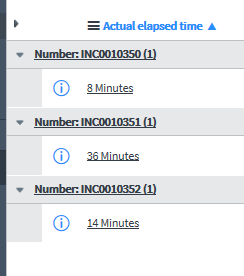
My SLA timer is set for 00:04:14 yet it gives random Actual Elapsed Times?

1. Yet the "actual elapsed time" sometimes stops at 3 mins or sometimes 4 mins yet still in progress?

2. Additionally once I do hit a stop condition by closing the incident the correct Actual elapsed time is shown?

3. So As you can see below its only after I "close" / "stop" the time does it show correct elapsed time as below. Prior to closing it will display ~ 4 min?

Solved! Go to Solution.
- Labels:
-
Reporting


- Mark as New
- Bookmark
- Subscribe
- Mute
- Subscribe to RSS Feed
- Permalink
- Report Inappropriate Content
06-02-2017 02:28 PM
Depending how near it is to breach or if it has breach, it will be updated differently. OOB it's like this:
SLA has default scheduled jobs to regularly refresh the time calculations on each active task SLA.
- SLA update (breach after 30 days): repeats every 5 days
- SLA update (breach within 1 day): repeats every hour
- SLA update (breach within 1 hour): repeats every 10 minutes
- SLA update (breach within 10 min): repeats every 1 minute
- SLA update (breach within 30 days): repeats every day
- SLA update (already breached): repeats every day
Note: By default, the SLA update (already breached) scheduled job will calculate either for up to one year after it was breached or if 1000% of its allocated time is breached. You can set this maximum actual elapsed percentage value property in the SLA Engine properties.
There is also a property that you can set to make it update when you look at the record in a form, to always have the latest numbers when you scroll down to the SLA related list. It's called "glide.sla.calculate_on_display"
//Göran

- Mark as New
- Bookmark
- Subscribe
- Mute
- Subscribe to RSS Feed
- Permalink
- Report Inappropriate Content
06-02-2017 09:57 AM
If I understand correctly Adam, the duration is when you will breach the SLA (in your case 4 minutes 14 seconds)
The actual elapsed time is how much time it actually took according to the start/stop/pause conditions to elapse.
While I can understand the 14 minute one being breached, the 3 minute one is a little less clear.
- Mark as New
- Bookmark
- Subscribe
- Mute
- Subscribe to RSS Feed
- Permalink
- Report Inappropriate Content
06-02-2017 11:37 AM
Thanks for the reply
I think the problem is similar to
Actual elapsed time not geting updated properly for breached task_sla records
The issue is that the "14Minute" example got stuck at the "4 minute" In Progress point it didn't update to the true elapsed time of 14 till I stopped the timer?
See example below it starts at 11:27:15 and elapse time is correct 2 minutes

Then "elapsed time gets stuck at 4 minutes and breach is true that's ok but it stops reporting elapsed time?

After I stop the sla timer it then updates elapsed time? to the 7 minutes which is correct. Its as if it stops reporting elapsed time once the breach is reached?

- Mark as New
- Bookmark
- Subscribe
- Mute
- Subscribe to RSS Feed
- Permalink
- Report Inappropriate Content
06-02-2017 02:28 PM
Depending how near it is to breach or if it has breach, it will be updated differently. OOB it's like this:
SLA has default scheduled jobs to regularly refresh the time calculations on each active task SLA.
- SLA update (breach after 30 days): repeats every 5 days
- SLA update (breach within 1 day): repeats every hour
- SLA update (breach within 1 hour): repeats every 10 minutes
- SLA update (breach within 10 min): repeats every 1 minute
- SLA update (breach within 30 days): repeats every day
- SLA update (already breached): repeats every day
Note: By default, the SLA update (already breached) scheduled job will calculate either for up to one year after it was breached or if 1000% of its allocated time is breached. You can set this maximum actual elapsed percentage value property in the SLA Engine properties.
There is also a property that you can set to make it update when you look at the record in a form, to always have the latest numbers when you scroll down to the SLA related list. It's called "glide.sla.calculate_on_display"
//Göran
- Mark as New
- Bookmark
- Subscribe
- Mute
- Subscribe to RSS Feed
- Permalink
- Report Inappropriate Content
06-03-2017 08:24 AM
Thanks!!!! that worked I set glide.sla.calculate_on_display to true awesome!