- Mark as New
- Bookmark
- Subscribe
- Mute
- Subscribe to RSS Feed
- Permalink
- Report Inappropriate Content
09-15-2021 04:30 AM
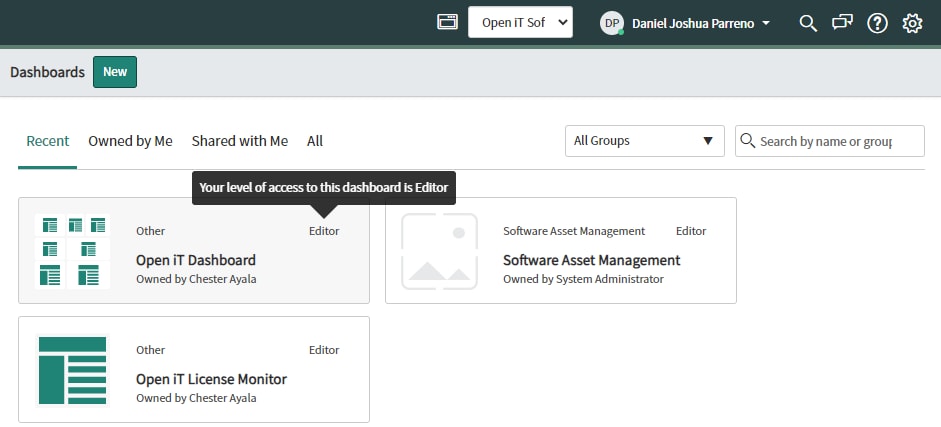
Hello, I have another user with Editor level access to the dashboard but the edit buttons are not appearing.
The user has admin and sn_admin roles. I have tried giving it a dashboard_admin and pa_admin roles as well but the user was still not able to edit the dashboard. Am I missing something? I tried sharing the dashboard too.


Solved! Go to Solution.
- Labels:
-
Dashboard
- Mark as New
- Bookmark
- Subscribe
- Mute
- Subscribe to RSS Feed
- Permalink
- Report Inappropriate Content
09-19-2021 04:02 PM
Still doesn't work.
But I found the solution which is weird, I just changed the owner of the Dashboards into System Administrator and it worked! Everyone with the required admin roles can now edit the dashboard.


- Mark as New
- Bookmark
- Subscribe
- Mute
- Subscribe to RSS Feed
- Permalink
- Report Inappropriate Content
09-15-2021 07:14 AM
Try adding pa_power_user.
Also here is a ServiceNow Doc on permissions. Looks like the only one that you have not added at this point is pa_power_user, let's see if that changes anything.
- Mark as New
- Bookmark
- Subscribe
- Mute
- Subscribe to RSS Feed
- Permalink
- Report Inappropriate Content
09-16-2021 12:25 AM
I have added pa_power_user role to the user, the user was still not able to edit the custom dashboard.
We are using Quebec version by the way.
- Mark as New
- Bookmark
- Subscribe
- Mute
- Subscribe to RSS Feed
- Permalink
- Report Inappropriate Content
09-16-2021 06:18 AM
I would say at this point to put in a HI Incident to see if something else is going on. You have given the user all the permissions needed to edit the Dashboard.
Sorry couldn't get this resolved for you, but I am sure HI will be able to see what is going on.

- Mark as New
- Bookmark
- Subscribe
- Mute
- Subscribe to RSS Feed
- Permalink
- Report Inappropriate Content
09-16-2021 03:24 AM
Hi
Your users need to have "dashboard_admin role".
you can also refer to this thread for your solution:
https://community.servicenow.com/community?id=community_question&sys_id=7d07ddbe1b8c2c106531ea89bd4bcb95
Please mark my answer as Correct & Helpful, if applicable.
Thanks
Sandeep