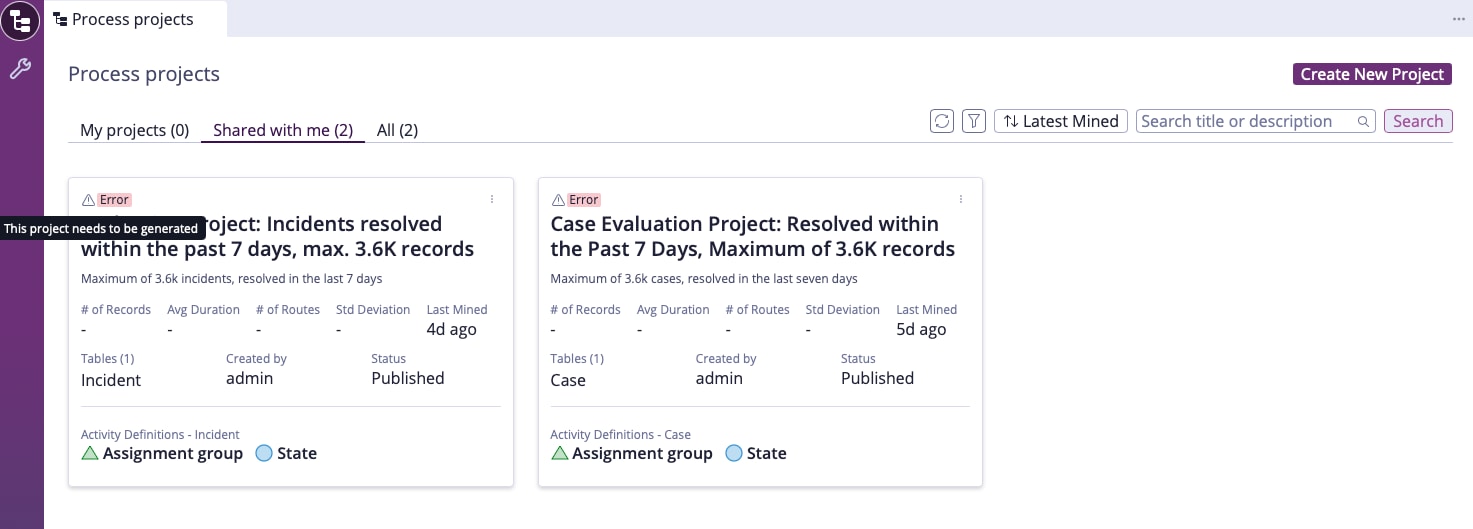
Errors when starting process mining demo projects

- Mark as New
- Bookmark
- Subscribe
- Mute
- Subscribe to RSS Feed
- Permalink
- Report Inappropriate Content
08-17-2025 06:14 PM
Hi Community!
I've just attended a session on Process Mining, where ServiceNow demonstrated the new free-tier demo process mining projects.
I tried to run them myself, both on my base account with process mining roles and on my platform admin account.
I'm not having any luck - it just gives me a generic error. Does anyone have any ideas?


- Mark as New
- Bookmark
- Subscribe
- Mute
- Subscribe to RSS Feed
- Permalink
- Report Inappropriate Content
08-18-2025 10:27 PM
Hi @Shane Baker
Do you have admin rights in your instance? If not, assign them and try again.
Regards
Dr Atul G. - Learn N Grow Together ServiceNow Techno - Functional Trainer
LinkedIn: https://www.linkedin.com/in/dratulgrover
YouTube: https://www.youtube.com/@LearnNGrowTogetherwithAtulG
******************************************************************************************
- Mark as New
- Bookmark
- Subscribe
- Mute
- Subscribe to RSS Feed
- Permalink
- Report Inappropriate Content
08-18-2025 10:30 PM
Hey Atul! Yep, I am logged in as my admin account
- Mark as New
- Bookmark
- Subscribe
- Mute
- Subscribe to RSS Feed
- Permalink
- Report Inappropriate Content
08-19-2025 04:20 AM
Are you the creator of this project? Try copying this project and then perform the mining and testing.
Regards
Dr Atul G. - Learn N Grow Together ServiceNow Techno - Functional Trainer
LinkedIn: https://www.linkedin.com/in/dratulgrover
YouTube: https://www.youtube.com/@LearnNGrowTogetherwithAtulG
******************************************************************************************


- Mark as New
- Bookmark
- Subscribe
- Mute
- Subscribe to RSS Feed
- Permalink
- Report Inappropriate Content
08-18-2025 10:55 PM - edited 08-18-2025 10:57 PM
It seems like the instance does not have user with "admin" username.
The project is mined based on created_by field, in this case it is "admin" so, in order to fix the issue, you need to update the created_by field by using background script.