How to send a email using Workspace client script in Servicenow operation workspace through an event

- Mark as New
- Bookmark
- Subscribe
- Mute
- Subscribe to RSS Feed
- Permalink
- Report Inappropriate Content
05-15-2026 05:14 AM
We have a UI action & we're expecting that once we click on that UI action , it has to send an email automatically based on the event in Service Operation Workspace view.
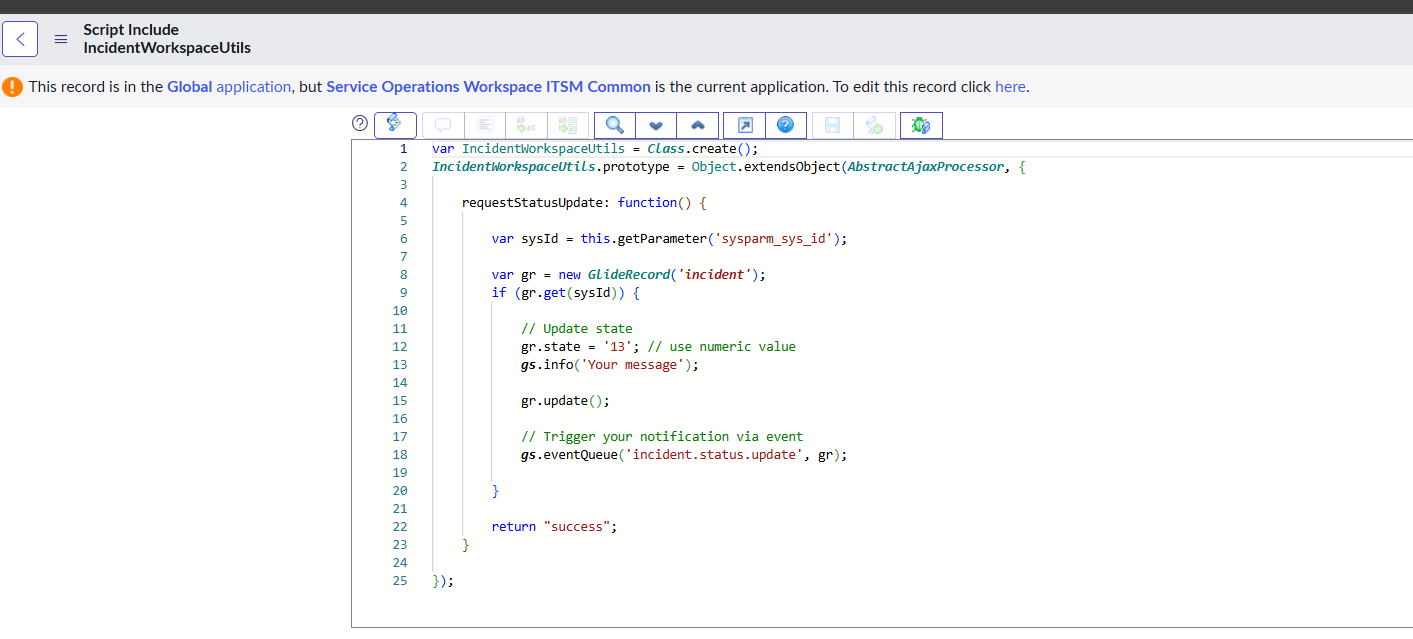
Attached is the Workspace client script in the UI action & the related script include which is called in that UI action , currently the email is not getting triggered based on the notification/event call.
Kindly check and advise if any changes required.
Thank you!


- Mark as New
- Bookmark
- Subscribe
- Mute
- Subscribe to RSS Feed
- Permalink
- Report Inappropriate Content
05-15-2026 05:29 AM
is Ajax call happening?
Ensure Script Include is made Accessible from All Scopes and then see if Ajax call happen
Also the notification attached to that event has recipient configured at notification level since you are not sending the recipient in parm1 or parm2 in eventQueue()
💡 If my response helped, please mark it as correct ✅ and close the thread 🔒— this helps future readers find the solution faster! 🙏
Ankur
✨ Certified Technical Architect || ✨ 10x ServiceNow MVP || ✨ ServiceNow Community Leader

- Mark as New
- Bookmark
- Subscribe
- Mute
- Subscribe to RSS Feed
- Permalink
- Report Inappropriate Content
05-15-2026 05:39 AM
Is the event triggered? Does the status change?
Next to that: why make it so difficult? Why not just a 'state changes to...' condition on the email notification?
Please mark any helpful or correct solutions as such. That helps others find their solutions.
Mark
- Mark as New
- Bookmark
- Subscribe
- Mute
- Subscribe to RSS Feed
- Permalink
- Report Inappropriate Content
05-15-2026 05:39 AM
Hi @Sree Harsha2,
your overall approach is correct.
A few things I noticed that may be causing the email not to trigger:
- Method name mismatch in GlideAjax
In your Workspace Client Script you are calling:
ga.addParam('sysparm_name', 'incident_status');But in the Script Include the function name is:
requestStatusUpdate: function()
These names must match exactly.
So either change the client script to:
ga.addParam('sysparm_name', 'requestStatusUpdate');OR rename the Script Include function to incident_status.
2. Make sure Script Include is Client Callable
Your Script Include extends AbstractAjaxProcessor, which is correct, but ensure:
Client callable = true
Accessible from = All application scopes
Otherwise the GlideAjax call will fail silently in Workspace.
3. Verify the Event actually fires
Add this temporarily in Script Include:
gs.info('Event Triggered');Then check:
System Logs → All
If you do not see the log, then the Ajax call itself is not reaching the Script Include.
4. Notification configuration
Your event queue call is:
gs.eventQueue('incident.status.update', gr);So ensure:
Event name exactly matches in Registry
Notification is attached to same event
Notification is Active
Recipients are configured in Notification
Since parm1/parm2 are not passed in eventQueue(), the notification must already know who the recipients are.
5. Workspace save timing
Right now you are doing:
g_form.setValue('state', '13');
g_form.save();
inside callback.
Sometimes Workspace saves asynchronously, so event may trigger before record fully updates.
You can also move the state update completely to the Script Include side for more reliable behavior.
Example:
gr.state = 13;
gr.update();
gs.eventQueue('incident.status.update', gr);
inside Script Include only.
That is usually more stable in Workspace implementations.
- Mark as New
- Bookmark
- Subscribe
- Mute
- Subscribe to RSS Feed
- Permalink
- Report Inappropriate Content
05-15-2026 07:38 AM
@pr8172510 Thank you for your help!
I've made changes to the script include as discussed with you here. I can see in the logs that the script include is called but still the notification is not triggered as it currently happens once you click on the same UI action in the native(ITIL) view, please suggest.
Kindly find the attached logs, script include, UI action and the notification.