How to send a email using Workspace client script in Servicenow operation workspace through an event

- Mark as New
- Bookmark
- Subscribe
- Mute
- Subscribe to RSS Feed
- Permalink
- Report Inappropriate Content
05-15-2026 05:14 AM
We have a UI action & we're expecting that once we click on that UI action , it has to send an email automatically based on the event in Service Operation Workspace view.
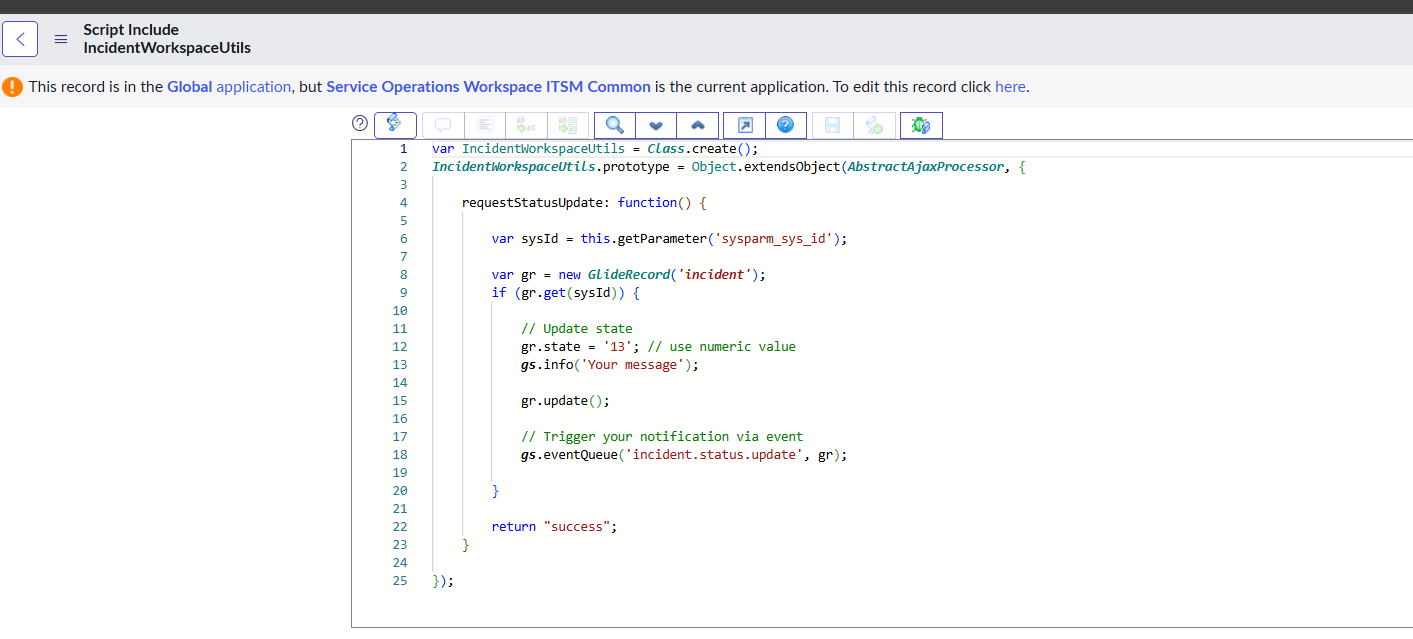
Attached is the Workspace client script in the UI action & the related script include which is called in that UI action , currently the email is not getting triggered based on the notification/event call.
Kindly check and advise if any changes required.
Thank you!


- Mark as New
- Bookmark
- Subscribe
- Mute
- Subscribe to RSS Feed
- Permalink
- Report Inappropriate Content
05-16-2026 12:24 AM
in your notification you have marked Event parm1 contains recipient but you are not sending any recipient
update your line as this
gs.eventQueue("incident.status.update", gr, gr.assigned_to.toString());
💡 If my response helped, please mark it as correct ✅ and close the thread 🔒— this helps future readers find the solution faster! 🙏
Ankur
✨ Certified Technical Architect || ✨ 10x ServiceNow MVP || ✨ ServiceNow Community Leader
- Mark as New
- Bookmark
- Subscribe
- Mute
- Subscribe to RSS Feed
- Permalink
- Report Inappropriate Content
05-17-2026 08:59 PM
Hey @Sree Harsha2,
You have checked Event parm 1 contains recipient but look at your Script Include:
gs.eventQueue('incident.status.update', gr);You are NOT passing any value in parm1 or parm2. You only passed the event name and the record. The notification is looking for a recipient in Event parm 1 but it's empty.
Change your Script Include event line to:
gs.eventQueue('incident.status.update', gr, gr.assigned_to.toString());

- Mark as New
- Bookmark
- Subscribe
- Mute
- Subscribe to RSS Feed
- Permalink
- Report Inappropriate Content
05-16-2026 12:01 AM
It is not working because gs.eventQueue() is a server-side function, while you are trying to call it from client-side code (Workspace Client Script).
Any code written inside the onclick function of a UI Action executes on the client side.
To make this work, remove the onclick function and place the code directly in the UI Action script so it runs on the server side.
Regards
Tanushree Maiti
ServiceNow Technical Architect
LinkedIn: https://www.linkedin.com/in/tanushreemaiti
- Mark as New
- Bookmark
- Subscribe
- Mute
- Subscribe to RSS Feed
- Permalink
- Report Inappropriate Content
05-16-2026 12:02 AM
It is not working because gs.eventQueue() is a server-side function, while you are trying to call it from client-side code (Workspace Client Script).
Any code written inside the onclick function of a UI Action executes on the client side.
To make this work, remove the onclick function and place the code directly in the UI Action script so it runs on the server side.
Refer:
Regards
Tanushree Maiti
ServiceNow Technical Architect
LinkedIn: https://www.linkedin.com/in/tanushreemaiti