Need to hide "Add / Edit / Remove" buttons from Approvers related list in SC Task

- Mark as New
- Bookmark
- Subscribe
- Mute
- Subscribe to RSS Feed
- Permalink
- Report Inappropriate Content
12-03-2025 11:33 PM
I have a requirement to hide the Add, Edit, and Remove buttons from the Approvers related list (sysapproval_approver) on an SC Task after a particular task is closed complete.
I created a Client Script (onLoad) on the sc_task table using:
But the buttons are not hiding.
I also tried placing the script inside a UI Policy with no success.
Is there a reliable way to hide the Add / Edit / Remove related list buttons for the Approvers list?
- Mark as New
- Bookmark
- Subscribe
- Mute
- Subscribe to RSS Feed
- Permalink
- Report Inappropriate Content
01-13-2026 02:03 AM
@Ankur Bawiskar
The page that you are showing is sctask approvers related list.
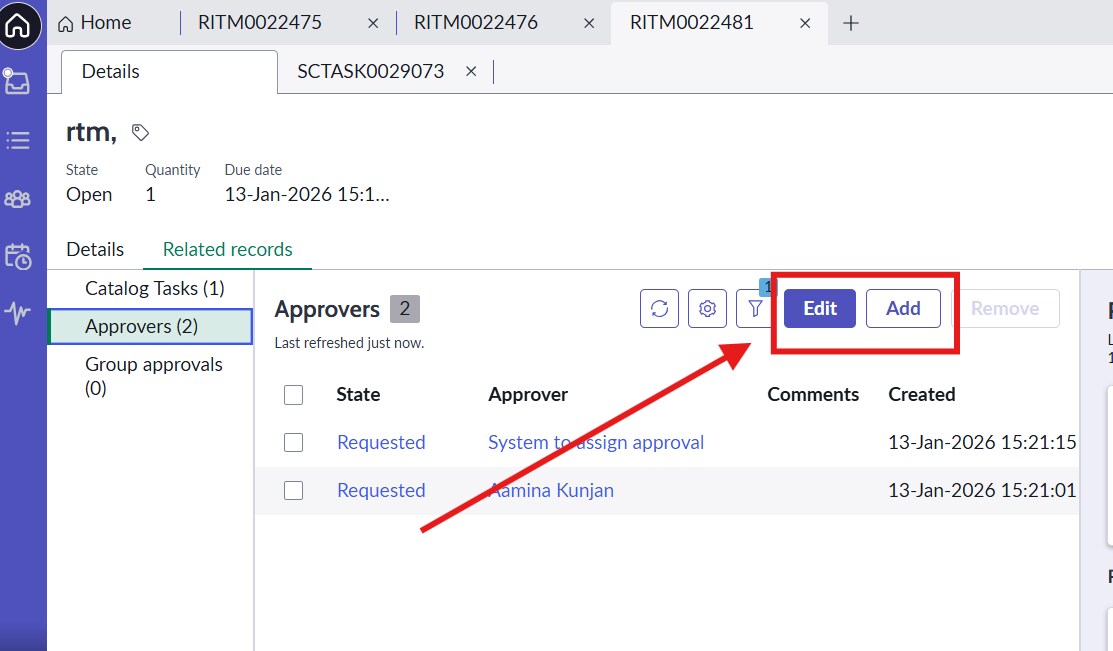
But I have these buttons in RITM approvers related list.


- Mark as New
- Bookmark
- Subscribe
- Mute
- Subscribe to RSS Feed
- Permalink
- Report Inappropriate Content
01-13-2026 03:46 AM
your question says you want to hide those from SC Task approvers related list
but now you are saying that's there on RITM approvers related list
I am confused what you want
💡 If my response helped, please mark it as correct ✅ and close the thread 🔒— this helps future readers find the solution faster! 🙏
Ankur
✨ Certified Technical Architect || ✨ 10x ServiceNow MVP || ✨ ServiceNow Community Leader
- Mark as New
- Bookmark
- Subscribe
- Mute
- Subscribe to RSS Feed
- Permalink
- Report Inappropriate Content
01-13-2026 04:00 AM
I need the Add and Edit buttons to be hidden in the RITM Approvers related list once a specific SC Task is moved to Closed Complete.
I have already restricted the Remove action using a server-side script in declarative actions, which prevents deletion after the approval has been processed by displaying an error message and aborting the action.
However, I’m unable to control the Add and Edit buttons because these actions are implemented as UXF Client Actions, and the same approach cannot be applied there.
Looking for guidance on how to conditionally hide or disable these UXF-based actions based on the state of a related SC Task.
- Mark as New
- Bookmark
- Subscribe
- Mute
- Subscribe to RSS Feed
- Permalink
- Report Inappropriate Content
01-13-2026 04:05 AM - edited 01-13-2026 04:07 AM
share those UXF Client Action config screenshots
in UXF Client Action you can add Script Condition
you can call script include function and pass the RITM sysId and then handle the logic

💡 If my response helped, please mark it as correct ✅ and close the thread 🔒— this helps future readers find the solution faster! 🙏
Ankur
✨ Certified Technical Architect || ✨ 10x ServiceNow MVP || ✨ ServiceNow Community Leader
- Mark as New
- Bookmark
- Subscribe
- Mute
- Subscribe to RSS Feed
- Permalink
- Report Inappropriate Content
01-13-2026 04:33 AM
@Ankur Bawiskar
Add button is UXF client action and Edit button is a client script.