Jochen Geist

ServiceNow Employee
Options
- Subscribe to RSS Feed
- Mark as New
- Mark as Read
- Bookmark
- Subscribe
- Printer Friendly Page
- Report Inappropriate Content
07-10-2020
01:57 AM
Automated Test Framework (ATF) enables you to design and run automated tests on your ServiceNow instance.
To ensure that a high amount of functionality is covered by Automated Testing, it's crucial to reduce maintenance efforts as much as possible. This will allow Test Designers to focus on addressing existing gaps in terms of Test Coverage instead of time consuming rework of existing ATF Test Cases. Among others factors, changes to a process often result in ATF Test Cases no longer working as steps and test data need to be modified to match the new process.
The more Test Cases exists in your instance, the bigger the maintenance impact of these changes becomes.
In this post we want to look into how a Custom Step could improve the situation.
Test Step Config: "Create Record from Template"
A new Custom Test Step Config can be easily created via the ATF module.
Provide a name and description that states for which use case the Test Step should be used:
Inputs & Outputs
Inputs and outputs allow us to make Test Steps dynamic, which is crucial for reusing the step in multiple tests.
As we are creating a record based on a template, we should be able to specify which template to use.
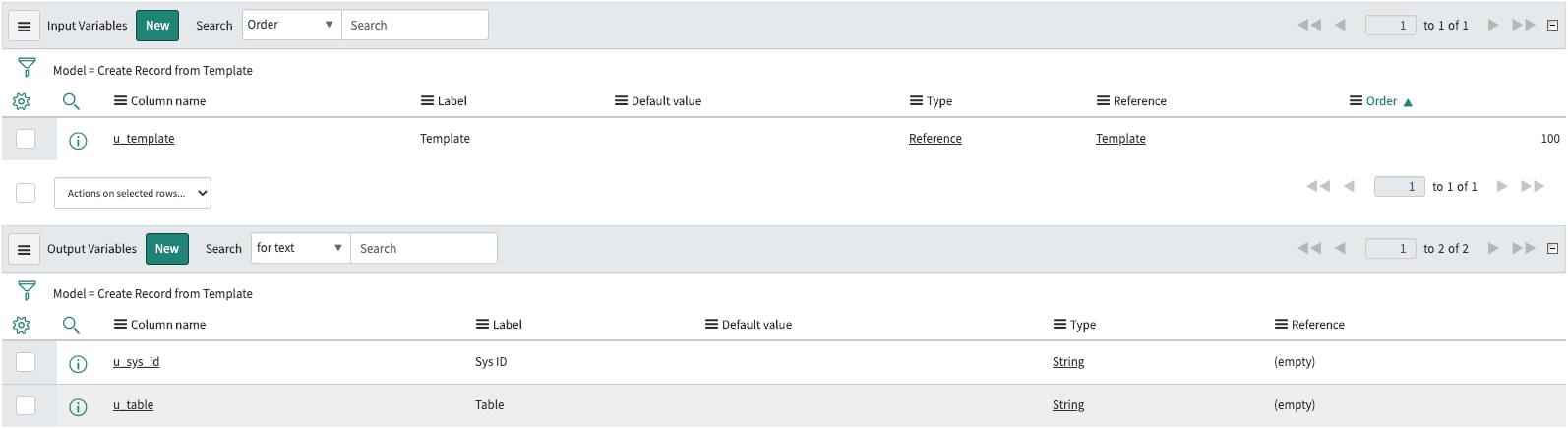
First, we need a new Input Variable of type "Reference" referencing the Template (sys_template) table:
- Column name "u_template" with Label "Template"
To make sure the newly created record can be used in subsequent test steps, we need to pass on at least the sysid.
Additionally, returning the table makes the setup of later tests steps easier.
Let's therefore create two Output Variables of type "String":
- Column name "u_sys_id" with Label "Sys ID"
- Column name "u_table" with Label "Table"
The in- and outputs setup should then look similar to this:
Description generation script
The Description generation script defines how the Test Step is described in the Step list when it's added to a Test Case. The text should allow Test Designers who are creating Test Cases to quickly understand what will happen in the individual step.
As an example we could populate the description with the name of the template and the table in which the record will be created:
function generateDescription() {
    var description = "";
    var grTemplate = new GlideRecord('sys_template');
    if (grTemplate.get(step.inputs.u_template)) {
        description = 'Create new Record in table ' + grTemplate.getValue('table') + ' using template ' + grTemplate.getDisplayValue('name');
    }
    return description;
}
generateDescription();
Step execution script
The execution script is the heart and soul of a custom step configuration. Like the description script, we have the full freedom of the scripting engine here to perform any operations required.
In this example we are creating a new record in a table using the GlideRecord and GlideTemplate APIs by applying the template record provided via the input variable:
(function executeStep(inputs, outputs, stepResult, timeout) {

    var templateId = inputs.u_template;
    if (gs.nil(templateId)) {
        stepResult.setOutputMessage(gs.getMessage("The '{0}' input variable was not specified", 'templateId'));
        stepResult.setFailed();
        return;
    }

    // create new GlideRecord and apply the template
    var template = new GlideRecord('sys_template');
    if (template.get(templateId)) {
        var testTemplate = new GlideTemplate.get(templateId);

        var grToBeCreated = new GlideRecord(template.getValue('table'));
        grToBeCreated.initialize();
        testTemplate.apply(grToBeCreated);
        outputs.u_sys_id = grToBeCreated.insert();
        outputs.u_table = template.getValue('table');

        stepResult.setSuccess();
    } else {
        stepResult.setFailed();
    }

}(inputs, outputs, stepResult, timeout));
Using the Step Config in an Example Test
For this example we want to test that a Case can be proposed as a Major Case via the UI and that the Case record is then successfully updated.
In Step 1 a new Case record is created and all required fields are populated using the "ATF: New Case not assigned" template.
Then in Steps 2- 6 a Test User is impersonated and the previously created Case opened and proposed as a Major Case.
In Step 7 we finally verify if the Test Case was successful by checking the Major case state attribute of the record created in Step 1.
In case a new mandatory field would now be added to the Case form, we could now simply update the "ATF: New Case not assigned" template without having to update the ATF Test Cases at all.
Conclusion
The above example was just one approach to use Custom Steps.
If you spend a significant amount of time on maintaining ATF Test Cases, it may be worth to investigate if a Custom Step could reduce some of these efforts.
Do you have any other examples for scenarios you addressed with Custom Steps in your testing setup?
Labels:
- 4,843 Views
1 Comment
You must be a registered user to add a comment. If you've already registered, sign in. Otherwise, register and sign in.