Alikutty A
Tera Sage
Options
- Subscribe to RSS Feed
- Mark as New
- Mark as Read
- Bookmark
- Subscribe
- Printer Friendly Page
- Report Inappropriate Content
08-12-2021
03:41 AM
During system upgrades, there won’t be any downtime and users can continue working in the instance but there are certain features that are not processed or delayed which can result in unexpected outcomes. For example, A discovery schedule or any other scheduled jobs are not executed during an upgrade. You will also find that system events like metric updates, text indexing, workflow or SLA timer activities are not processed and are delayed until the upgrade is completed. This can cause some inconsistent behaviour in the instance which may either delay your business processes or can cause some inconsistent behavior depending on the schedules that you have setup in your instance.
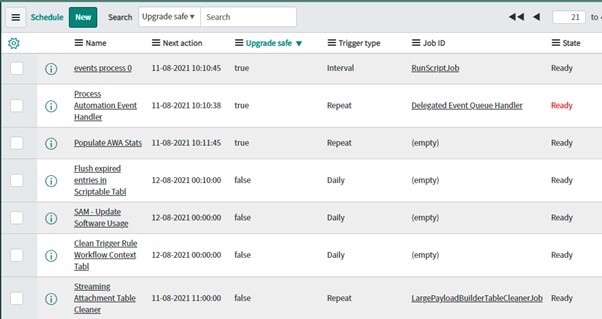
You may also find certain events that ServiceNow has allowed to execute even during an upgrade due to its business criticality. For example, the email events are executed which allows sending and receiving of emails during an upgrade. There are also a set of jobs related to event management that are executed during an upgrade to generate alerts from an event. These triggers are executed because they have the Upgrade safe flag checked in the sys_trigger table which allows them to run during upgrades.
ServiceNow does not recommend to change the Upgrade safe flag for any scheduler jobs either out of the box or for custom ones. This is because it will cause performance issues during your upgrade which can delay the process and affect your instance health. Additionally the impact of executing an out of box schedule during an upgrade is unpredictable as ServiceNow may have introduced new changes to the configurations as a part of upgrade and it can produce unexpected results during its execution. There is also a big confusion whether the mid server is taken down during an upgrade which is incorrect. The mid server remains active throughout the upgrade process but the scheduled jobs does not execute which keeps the ECC queue empty and hence no work is assigned to the mid server. When upgrade starts, all existing entries within the ECC queue will be processed by the mid server and no new entries are added to it until the upgrade is complete. When the mid server upgrade itself at the end of the cycle, it would perform a restart to reflect the new changes which only last for few minutes.
Ofcourse, there can be cases which are very critical to your business processes or having financial impacts and exceptions can certainly be availed in such cases. One of such case that I had come across was to enable the execution of SLA breach notifications during an upgrade and this can be allowed by setting the Upgrade safe flag on the related schedules. The solution has been documented in a ServiceNow support ticket which you can access here. With that said, you should plan your production upgrades on a proper schedule preferably on weekends and during off business hours. It is not at all recommended to activate the Upgrade safe flag unless and until there is a critical business case which needs to be addressed during an upgrade.
References
Features that can be affected during an instance upgrade
Event Management jobs with upgrade safe
- 4,898 Views
1 Comment
You must be a registered user to add a comment. If you've already registered, sign in. Otherwise, register and sign in.