- Mark as New
- Bookmark
- Subscribe
- Mute
- Subscribe to RSS Feed
- Permalink
- Report Inappropriate Content
07-19-2016 10:20 AM
Hi,
I need to change the name of a button on the Order Guide. It is the "Choose Options" button.

I already did it before by going to UI messages and changing the "choose options" there, but I need it only change on the buttons in this case, and not the process flow.
Because if I change it in UI messages, it changes the name on the process flow as well. I do not want that.
I tried looking in the UI page com.glideapp.servicecatalog_cat_item_guide_view and see that the button is generated here:
<td style="white-space: nowrap; padding-right: 5px; float: right">
<g:inline template="com.glideapp.servicecatalog_guide_tabs_controls.xml" />
</td>
I just want to know where I can find the label of the button itself and change it? I tried searching for com.glideapp.servicecatalog_guide_tabs_controls.xml under UI macros, script includes, UI messages, UI pages, but I can't seem to find it anywhere.
Solved! Go to Solution.

- Mark as New
- Bookmark
- Subscribe
- Mute
- Subscribe to RSS Feed
- Permalink
- Report Inappropriate Content
07-19-2016 10:50 AM
Vibee,
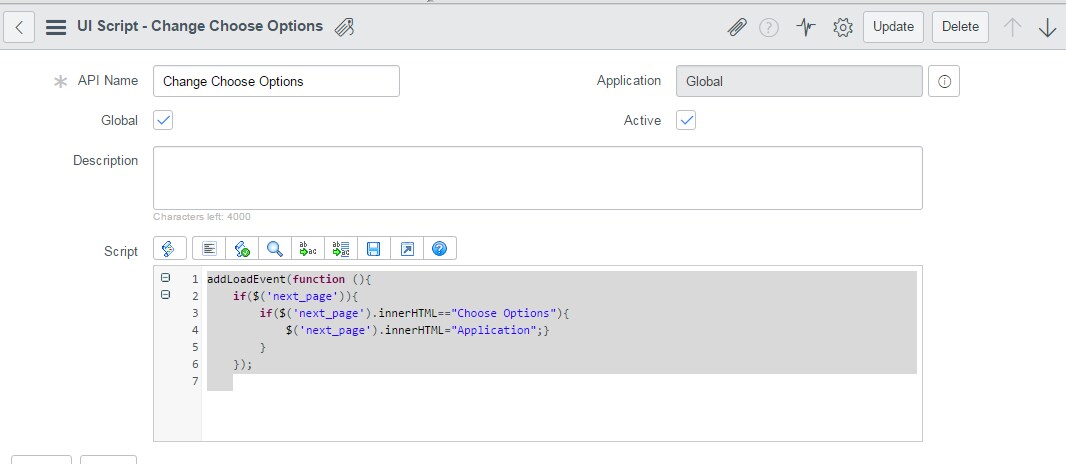
One thing you could do is create a UI script and check the global checkbox, then add an onLoadEvent and put this script in there.
addLoadEvent(function (){
if($('next_page')){
if($('next_page').innerHTML=="Choose Options"){
$('next_page').innerHTML="Application Details";}
}
});

- Mark as New
- Bookmark
- Subscribe
- Mute
- Subscribe to RSS Feed
- Permalink
- Report Inappropriate Content
04-18-2017 03:30 AM

- Mark as New
- Bookmark
- Subscribe
- Mute
- Subscribe to RSS Feed
- Permalink
- Report Inappropriate Content
07-20-2016 07:08 PM
Did you get this working? Let me know if you have any questions
- Mark as New
- Bookmark
- Subscribe
- Mute
- Subscribe to RSS Feed
- Permalink
- Report Inappropriate Content
07-21-2016 07:45 AM
yes it's working now Thanks
- Mark as New
- Bookmark
- Subscribe
- Mute
- Subscribe to RSS Feed
- Permalink
- Report Inappropriate Content
07-10-2018 12:14 AM
Hi All,
I have a same requirement on the a particular Order Guide that choose options should be renamed to a different one.
I have created the above UI script however it is not working for the Jakarta verision. The script is throwing an error,
(g_env) [SCRIPT:EXEC] Error while running Client Script "change choose options": ReferenceError: addLoadEvent is not defined.
Could you please help me in knowing where or what I have to define.
Many Thanks in Advance.
- Mark as New
- Bookmark
- Subscribe
- Mute
- Subscribe to RSS Feed
- Permalink
- Report Inappropriate Content
11-18-2018 09:54 PM
Hi Sonalin,
Did u achieved for 1 order guide with out impacting to other order guides