- Mark as New
- Bookmark
- Subscribe
- Mute
- Subscribe to RSS Feed
- Permalink
- Report Inappropriate Content
07-24-2025 07:30 AM
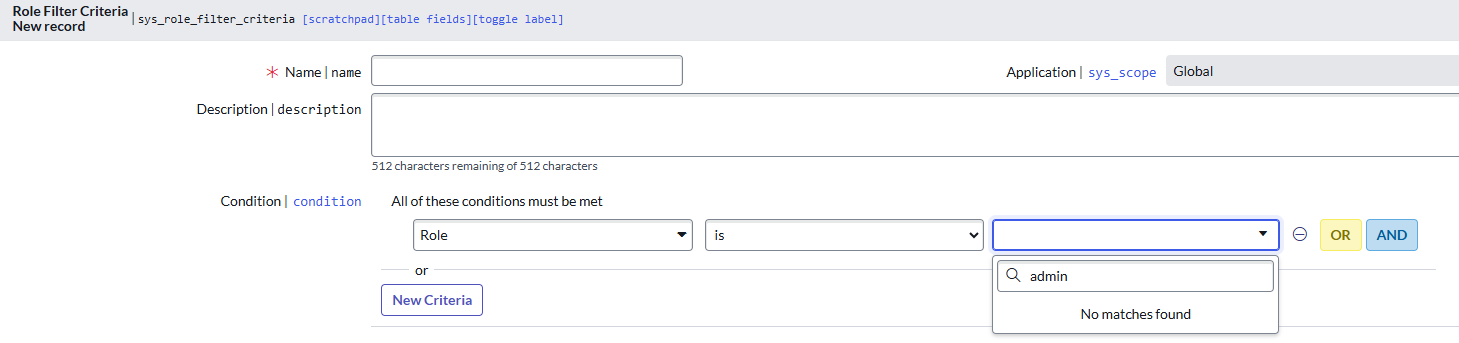
I have an issue with Condition Builder in Role Filter Criteria. In all environments related to this project it does not show any role to select. I have checked other instances, not related to this project and it's working fine.

Solved! Go to Solution.
- Mark as New
- Bookmark
- Subscribe
- Mute
- Subscribe to RSS Feed
- Permalink
- Report Inappropriate Content
07-25-2025 12:14 AM
There was acl query range that was blocking visibility in Condition Builder even though I had an access to table itself.
- Mark as New
- Bookmark
- Subscribe
- Mute
- Subscribe to RSS Feed
- Permalink
- Report Inappropriate Content
07-24-2025 07:37 AM
Hi @KamilaC ,
this one?
if yes ( you have to type at least one character to roles to showup)

there is some issue with the community please reattach the photo preferably as an attachment

Please mark my answer as helpful/correct if it resolves your query.
Regards,
Chaitanya
- Mark as New
- Bookmark
- Subscribe
- Mute
- Subscribe to RSS Feed
- Permalink
- Report Inappropriate Content
07-24-2025 07:44 AM
- Mark as New
- Bookmark
- Subscribe
- Mute
- Subscribe to RSS Feed
- Permalink
- Report Inappropriate Content
07-24-2025 08:15 AM - edited 07-24-2025 08:16 AM
Hi @KamilaC ,
@Ambuj Tripathi is correct I have removed access to sys_user_role table to my account in my PDI and I'm able to reproduce this issue
check if you have access to sys_user_role table (it's reference field 🙂)
if you are still facing the issue log a HI case
Please mark my answer as helpful/correct if it resolves your query.
Regards,
Chaitanya

- Mark as New
- Bookmark
- Subscribe
- Mute
- Subscribe to RSS Feed
- Permalink
- Report Inappropriate Content
07-24-2025 08:02 AM - edited 07-24-2025 08:03 AM
Can you please check if this user you are logged in with has access to roles table - sys_user_role?
If yes, then try to repair the Adaptive Authentication plugin.
If not, its recommended to have admin role to be able to configure Adaptive Authentication filters.
Cheers!