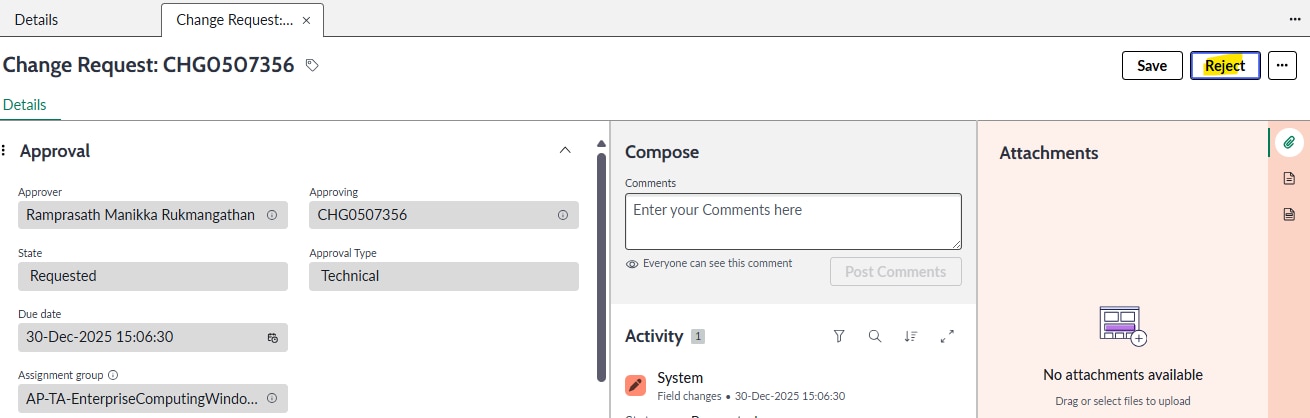
Approve / Reject button ena in the service operation workspace but does not perform any action .

- Mark as New
- Bookmark
- Subscribe
- Mute
- Subscribe to RSS Feed
- Permalink
- Report Inappropriate Content
12-31-2025 01:14 AM
Hi All,
Approve / Reject button ena in the service operation workspace but does not perform any action . We have the Esignature utils used in both UI actions. Its not popping up any dialog window in SOW like Authentication user and password.
Please refer the screenshoot and help to work both Ui action in workspace/
Reject UI action script

- Mark as New
- Bookmark
- Subscribe
- Mute
- Subscribe to RSS Feed
- Permalink
- Report Inappropriate Content
12-31-2025 02:11 PM
What you’re running into is a Workspace vs classic UI issue.
In Service Operations Workspace, a lot of the older UI Action patterns don’t behave the same way as UI16. Your script is using UI16-style functions like gel(...), gsftSubmit(...), and the e-sign prompt helpers promptCheck, displayGreyout. In Workspace those pieces often don’t render a dialog at all, so the button click fires but you never see the username/password prompt.
What to do:
First, confirm this works in the classic UI. If it does, that basically proves it’s a Workspace compatibility problem not ESignatureUtils itself.
For Workspace, you usually need to move the approve/reject + e-sign check server-side Script Include / Flow and have the Workspace button call that, then show a Workspace modal for the e-sign step (instead of the old UI16 prompt functions).
At minimum, stop relying on gel() and gsftSubmit() and use workspace-friendly calls like g_form.getUniqueValue() and g_form.save()—but the key fix is replacing the UI16 e-sign prompt with a Workspace-supported modal/prompt.
Let me know if that works my friend!
@umar12 - Please mark as Accepted Solution and Thumbs Up if you found Helpful!!
- Mark as New
- Bookmark
- Subscribe
- Mute
- Subscribe to RSS Feed
- Permalink
- Report Inappropriate Content
01-04-2026 11:48 PM
Hi Matthew I have made few changes still its not working . could you please share the script that will help to work in service operation workspace . Its is working in Native UI (Classic UI ).
- Mark as New
- Bookmark
- Subscribe
- Mute
- Subscribe to RSS Feed
- Permalink
- Report Inappropriate Content
01-04-2026 11:53 PM
Hi Matthew ,
Thesee changes I have tried button not working in Workspace(SOW) but the script I shared working in Native UI (Classic UI) . Could you please share in sharing the script and try to work same has in native UI .