- Mark as New
- Bookmark
- Subscribe
- Mute
- Subscribe to RSS Feed
- Permalink
- Report Inappropriate Content
02-27-2026 01:00 AM
Hello community!
If anyone knows anything about order decomposition, please let me know.
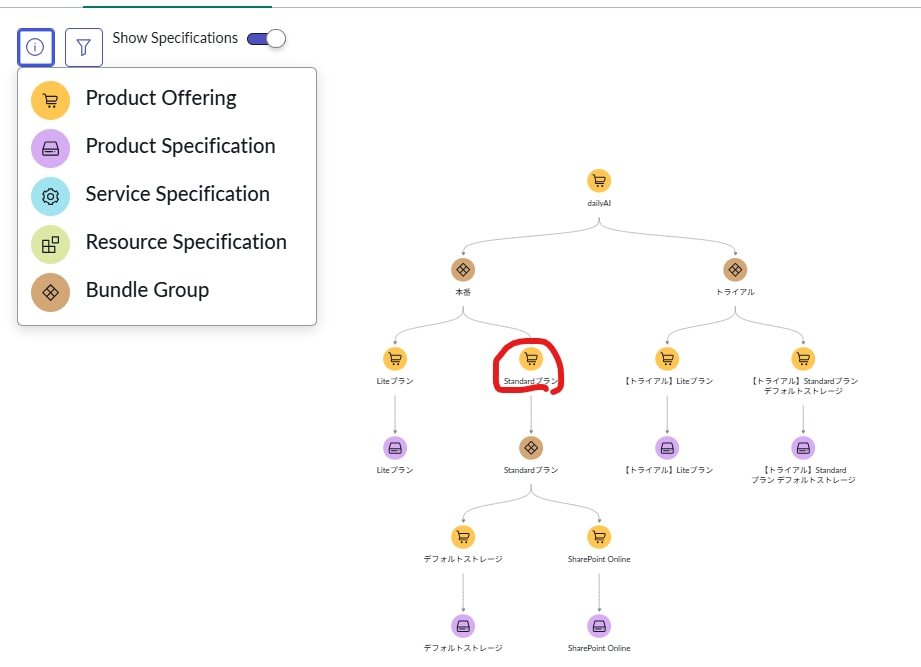
If a bundled offering is further bundled, an error occurs in order decomposition when creating an order specifying that offering, and no order task is generated.
For other offerings that are not in a multi-tiered structure, order decomposition is performed without any problems.
Is there a specification that prevents order decomposition from working correctly in this multi-tiered structure?
Solved! Go to Solution.

- Mark as New
- Bookmark
- Subscribe
- Mute
- Subscribe to RSS Feed
- Permalink
- Report Inappropriate Content
03-05-2026 05:50 AM
Hi Wataru
You are welcome. Follow up on your questions below.
- When I checked the order disassembly flow, I found the attached error. Do you have any idea what the cause of this is?
- This error is related to a “null pointer” exception in the OM TMT engine. It is trying to execute a Decomposition Rule, but is looking for a specific data property named “existing” on an object that doesn’t actually exist, it’s “undefined” . It looks like there is a mismatch between your Product Catalog configuration and the actual data in the Customer Order Line Item in ORDL0005154 displayed in the screen shot. It could be either a scripted Decomposition Rule or a Mapping Rule.
- Likely Causes:
- Look for Missing Relationship data since the rule is trying to check if a service or resource “exists” for this customer. When it tries to access product.existing but the product object wasn’t found or loaded, it throws that error.
- Another thing to look for is if your decomposition logic relies on a specific Order Line Item Characteristic ( “existing service ID” ) and that field is empty or missing from the payload, the script might fail if it doesn’t have a “null check”.
- Last thing is contextual variable failure: The "Decompose Customer Order Line Item" action ( in your screenshot) expects a fully populated record. If the record ORDL0005154 is missing a mandatory reference to a Product Specification, the decomposition engine "breaks" because it doesn't know which rules to apply.
- Troubleshooting:
- Check the "Runtime Value": Click the link for ORDL0005154 in your screenshot. Check the Characteristics tab. Is there an "Existing Service" field that is blank when it should be filled?
- Inspect Decomposition Rules: Navigate to Order Management > Decompositions > Decomposition Rules. Look for rules associated with the Product Specification of that order line. Look for any scripts containing the word .existing.
- Validate the Product Specification: Ensure the Product Specification (and its associated Product Offer) is "Published." Sometimes a "Draft" status prevents the decomposition engine from building the object tree correctly.
- Add a Null Guard (If you are the developer): If you find the script, ensure it checks if the object exists before looking for the property.
- Bad: if (item.existing == true)
- Good: if (item && item.existing == true)
- I haven't created any Decomposition Rules in particular, but when I looked at the creation screen, I saw that I needed to create one for each Characteristic associated with the Standard plan. Is that correct?
- I would say you do need Decomposition Rules (or scripts)\ Mapping Rule. They are the “brains” that determine which sub-orders are created based on the attributes of the customer’s request.
- This is the first time I've heard of Decomposition Explorer. Where can I find it?
- I was referring to the Decomposition Map, Staggered Decomposition and Decomposition Rules.
Let me know if this helps.
As always, don't have a good day. Have a great day!
Brandi

- Mark as New
- Bookmark
- Subscribe
- Mute
- Subscribe to RSS Feed
- Permalink
- Report Inappropriate Content
02-27-2026 03:41 AM
Can you please share the Catalog structure - I particularly do not follow when you said "If a bundled offering is further bundled"
- Mark as New
- Bookmark
- Subscribe
- Mute
- Subscribe to RSS Feed
- Permalink
- Report Inappropriate Content
02-27-2026 03:46 AM
Thank you for confirming.
This refers to the offering circled in red in the attached image.
An error occurs in the order decomposition only when this offering is selected.
- Mark as New
- Bookmark
- Subscribe
- Mute
- Subscribe to RSS Feed
- Permalink
- Report Inappropriate Content
02-27-2026 03:50 AM
Ok, thank you for sharing.
Can you confirm,
[1] How does your line items look like?
[2] if you see Product Orders (domain order) created for the offers/specs in question?
- Mark as New
- Bookmark
- Subscribe
- Mute
- Subscribe to RSS Feed
- Permalink
- Report Inappropriate Content
02-27-2026 04:13 AM
[1] How does your line items look like?
→I have attached a screenshot
[2] if you see Product Orders (domain order) created for the offers/specs in question?
→No product order was created.