- Mark as New
- Bookmark
- Subscribe
- Mute
- Subscribe to RSS Feed
- Permalink
- Report Inappropriate Content
05-14-2026 12:31 AM
Hi team,
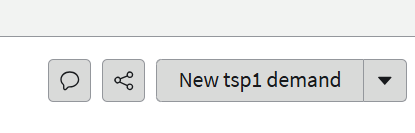
We have installed Teamspace 1 plugin and trying to create new Project or new demand from Strategic Planning workspace and have requirement to rename the UI action "New tsp1 Demand" to something else but unable to find the configuration. Help will be approciated.
Note: already checked declarative actions , its not available there.
Thanks in advance,
Pooja
Solved! Go to Solution.

- Mark as New
- Bookmark
- Subscribe
- Mute
- Subscribe to RSS Feed
- Permalink
- Report Inappropriate Content
05-14-2026 12:46 AM
Ahoy @Pooja P,
if you go to UI Actions, could you find a record/button with such name?
If not, check field labels at the [sys_documentation], it could be there as well. Last but not least, the UI messages.
✂-----Cutting-out-the---✦AI-noise✦---All-replies-written-and-vouched-for-by-GlideFather---
- Mark as New
- Bookmark
- Subscribe
- Mute
- Subscribe to RSS Feed
- Permalink
- Report Inappropriate Content
05-14-2026 12:46 AM
Ahoy @Pooja P,
if you go to UI Actions, could you find a record/button with such name?
If not, check field labels at the [sys_documentation], it could be there as well. Last but not least, the UI messages.
✂-----Cutting-out-the---✦AI-noise✦---All-replies-written-and-vouched-for-by-GlideFather---

- Mark as New
- Bookmark
- Subscribe
- Mute
- Subscribe to RSS Feed
- Permalink
- Report Inappropriate Content
05-14-2026 01:35 AM
Hi @Pooja P
Option1:
- Navigate to All-> Now Experience Framework->Declarative action-> Form Actions
- Table Name for your reference - sys_declarative_action_assignment
- Search for "New tsp1 Demand"
- Rename it.
Option2:
Navigate to table - sys_ux_form_action_layout and search for "New tsp1 Demand" and try to change
https://www.servicenow.com/community/grc-forum/rename-ui-action-in-workspace/m-p/3276003
Regards
Tanushree Maiti
ServiceNow Technical Architect
LinkedIn: https://www.linkedin.com/in/tanushreemaiti


- Mark as New
- Bookmark
- Subscribe
- Mute
- Subscribe to RSS Feed
- Permalink
- Report Inappropriate Content
05-14-2026 01:41 AM
are you sure this is an OOTB button because the name looks different?
Did you check in form action?
how and where this button is shown? your image is not complete
Ankur
✨ Certified Technical Architect || ✨ 10x ServiceNow MVP || ✨ ServiceNow Community Leader