- Mark as New
- Bookmark
- Subscribe
- Mute
- Subscribe to RSS Feed
- Permalink
- Report Inappropriate Content
11-26-2024 04:59 AM
Hi, does anyone know where the configuration for the 'Recalculate Risk' link in the Service Operations Workspace is? Or even better, how to disable this functionality? It's not working, and we don't want to use the feature anyway.

Many thanks
Max
Solved! Go to Solution.

- Mark as New
- Bookmark
- Subscribe
- Mute
- Subscribe to RSS Feed
- Permalink
- Report Inappropriate Content
02-19-2026 11:44 AM
Hi @CCZMAX1 CCZMAX1 and @Zeinabc Zeinabc,
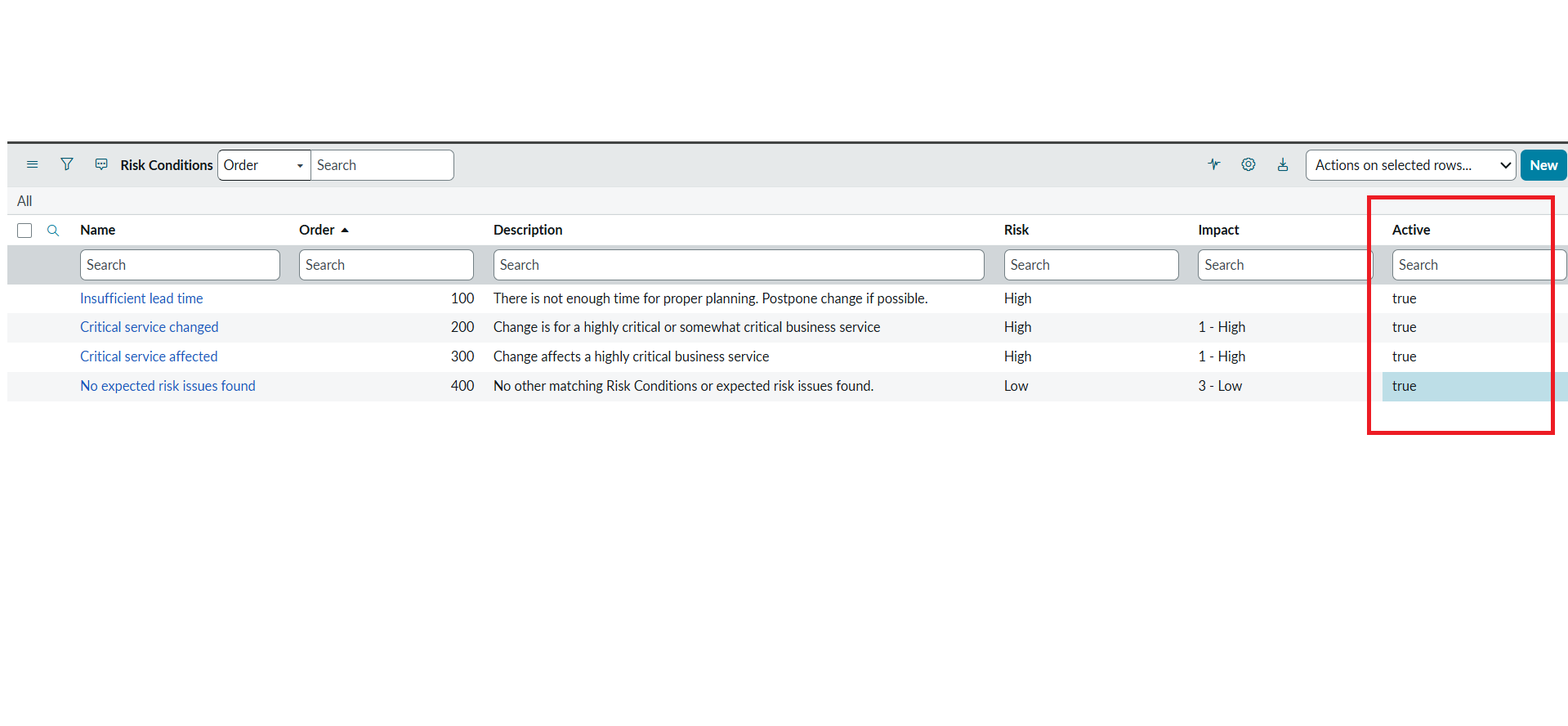
After spending some time analyzing this, I found that the Recalculate Risk button in Service Operations Workspace is driven by the records in the Risk Conditions (risk_conditions) table.
In my instance, there were four active risk conditions. When all four conditions were set to Inactive, the Recalculate Risk button no longer appeared in the workspace, which met the requirement.
You can also test by disabling the conditions one by one to verify whether a specific rule is required, but in my case the button disappeared only after all active risk conditions were deactivated.
I’m attaching screenshots for reference.
Hope this helps. If this response resolves your issue, please mark it as helpful and accept it as the solution so it can help others as well.


If you found this helpful, please mark it as Helpful and Accept as Solution so it can reach others too.
Thanks & Regards,
Sachin Narayanasamy
- Mark as New
- Bookmark
- Subscribe
- Mute
- Subscribe to RSS Feed
- Permalink
- Report Inappropriate Content
02-19-2026 08:50 AM
Also currently trying to deactivate recalculate risk. Did you ever figure it out?
- Mark as New
- Bookmark
- Subscribe
- Mute
- Subscribe to RSS Feed
- Permalink
- Report Inappropriate Content
02-24-2026 01:39 AM
The solution is posted above you can have a look on it Zeinabc
If you found this helpful, please mark it as Helpful and Accept as Solution so it can reach others too.
Thanks & Regards,
Sachin Narayanasamy
- Mark as New
- Bookmark
- Subscribe
- Mute
- Subscribe to RSS Feed
- Permalink
- Report Inappropriate Content
02-19-2026 09:12 AM
Any solutions?
- Mark as New
- Bookmark
- Subscribe
- Mute
- Subscribe to RSS Feed
- Permalink
- Report Inappropriate Content
02-19-2026 11:45 AM
Hi CCZMAX1 and Zeinabc,
After spending some time analyzing this, I found that the Recalculate Risk button in Service Operations Workspace is driven by the records in the Risk Conditions (risk_conditions) table.
In my instance, there were four active risk conditions. When all four conditions were set to Inactive, the Recalculate Risk button no longer appeared in the workspace, which met the requirement.
You can also test by disabling the conditions one by one to verify whether a specific rule is required, but in my case the button disappeared only after all active risk conditions were deactivated.
I’m attaching screenshots for reference.
Hope this helps. If this response resolves your issue, please mark it as helpful and accept it as the solution so it can help others as well.
If you found this helpful, please mark it as Helpful and Accept as Solution so it can reach others too.
Thanks & Regards,
Sachin Narayanasamy