- Mark as New
- Bookmark
- Subscribe
- Mute
- Subscribe to RSS Feed
- Permalink
- Report Inappropriate Content
09-03-2025 06:38 PM
Hi all,
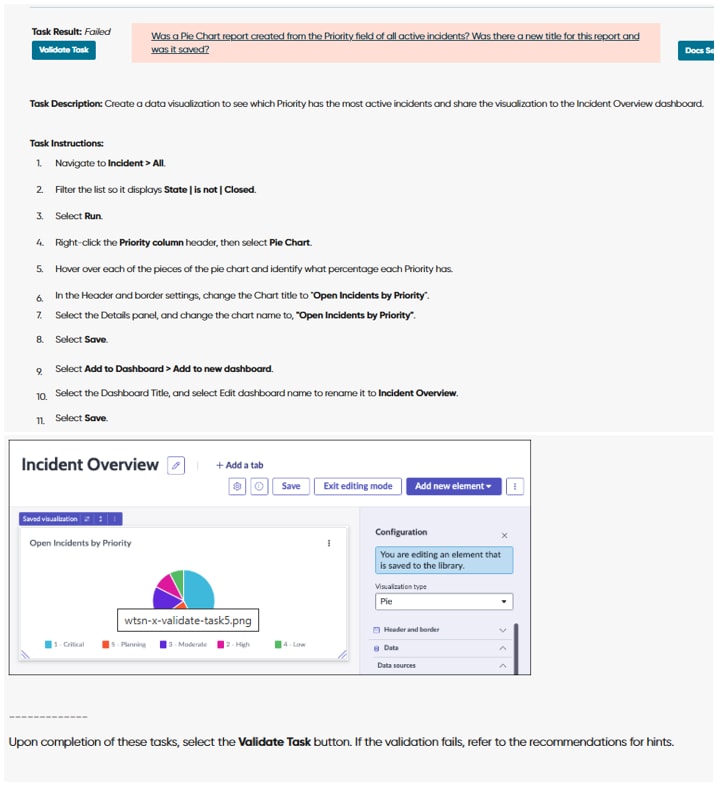
I’m working on the Platform Analytics Task, but it keeps failing validation despite multiple attempts. I’ve carefully followed the task instructions and recreated the dashboard and chart to match the example image at the end of the task.
The validation error I’m receiving is:
“Was a Pie Chart report created from the Priority field of all active incidents? Was there a new title for this report and was it saved?”
I can confirm that the answer to both is yes. My dashboard and chart look identical to the example, yet the task still fails. I’ve attached a screenshot showing both the dashboard/chart and the validation error.
Has anyone else run into this issue or found a solution? Any suggestions would be greatly appreciated.
Thanks in advance for your help!
Solved! Go to Solution.

- Mark as New
- Bookmark
- Subscribe
- Mute
- Subscribe to RSS Feed
- Permalink
- Report Inappropriate Content
09-04-2025 06:47 AM
Click on information icon of dashboard and change the chart title as per instructions 'Open Incidents by Priority'. In your dashboard, it is currently 'Incident Overview', change it accordingly. Save the dashboard and validate it.

If this helped to answer your query, please mark it helpful & accept the solution.
Thanks,
Bhuvan
- Mark as New
- Bookmark
- Subscribe
- Mute
- Subscribe to RSS Feed
- Permalink
- Report Inappropriate Content
09-20-2025 01:09 AM
Hey, I'm facing the same issue with Platform Analytics Task,
The validation error I’m receiving is:
“Was a Pie Chart report created from the Priority field of all active incidents? Was there a new title for this report and was it saved?”
I did change the chart title from "incident overview " to "Open Incident by Priority" , but the validation still fails.
Please help out, thanks for any suggestions in advance.

- Mark as New
- Bookmark
- Subscribe
- Mute
- Subscribe to RSS Feed
- Permalink
- Report Inappropriate Content
09-20-2025 07:50 AM
Can you share the data source filter conditions screenshot from your configuration ?
Thanks,
Bhuvan

- Mark as New
- Bookmark
- Subscribe
- Mute
- Subscribe to RSS Feed
- Permalink
- Report Inappropriate Content
11-11-2025 06:35 AM
Have you got any solution for the error. I am also facing the same issue from my end.

- Mark as New
- Bookmark
- Subscribe
- Mute
- Subscribe to RSS Feed
- Permalink
- Report Inappropriate Content
11-26-2025 10:23 AM
getting the same message
- Mark as New
- Bookmark
- Subscribe
- Mute
- Subscribe to RSS Feed
- Permalink
- Report Inappropriate Content
10-09-2025 10:53 AM
I'm having the identical issue.