- Mark as New
- Bookmark
- Subscribe
- Mute
- Subscribe to RSS Feed
- Permalink
- Report Inappropriate Content
08-17-2020 03:20 PM
Our Pay topic starts with a static choice that has 8 options. This static choice control has an associated entity, which is a list type entity. This way if the user types something related to one fo the 8 branches in the topic, VA will take the user straight thru the correct conversation path, rather than prompting the user to select from the main menu. Here's how part of the topic looks:

The entity extraction is working nicely for the majority of the branches except for 2 of them (in this question I'll only refer to Incorrect pay or else branch). Per the NLU tests the utterances match 100% on the topic and the entity, yet when testing in the VA UI, the extraction does not occur.
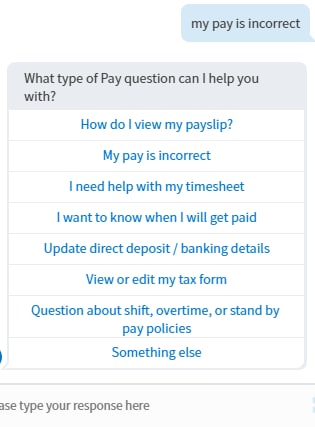
Utterance My pay is incorrect OR my pay is incorrect
Entity List @PayAction
Entity Value @incorrect pay or else
Topic branch: incorrect pay or else
When typing the exact utterance in VA UI, it does not recognize the correct path. It does not do the entity extraction and prompts user to select an item from the main menu. The same happens for any utterance associated to this item within the list entity. The NLU Test results are successful 100%.

Utterance associated to the list entity:

VA UI results: Entity extraction failed. Although the exact utterance exists in the Pay intent, and it is associated to the list entity, it does not take the user through the conversation path, it stops at the initial menu within the topic.

On the other hand, here's an example of an utterance for which the entity extraction is working perfectly on another branch within the same topic.
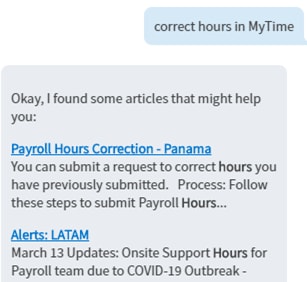
Utterance Correct hours in MyTime OR correct hours in MyTime
Entity @PayAction
Entity Value @timesheet
NLU Test results: successful

VA UI results: Successful. Entity extraction achieved. Took user straight to the correct path.

I've tried many utterances and none are working for the exact same path. I've even renamed the choice value within the static choice list, to match with the value of the arrow path and to match the value of the item within the list entity, thinking that is the issue, but no success. How does VA match the item within the list entity with the item on the static choice list to take the user through the correct path?
Thanks in advance!
Solved! Go to Solution.
- Labels:
-
Virtual Agent

- Mark as New
- Bookmark
- Subscribe
- Mute
- Subscribe to RSS Feed
- Permalink
- Report Inappropriate Content
11-17-2020 12:44 AM
Of course the logical statement is that "these entity values are not very read-friendly". I tried using UI Messages to change it for the user - even when changing the label from the entity value to the UI Message translation would stop the entity extraction/slot filling from working. What I had to end up doing is literally call my values in the entity list as the Static choice option labels.
Let me know if this works for you! More importantly though, someone needs to explain the reasoning behind this. What's the point of the Value?


- Mark as New
- Bookmark
- Subscribe
- Mute
- Subscribe to RSS Feed
- Permalink
- Report Inappropriate Content
11-17-2020 02:28 AM
Orlando should work fine. Like
I've been having challenges with Paris but have not yet been able to consistently reproduce the issue. Please create tickets/cases so we can find out what and where the issue is, whether configuration or a defect.
Thank you for your patience and efforts.

- Mark as New
- Bookmark
- Subscribe
- Mute
- Subscribe to RSS Feed
- Permalink
- Report Inappropriate Content
11-17-2020 03:23 AM
Thanks
- Mark as New
- Bookmark
- Subscribe
- Mute
- Subscribe to RSS Feed
- Permalink
- Report Inappropriate Content
11-18-2020 08:41 AM
Thank you so much for all your inputs. The advice to use the label field of the static choice instead of the value field does the trick. I had tried this way before but wouldn't work consistently. Very happy to see it working now.