- Mark as New
- Bookmark
- Subscribe
- Mute
- Subscribe to RSS Feed
- Permalink
- Report Inappropriate Content
07-07-2022 10:28 PM
Dear all,
I want to add a new translation language in Virtual Agent, such as Japanese.
I have installed i18n translation plugin,
But I don't see Japanese options. How should I operate?

Solved! Go to Solution.


- Mark as New
- Bookmark
- Subscribe
- Mute
- Subscribe to RSS Feed
- Permalink
- Report Inappropriate Content
07-13-2022 08:01 PM
Hi Junyu,
In addition to what Sandeep shared, you can also refer to this article for tips on how to translate your VA topics:
Best Practices and How-Tos for Localizing Virtual Agent Topics
If I have answered your question, please mark my response as correct and/or helpful.
Regards,
Nilima

- Mark as New
- Bookmark
- Subscribe
- Mute
- Subscribe to RSS Feed
- Permalink
- Report Inappropriate Content
07-07-2022 10:37 PM
Hi
You can currently use dynamic translation to translate VA topics or NLU models as a configuration without language plugins.
Here is your doc which you have to refer: https://docs.servicenow.com/bundle/sandiego-servicenow-platform/page/administer/conversational-inter...
Also, it's not considered a good practice to have a "mixed language" experience in any UI, and it nearly always hurts the adoption of the new solution by the end-users if it's not consistently available in their language. If you want to learn more about it, check out one of my previous webinars available here:
Mark my answer correct & Helpful, if Applicable.
Thanks,
Sandeep
- Mark as New
- Bookmark
- Subscribe
- Mute
- Subscribe to RSS Feed
- Permalink
- Report Inappropriate Content
07-07-2022 10:53 PM
Hi
The doc you sent me is about Agent Chat but not for VA topic.
I know that dynamic translation works in Agent Chat. but it doesn't work in my case
- Mark as New
- Bookmark
- Subscribe
- Mute
- Subscribe to RSS Feed
- Permalink
- Report Inappropriate Content
07-07-2022 10:59 PM
Hi
please go through this link:
Mark my answer correct & Helpful, if Applicable.
Thanks,
Sandeep
- Mark as New
- Bookmark
- Subscribe
- Mute
- Subscribe to RSS Feed
- Permalink
- Report Inappropriate Content
07-07-2022 11:08 PM
Hi
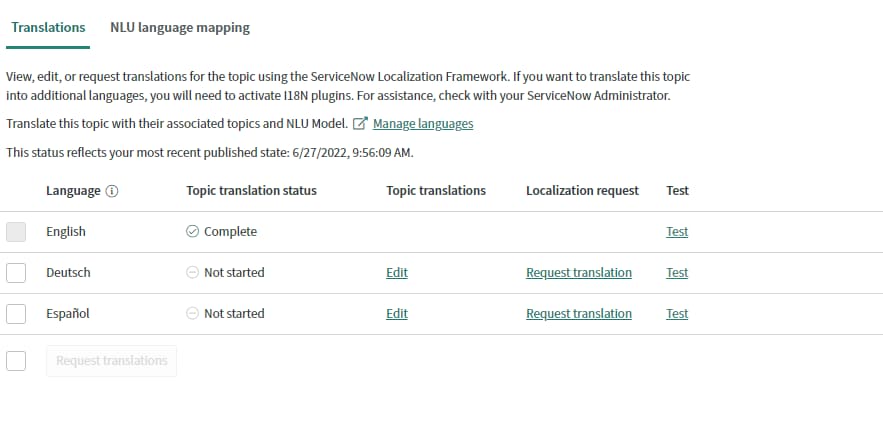
I am trying this way, but after the i18n plugin installed, I can't find corresponding language option in Virtual Agent -> Properties ->Translations