- Mark as New
- Bookmark
- Subscribe
- Mute
- Subscribe to RSS Feed
- Permalink
- Report Inappropriate Content
08-24-2026 01:14 AM
Hi Community,
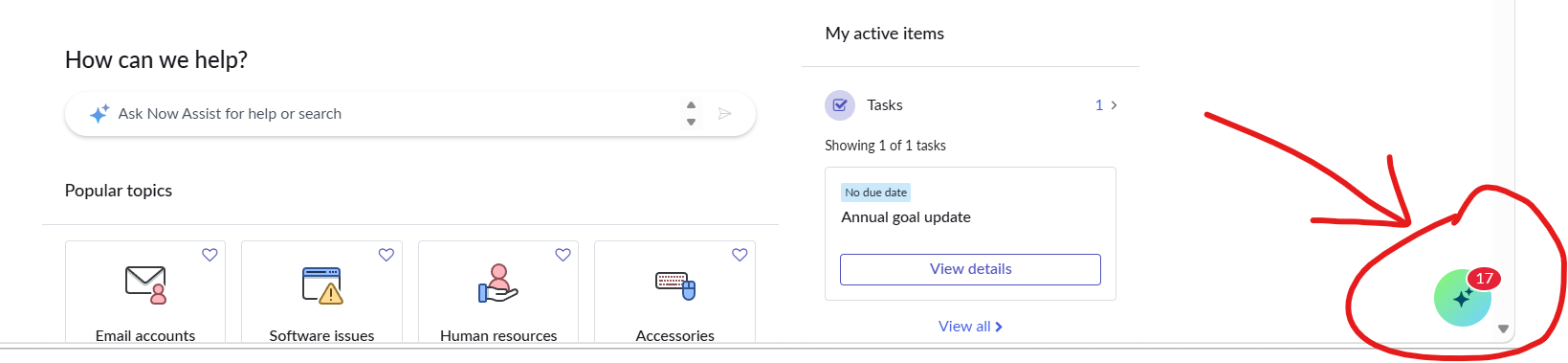
Is there a supported way to change the color of the Now Assist (Virtual Agent) launcher icon displayed in the bottom-right corner of Employee Center/ESC? Is this controlled through theming, branding, UI Builder, or CSS customization?
Any guidance would be appreciated.
Thanks!
Solved! Go to Solution.
- Mark as New
- Bookmark
- Subscribe
- Mute
- Subscribe to RSS Feed
- Permalink
- Report Inappropriate Content
08-27-2026 02:42 AM
Got the solution from servicenow side
When Enhanced Chat is enabled on a Service Portal, modifying the theming CSS variables described in the Now Assist full‑page theming documentation does not affect the FAB icon colors. The variables are ignored, leaving the default gradient background and FAB colors unchanged, which prevents customers from customizing the chat appearance as intended.
Workaround
1. Open the Service Portal record that hosts the Enhanced Chat.
2. In the **CSS Variables** field, add the following definitions, replacing **#0000FF** with the desired color value:
```css
now-assist-full-page-wrapper-app {
--now-actionable--primary-ai--background-color-gradient--start:
#0000FF;
--now-actionable--primary-ai--background-color-gradient--end:
#0000FF;
--now-assist-selfservice_FAB_hover_color_1: #0000FF;
--now-assist-selfservice_FAB_active_color_1: #0000FF;
}
```
3. If a gradient is not required, set the same color for both
`--now-actionable--primary-ai--background-color-gradient--start`
and
`--now-actionable--primary-ai--background-color-gradient--end`.
4. If want to customize the sparkle icon color inside the FAB, please include: --now-assist-selfservice_FAB_icon_color: #desired-color-HEX-value in above css block
5. Save the portal record and refresh the page; the FAB colors now reflect the specified values.
Thanks,
Naman


- Mark as New
- Bookmark
- Subscribe
- Mute
- Subscribe to RSS Feed
- Permalink
- Report Inappropriate Content
08-24-2026 01:18 AM
To change the color of the ServiceNow Now Assist sparkle/star icon, you can use theme CSS variables or update the branding settings depending on whether it appears in the Service Portal or a Configurable Workspace
- Go to your portal theme record.
- Add or update the
$now-sp-nass-FAB-iconvariable or custom CSS properties.
- Adjust the primary accent color or design tokens in your UX Theme style definitions
Regards
Dr Atul G. - Learn N Grow Together ServiceNow Techno - Functional Trainer
LinkedIn: https://www.linkedin.com/in/dratulgrover
YouTube: https://www.youtube.com/@LearnNGrowTogetherwithAtulG
******************************************************************************************

- Mark as New
- Bookmark
- Subscribe
- Mute
- Subscribe to RSS Feed
- Permalink
- Report Inappropriate Content
08-25-2026 05:36 AM
Hi @namanajain,
You can set this using the Branding option in Conversational Interface -> Home -> VA Branding. In that, select Default (or your custom VA), and you can achieve this requirement.

SohamTipnis_0-1787661043376.png
Select your color using its code and set it:

SohamTipnis_1-1787661127436.png
If you find my answer useful, please mark it as helpful and correct. 😊
Regards,
Soham Tipnis
ServiceNow Developer || Technical Consultant
LinkedIn: www.linkedin.com/in/sohamtipnis10
- Mark as New
- Bookmark
- Subscribe
- Mute
- Subscribe to RSS Feed
- Permalink
- Report Inappropriate Content
08-27-2026 02:40 AM
Hi @SohamTipnis
Its not valid for the Now assist in virtual agent. This is the comment share by servicenow side
"When Enhanced Chat is enabled on a Service Portal, modifying the theming CSS variables described in the Now Assist full‑page theming documentation does not affect the FAB icon colors. The variables are ignored, leaving the default gradient background and FAB colors unchanged, which prevents customers from customizing the chat appearance as intended."
Thanks
Naman
- Mark as New
- Bookmark
- Subscribe
- Mute
- Subscribe to RSS Feed
- Permalink
- Report Inappropriate Content
08-27-2026 02:42 AM
Got the solution from servicenow side
When Enhanced Chat is enabled on a Service Portal, modifying the theming CSS variables described in the Now Assist full‑page theming documentation does not affect the FAB icon colors. The variables are ignored, leaving the default gradient background and FAB colors unchanged, which prevents customers from customizing the chat appearance as intended.
Workaround
1. Open the Service Portal record that hosts the Enhanced Chat.
2. In the **CSS Variables** field, add the following definitions, replacing **#0000FF** with the desired color value:
```css
now-assist-full-page-wrapper-app {
--now-actionable--primary-ai--background-color-gradient--start:
#0000FF;
--now-actionable--primary-ai--background-color-gradient--end:
#0000FF;
--now-assist-selfservice_FAB_hover_color_1: #0000FF;
--now-assist-selfservice_FAB_active_color_1: #0000FF;
}
```
3. If a gradient is not required, set the same color for both
`--now-actionable--primary-ai--background-color-gradient--start`
and
`--now-actionable--primary-ai--background-color-gradient--end`.
4. If want to customize the sparkle icon color inside the FAB, please include: --now-assist-selfservice_FAB_icon_color: #desired-color-HEX-value in above css block
5. Save the portal record and refresh the page; the FAB colors now reflect the specified values.
Thanks,
Naman