An event mapping in UI Builder is the process that enables you to map an event's payload or contextual values to the object or handler that acts on that event. The four event types are: component, page, data resource, and
declarative action.
Event mapping is an important process within UI Builder. When you build pages with components, you need those components to perform actions for users. For example, if you add a button component to the page, a button-clicked event must be mapped to an event handler. The event handler performs a button-clicked action when
it is selected by a user. An example is when you add a data resource, such as a form, and have an event handler notify the user when the form successfully loads.
Event types
The event types that are available are based on the component. For example, declarative action events are available for specific components, such as the Action bar and List components.
You choose a type of event based on what action you want to perform on your page. For example, if you want to bind an action to a component, such as a button loading a web page, you would use a component event. If you want an
event to apply to your whole page, such as adding an alert notification to a page, you use a page event. The following table describes each event type that is available in UI Builder and provides some examples on how you can use the events.
표 1. Event types and descriptions
| Event type |
Description |
| Component events |
Action that you set up for a component. You set up an event handler to configure that component action. For example, add an event handler to apply an action for a button, such as going to a web page. For more
information on binding events to components, see Bind an event to a component. |
| Page events |
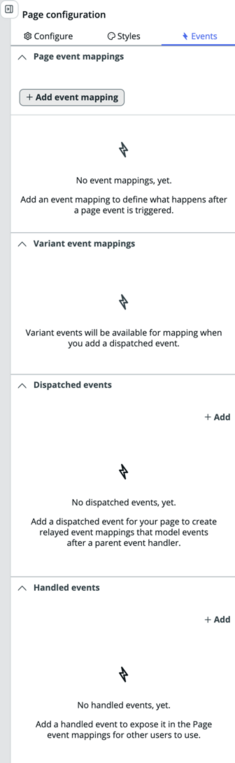
Page event that performs an action for the entire page. You can configure the following page events:
- Page event mappings.
- These event mappings are saved on the page definition record, which can be found in the [sys_ux_macroponent] table.
- The source events for these event mappings are Page ready and Page property. They are defined for your page.
- The available handlers for these event mappings are:
- User session events
- Page-level events
- UXR App Shell Data Source
- Client scripts that are defined on the page
- Operations from local and inherited data resources
- Variant event mappings.
- These event mappings are saved on the variant record, which you can find in the [sys_ux_screen] table.
- The source events for these event mappings are any dispatched events that are defined for your page.
- The available handlers for these event mappings are canvas-level events, the UXR App Shell Data Source, and operations from the inherited data resources.
- Variant event mappings are used as relays so that the events that are dispatched from components on your page can be relayed up to user session event handlers.
- Mappings are created automatically on a page save when you have mapped a component's dispatched event to a user session handler. For example, by mapping a Button clicked event to
the canvas-level Link to destination event, the event creates a dispatched relay event and a variant event mapping when the page is saved.
- Dispatched events.
These events are saved in the [sys_ux_event] table. The page definition record contains references to the [sys_ux_event] record. These events serve as source events for variant event mappings. You can select +Add to create new dispatched events for your page. Configure the event label to auto-populate the event name and payload fields for your new
sys_ux_event. These events are used to create relay event mappings. You can select a Target parent event handler to model the payload fields after the selected event. You can also manually
create payload fields for your dispatched event.
- Handled events.
These events are saved in the [sys_ux_event] table. The page definition record contains references to the [sys_ux_event] record. These events serve as source events for page event mappings. You can select +Add to create new dispatched events for your page. Handled events are not modeled after parent event handlers. Payload fields for handled events are created
manually. To use an existing handler's payload fields as a template, select a template and edit the fields as necessary.
For more information on binding an event to a page, see Bind an event to a page. |
| Data resource events |
Events that are mapped to data resources to provide notifications about when data is fetched.
- Data Fetch Initiated. When a data resource event is triggered, the event handler executes the data fetch process.
- Data Fetch Succeeded. When a data resource event is triggered, the event handler executes the process to notify a user when the data fetch completed successfully.
- Data Fetch Failed. When a data resource event is triggered, the event handler executes the process to notify a user if the data fetch was unsuccessful.

For more information on binding an event to a data resource, see Bind an event to a data resource. |
| Declarative action events |
Bind data elements within UI Builder to add
event actions to a declarative action.
You configure a declarative action event mapping in the ServiceNow AI Platform® declarative action assignment
table. For an example, navigate to and then search for and open an existing
declarative action.
In UI Builder, you bind an event to the
declarative action. For more information on how to use
declarative action events, see Bind an event to a declarative action. |