- Mark as New
- Bookmark
- Subscribe
- Mute
- Subscribe to RSS Feed
- Permalink
- Report Inappropriate Content
01-16-2026 07:03 AM
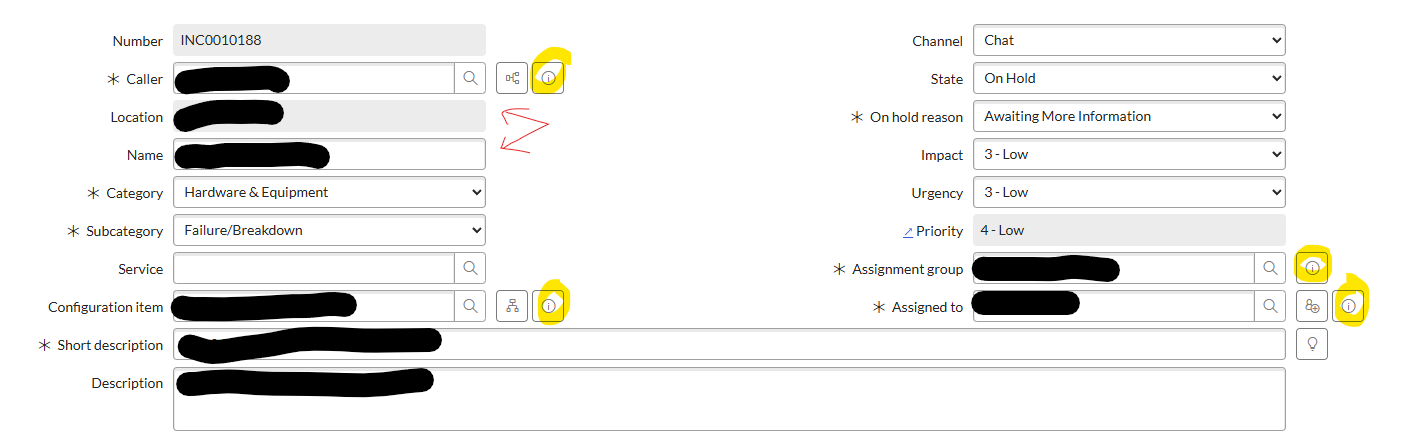
How do I add the "Preview this record" on the Incident record. It works great for other places in the Incident record, but doesn't show up for Location. The location and name are both fields showing info from the location table, so attaching it to either would be great.
Location = cmn_location.u_number
Name = cmn_location.name
Solved! Go to Solution.
- Mark as New
- Bookmark
- Subscribe
- Mute
- Subscribe to RSS Feed
- Permalink
- Report Inappropriate Content
01-16-2026 12:42 PM
There was a UI policy that set location to "read-only". Doing that eliminates the information button. That solved the problem.
- Mark as New
- Bookmark
- Subscribe
- Mute
- Subscribe to RSS Feed
- Permalink
- Report Inappropriate Content
01-16-2026 07:22 AM - edited 01-16-2026 09:32 AM
Hi @mheyman,
The "Preview" icon (the little "i") only appears automatically for Reference type fields. If your Location or Name fields are String types, the icon will not show.
Ensure the Location field on the Incident form is a Reference field pointing to the cmn_location table.
To show both the Number and Name, use Dot-walking:
Right-click the header - Configure - Form Layout.
Select the Location field and click the Expand icon (between the slushbuckets).
Add the Name or Number fields from the expanded list.
Accept the solution and mark as helpful if it does, to benefit future readers.
Regards,
Andrii


- Mark as New
- Bookmark
- Subscribe
- Mute
- Subscribe to RSS Feed
- Permalink
- Report Inappropriate Content
01-16-2026 08:03 AM
As per your question
Location = cmn_location.u_number
Name = cmn_location.name
Regards,
Sumanth
- Mark as New
- Bookmark
- Subscribe
- Mute
- Subscribe to RSS Feed
- Permalink
- Report Inappropriate Content
01-16-2026 09:40 AM
They are already reference types. Looks like something someone else created hid that functionality for the Incident record.
With cmn_location.name I was pointing to the specific dot-walked information that was showing in hopes of providing more info to help with the solution.
- Mark as New
- Bookmark
- Subscribe
- Mute
- Subscribe to RSS Feed
- Permalink
- Report Inappropriate Content
01-16-2026 12:42 PM
There was a UI policy that set location to "read-only". Doing that eliminates the information button. That solved the problem.