- Mark as New
- Bookmark
- Subscribe
- Mute
- Subscribe to RSS Feed
- Permalink
- Report Inappropriate Content
07-24-2017 02:09 PM
I've created a client script to populate fields onChange from a custom table. The field is returning a sys_id and not locating the vendor name.
How can I return the display value for the sys_id
Here is my client script:
function onChange(control, oldValue, newValue, isLoading) {
if (isLoading || newValue == '') {
return;
}
var existingVendor = g_form.getValue('existing_vendor');
var venRec = new GlideRecord ('u_business_impact_analysis'); //Look at BIA table and find existing vendor
venRec.addQuery('u_vendor_name', existingVendor);
venRec.query(mycallback);
function mycallback(venRec){
while (venRec.next()){
//Populate form txt fields from BIA table.
g_form.setValue('system_owner', venRec.u_system_owner);
g_form.setValue('asset_type', venRec.u_asset_type);
g_form.setValue('product_scope', existingVendor);
}
}
}
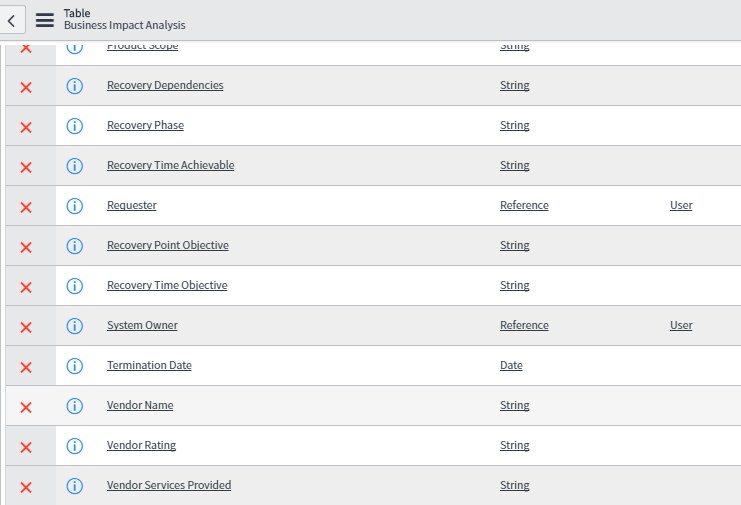
Table:
The Vendor Name is a string field for when a new vendor is entered and i'm attempting to retrieve the display value of this field in the client script.

Solved! Go to Solution.
- Labels:
-
Scripting and Coding
- Mark as New
- Bookmark
- Subscribe
- Mute
- Subscribe to RSS Feed
- Permalink
- Report Inappropriate Content
07-25-2017 02:48 PM
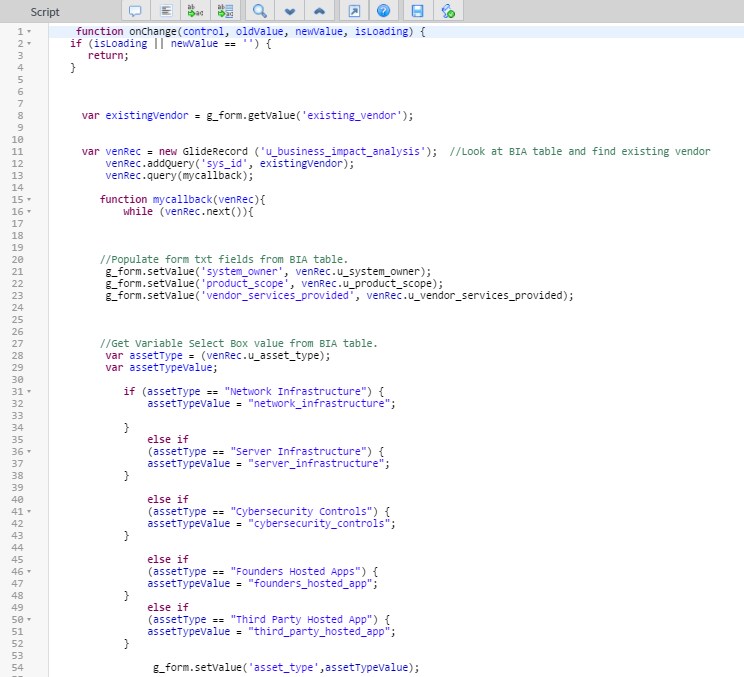
I found a solution to get the display values as needed. I had to set the value for each variable in an if statement.
Thank you for your assistance.


- Mark as New
- Bookmark
- Subscribe
- Mute
- Subscribe to RSS Feed
- Permalink
- Report Inappropriate Content
07-25-2017 09:58 AM
Select Boxes, Do you mean check boxes?
If checkboxes, you can set their values by using
if (my condition matches)
{
g_form.setValue('checkbox1',true);
}
If you are talking about dropdown, g_form.setValue('dropdown1','myvalue');
Please mark this response as correct or helpful if it assisted you with your question.
- Mark as New
- Bookmark
- Subscribe
- Mute
- Subscribe to RSS Feed
- Permalink
- Report Inappropriate Content
07-25-2017 02:48 PM