- Mark as New
- Bookmark
- Subscribe
- Mute
- Subscribe to RSS Feed
- Permalink
- Report Inappropriate Content
10-02-2018 10:45 AM
I have created separate knowledge bases and I want different topcis and categories for each knowledge base. I've created a few new topics but I don't see where I can make those topics specific to one knowledge base.
Any ideas?
I've tried configuring the form, I've trying configure ALL so I can see if there were UI Policies or anything else on where I make these changes. I didn't find anything.
Karen
Solved! Go to Solution.

- Mark as New
- Bookmark
- Subscribe
- Mute
- Subscribe to RSS Feed
- Permalink
- Report Inappropriate Content
10-02-2018 11:04 AM
FYI. This article shows how this is done in all recent versions of ServiceNow. No topics, all categories.
To get it to work with the older structure, I think you would just want to set up 'Topic' as a dependent field of your 'Knowledge base' field similar to how 'Subcategory' is dependent on the 'Category' field on an incident record.
https://docs.servicenow.com/administer/field_administration/task/t_MakingAFieldDependent.html
Here is a video showing how you can set this up.
- Mark as New
- Bookmark
- Subscribe
- Mute
- Subscribe to RSS Feed
- Permalink
- Report Inappropriate Content
10-02-2018 10:51 AM
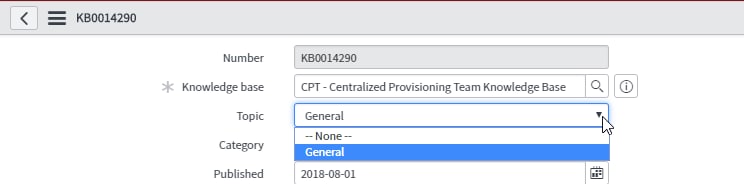
Can you post a screenshot of your knowledge form? Topics aren't really used in the newer releases of ServiceNow (in favor of a hierarchical category structure) so it would be helpful to see specifically what you're working with. I'd also recommend moving to the new category structure if possible.
- Mark as New
- Bookmark
- Subscribe
- Mute
- Subscribe to RSS Feed
- Permalink
- Report Inappropriate Content
10-02-2018 10:59 AM
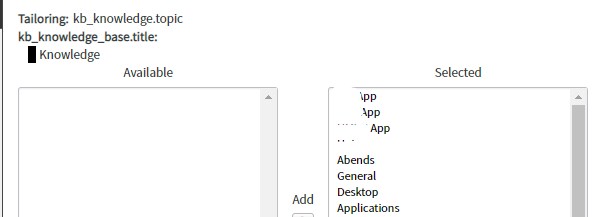
Hey Mark - I am beginning to create separate knowledge bases for each area:

When the customer that has access to that Knowledge Base goes to a published article or creates new, I want them to see the topics that I created for their knowledge base so that I can apply UI Policies for those topics. That UI Policy would say show these categories when Topic = Abends or whatever.


- Mark as New
- Bookmark
- Subscribe
- Mute
- Subscribe to RSS Feed
- Permalink
- Report Inappropriate Content
10-02-2018 11:04 AM
FYI. This article shows how this is done in all recent versions of ServiceNow. No topics, all categories.
To get it to work with the older structure, I think you would just want to set up 'Topic' as a dependent field of your 'Knowledge base' field similar to how 'Subcategory' is dependent on the 'Category' field on an incident record.
https://docs.servicenow.com/administer/field_administration/task/t_MakingAFieldDependent.html
Here is a video showing how you can set this up.
- Mark as New
- Bookmark
- Subscribe
- Mute
- Subscribe to RSS Feed
- Permalink
- Report Inappropriate Content
10-02-2018 11:08 AM
Thanks Mark. Much appreciated.