- Mark as New
- Bookmark
- Subscribe
- Mute
- Subscribe to RSS Feed
- Permalink
- Report Inappropriate Content
08-22-2019 01:10 PM
Hello all,
I have a Client Script that I am using to try to add a button next to a variable, called "Requested By". NOTE: The variable is within a variable set.
function onLoad() {
try{
var form = typeof g_sc_form != "undefined" ? g_sc_form : g_form;
var varControl = form.getControl("requested_by").id;
$(varControl).insert({
after: '<span><a id="icon-check-circle" class="btn btn-default sc-ref-spacer icon-check-circle sn-tooltip-basic" title="" data-original-title="Check availability"></a></span>'
});
}
catch(e){
alert(e.message);
}
}
Ideally, the button would appear here, inside the Variables, that's why I am trying to add it via Client Script.

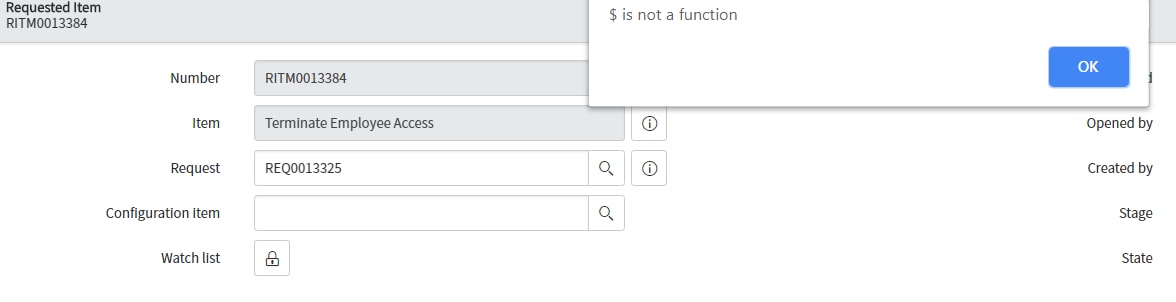
I am currently getting this error message:

Any ideas or suggestions?
Solved! Go to Solution.
- Mark as New
- Bookmark
- Subscribe
- Mute
- Subscribe to RSS Feed
- Permalink
- Report Inappropriate Content
08-23-2019 05:33 AM
Oh man, oh man, I swear I do my best programming in the morning!! 😃
Here is the result, a button that pulls of the related Requested Items, based on the "requested by" variable, WITHIN the variables collection. This will work for every service catalog item that has a "requested_by" variable (which is most of them) and DOES NOT require a change/update to each service catalog item.

Modal window of Related Request Items by Requested For user

Client Script code:
function onLoad() {
try{
var form = typeof g_sc_form != "undefined" ? g_sc_form : g_form;
var varControl = "lookup." + form.getControl("requested_by").id;
if(varControl)
{
$(varControl).insert({
after: '<span><a onclick="showRelatedRequestItems()" id="icon-check-circle" class="btn btn-default sc-ref-spacer icon-tree-right sn-tooltip-basic" title="" data-original-title="Show related Request Items"></a></span>'
});
}
}
catch(e){
alert(e.message);
}
}
//onclick event to fire when the button is clicked
function showRelatedRequestItems() {
try {
var form = typeof g_sc_form != "undefined" ? g_sc_form : g_form;
var displayValue = g_form.getDisplayBox("requested_by").value;
var title = 'Showing Requested Items for: ' + displayValue;
var query = 'request.requested_for=' + form.getValue("requested_by");
var gdw = new GlideModal('show_list');
gdw.setTitle(title);
gdw.setSize(750);
gdw.setPreference('table', 'sc_req_item_list');
gdw.setPreference('sysparm_query', query);
gdw.render();
} catch (e) {
jslog('error showing related list');
jslog(e);
}
}
- Mark as New
- Bookmark
- Subscribe
- Mute
- Subscribe to RSS Feed
- Permalink
- Report Inappropriate Content
08-23-2019 05:33 AM
Oh man, oh man, I swear I do my best programming in the morning!! 😃
Here is the result, a button that pulls of the related Requested Items, based on the "requested by" variable, WITHIN the variables collection. This will work for every service catalog item that has a "requested_by" variable (which is most of them) and DOES NOT require a change/update to each service catalog item.
Modal window of Related Request Items by Requested For user
Client Script code:
function onLoad() {
try{
var form = typeof g_sc_form != "undefined" ? g_sc_form : g_form;
var varControl = "lookup." + form.getControl("requested_by").id;
if(varControl)
{
$(varControl).insert({
after: '<span><a onclick="showRelatedRequestItems()" id="icon-check-circle" class="btn btn-default sc-ref-spacer icon-tree-right sn-tooltip-basic" title="" data-original-title="Show related Request Items"></a></span>'
});
}
}
catch(e){
alert(e.message);
}
}
//onclick event to fire when the button is clicked
function showRelatedRequestItems() {
try {
var form = typeof g_sc_form != "undefined" ? g_sc_form : g_form;
var displayValue = g_form.getDisplayBox("requested_by").value;
var title = 'Showing Requested Items for: ' + displayValue;
var query = 'request.requested_for=' + form.getValue("requested_by");
var gdw = new GlideModal('show_list');
gdw.setTitle(title);
gdw.setSize(750);
gdw.setPreference('table', 'sc_req_item_list');
gdw.setPreference('sysparm_query', query);
gdw.render();
} catch (e) {
jslog('error showing related list');
jslog(e);
}
}