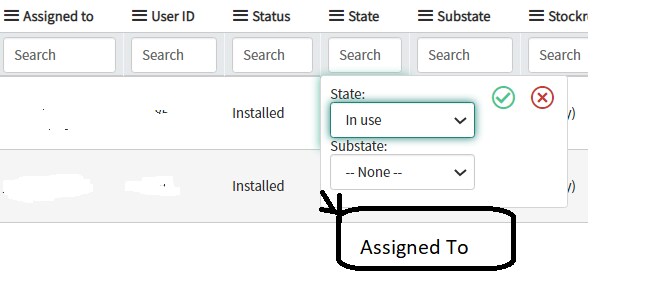
How to make fields mandatory in list view

- Mark as New
- Bookmark
- Subscribe
- Mute
- Subscribe to RSS Feed
- Permalink
- Report Inappropriate Content
04-14-2021 10:03 AM
Hi Experts,
I want to make "Assigned To" Field mandatory in list view in state "In Use" , is there any way to add "Assigned To" field in below State and Substate in list view ?

Thank you.
- Labels:
-
Scripting and Coding
-
Team Development


- Mark as New
- Bookmark
- Subscribe
- Mute
- Subscribe to RSS Feed
- Permalink
- Report Inappropriate Content
04-14-2021 10:24 AM
Please see following client script. Let me if you have any question.

- Mark as New
- Bookmark
- Subscribe
- Mute
- Subscribe to RSS Feed
- Permalink
- Report Inappropriate Content
04-14-2021 10:37 AM

- Mark as New
- Bookmark
- Subscribe
- Mute
- Subscribe to RSS Feed
- Permalink
- Report Inappropriate Content
06-28-2021 06:42 AM
I tried this for the "Assignment group" field of the Incidents List View, but it works partially;
- With this Client Script activated, you cannot leave the "Assignment group" field empty.
- But.. you also cannot do any other input and this last detail is a big one, a big issue.
How can I solve this?
My Client Script details:
- Table = Incident
- UI Type = Desktop
- Type = onCellEdit
- Field name = Assignment group
- Script:
function onCellEdit(sysIDs, table, oldValues, newValue, callback) {
var saveAndClose = true;
//Type appropriate comment here, and begin script below
g_form.setMandatory('assignment_group', true);
callback(saveAndClose);
}
- Mark as New
- Bookmark
- Subscribe
- Mute
- Subscribe to RSS Feed
- Permalink
- Report Inappropriate Content
04-14-2021 10:40 AM