- Mark as New
- Bookmark
- Subscribe
- Mute
- Subscribe to RSS Feed
- Permalink
- Report Inappropriate Content
09-06-2019 08:53 AM
Hi Team,
i want to use a rest message post method with request body having variables.
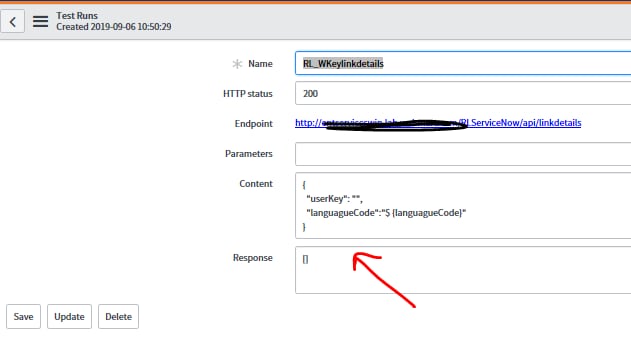
please find the screenshot below
the request body is a json format which passes 2 parameters which i want to pass dynamic values.
so i set the request body json like below
{
"userKey": "${userKey}",
"languagueCode":"$ {languagueCode}"
}

i am getting following response:

please help me how to set up variables in request body..
Thanks,
pavani
Solved! Go to Solution.
- Labels:
-
Scripting and Coding
- Mark as New
- Bookmark
- Subscribe
- Mute
- Subscribe to RSS Feed
- Permalink
- Report Inappropriate Content
09-06-2019 09:17 AM
Hello Pavani,
It looks like you are close, but have two typos. The variables are case-sensitive, and in your Content block you have ${userKey} with a capital 'K', but in your variable substitutions you have "userkey" with a lower-case 'k'. For your languageCode in Content, you have a space between the dollar sign and first squirrely bracket: "$ {" vs "${" which is causing the variable to not resolve.
- Mark as New
- Bookmark
- Subscribe
- Mute
- Subscribe to RSS Feed
- Permalink
- Report Inappropriate Content
09-06-2019 09:17 AM
Hello Pavani,
It looks like you are close, but have two typos. The variables are case-sensitive, and in your Content block you have ${userKey} with a capital 'K', but in your variable substitutions you have "userkey" with a lower-case 'k'. For your languageCode in Content, you have a space between the dollar sign and first squirrely bracket: "$ {" vs "${" which is causing the variable to not resolve.

- Mark as New
- Bookmark
- Subscribe
- Mute
- Subscribe to RSS Feed
- Permalink
- Report Inappropriate Content
09-06-2019 09:22 AM
you need
{
"userKey": "${userkey}",
"languagueCode":"${languagueCode}"
}