- Mark as New
- Bookmark
- Subscribe
- Mute
- Subscribe to RSS Feed
- Permalink
- Report Inappropriate Content
10-10-2022 09:56 PM
Hi Experts,
I need your help. I have a requirement to cancel change requests Type=Standard, State=Draft and Active=True.
Then update close notes and Implementation status.
(There are 480 change records)
My Script:
var gr = new GlideRecord("change_request");
gr.addQuery('type=Standard^state=-22^active=true');
gr.query();
while(gr.next()){
gr.state = '4';
gr.u_implementation_status = 'cancelled';
gr.setValue( 'close_notes' , 'Cancelling change due to aging');
gr.update();
}
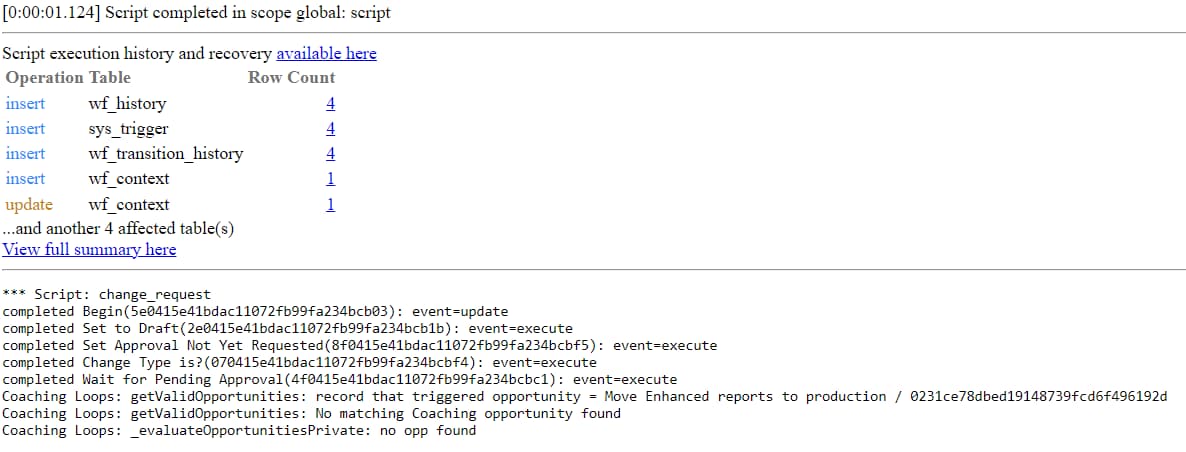
When I run the above background script only 1 change records is cancelled out of 480 records. If my script has any errors please help me out. I have attached the pic after running background script.
Solved! Go to Solution.


- Mark as New
- Bookmark
- Subscribe
- Mute
- Subscribe to RSS Feed
- Permalink
- Report Inappropriate Content
10-11-2022 01:58 AM
I believe there is an BR on your system which is stopping it from happening
var cr = new GlideRecord("change_request");
cr.addEncodedQuery('type=Standard^state=-22^active=true');
cr.query();
while(cr.next()){
cr.state = '4';
cr.u_implementation_status = 'cancelled';
cr.setValue( 'close_notes' , 'Cancelling change due to aging');
cr.active=false;
cr.update();
}
If the above does not work then try this:-
var cr = new GlideRecord("change_request");
cr.addEncodedQuery('type=Standard^state=-22^active=true');
cr.query();
while(cr.next()){
cr.setWorkflow(false);
cr.state = '4';
cr.u_implementation_status = 'cancelled';
cr.setValue( 'close_notes' , 'Cancelling change due to aging');
cr.active=false;
var workflow = new global.Workflow();
workflow.cancel(cr);
cr.update();
}
- Mark as New
- Bookmark
- Subscribe
- Mute
- Subscribe to RSS Feed
- Permalink
- Report Inappropriate Content
10-10-2022 10:20 PM
Hello,
You need to use addEncodedQuery instead of addQuery
Please use the below script:-
var gr = new GlideRecord("change_request");
gr.addEncodedQuery('type=Standard^state=-22^active=true');
gr.query();
while(gr.next()){
gr.state = '4';
gr.u_implementation_status = 'cancelled';
gr.setValue( 'close_notes' , 'Cancelling change due to aging');
gr.update();
}
Please mark my answer as correct based on Impact.
- Mark as New
- Bookmark
- Subscribe
- Mute
- Subscribe to RSS Feed
- Permalink
- Report Inappropriate Content
10-10-2022 10:27 PM
Hi Saurav11
Thanks for your response. But unfortunately it didn't work. Still only one records gets updated. I am not sure why.
- Mark as New
- Bookmark
- Subscribe
- Mute
- Subscribe to RSS Feed
- Permalink
- Report Inappropriate Content
10-10-2022 10:33 PM
Hello,
Use gr.setWorkflow(false) so use the below code
var gr = new GlideRecord("change_request");
gr.addEncodedQuery('type=Standard^state=-22^active=true');
gr.query();
while(gr.next()){
gr.setWorkflow(false)
gr.state = '4';
gr.u_implementation_status = 'cancelled';
gr.setValue( 'close_notes' , 'Cancelling change due to aging');
gr.update();
}
Please mark my answer as correct based on Impact.
- Mark as New
- Bookmark
- Subscribe
- Mute
- Subscribe to RSS Feed
- Permalink
- Report Inappropriate Content
10-10-2022 10:36 PM
Also I would suggest to change the 'gr' variable to to something else like cr or change request or anything