Why is mid.eccq.max_payload_size mid server setting change having NO impact?

- Mark as New
- Bookmark
- Subscribe
- Mute
- Subscribe to RSS Feed
- Permalink
- Report Inappropriate Content
03-08-2020 01:16 PM
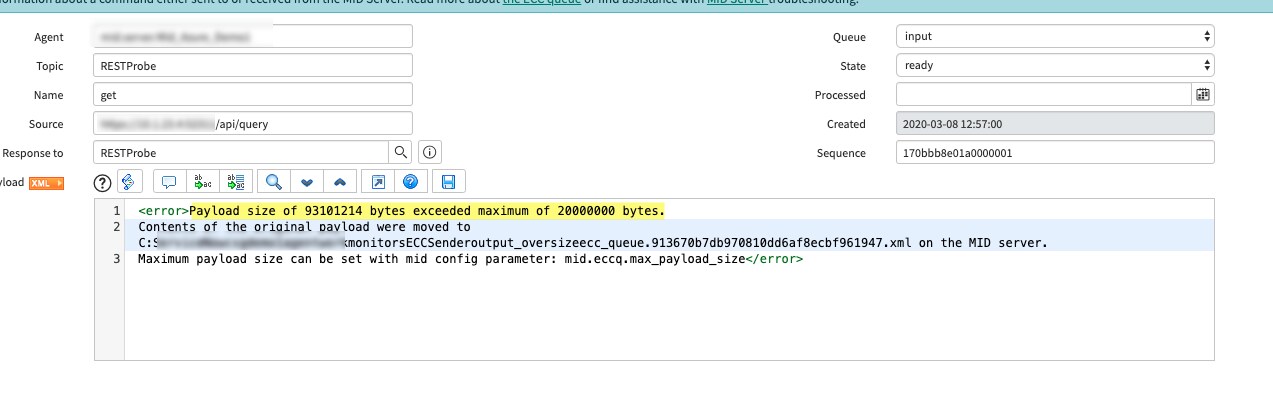
I make a call over the mid server that results in a response of 93MB file. This exceeds the threshold of 20MB and I get the below error (see first image below). I've tried adding the property called mid.eccq.max_payload_size as both a config parameter as well as a property (since you can do both) and it has no impact.
That is, I still get the same error all the time. I always restart the mid server (usually from SNOW instance) but I also tried restarting it directly on the server with the start.bat and stop.bat files. Nothing seems to work as I get the exact same error message below after making the changes and restarting.
Here are contents in my mid server log file that shows activity on the server. Notice it has same error all the time.
03/08/20 20:03:59 (432) Worker-Expedited:MIDWorker-28e73c3fdb970810dd6af8ecbf9619f9 Worker starting: RESTProbe source: https://10.1.23.4:52311/api/query
03/08/20 20:04:14 (245) Worker-Expedited:MIDWorker-28e73c3fdb970810dd6af8ecbf9619f9 Enqueuing: C:\ServiceNow\csgdemo1\agent\work\monitors\ECCSender\output_1\ecc_queue.28e73c3fdb970810dd6af8ecbf9619f9.xml
03/08/20 20:04:15 (573) Worker-Expedited:MIDWorker-28e73c3fdb970810dd6af8ecbf9619f9 Worker completed: RESTProbe source: https://10.1.23.4:52311/api/query time: 0:00:13.782
03/08/20 20:04:19 (746) ECCSender.1 SEVERE *** ERROR *** Payload size of 93101632 bytes exceeded maximum of 20000000 bytes.
Contents of the original payload were moved to C:\ServiceNow\csgdemo1\agent\work\monitors\ECCSender\output_oversize\ecc_queue.28e73c3fdb970810dd6af8ecbf9619f9.xml on the MID server.
Maximum payload size can be set with mid config parameter: mid.eccq.max_payload_size
03/08/20 20:04:22 (809) ECCSender.1 Sending ecc_queue.28e73c3fdb970810dd6af8ecbf9619f9.xml
Here is a snippet of my attempt to add the setting to my config.xml.
<parameter name="mid.eccq.max_payload_size" value="95000000"/>

This shows I attempted to resolve by using a properties entry for the mid server. It didn't work - even after restart.

Notice my config.xml entry shows up fine after restarting the mid server. It didn't work after restart either.

- Labels:
-
Integrations


- Mark as New
- Bookmark
- Subscribe
- Mute
- Subscribe to RSS Feed
- Permalink
- Report Inappropriate Content
03-09-2020 10:11 AM
In the past, I had to add "mid.discovery.max_payload_size" with value -1 to "ecc_agent_property" table, reboot mid server service. Don't like the name trip you up. I believe I tried the "mid.eccq.max_payload_size" and still no luck for myself.