- Mark as New
- Bookmark
- Subscribe
- Mute
- Subscribe to RSS Feed
- Permalink
- Report Inappropriate Content
02-18-2025 04:01 AM
Where is the Assignment Group for Source Requests determined / configured?
I can see that:
- the catalog item does reference the "Standard Hardware Asset Request" (comes with HAM Pro)
- that the flow waits for the RITM Sourced state to change to true
- that there is a separate workflow "Source Request" on the Request creating the catalog task "Source Request Items"
- the workflow is not referenced in the catalog item
- the workflow sets the assignment group for the catalog task
- the triggering of the workflow seems related to the Request attribute "sourceable"
I would guess that the trigger for the workflow is somehow connected to the Service Catalog (compare https://www.servicenow.com/community/ham-forum/in-custom-catalog-item-sourcing-task-not-created/m-p/...) - but how and where?
Solved! Go to Solution.

- Mark as New
- Bookmark
- Subscribe
- Mute
- Subscribe to RSS Feed
- Permalink
- Report Inappropriate Content
02-27-2025 10:08 AM
Hello, I posted this in another thread you commented on, but I figured I would update it here as well.
Source request workflow is triggered when the Request is 'Sourceable'. On the Request table there is a field called Sourceable that is marked as true if the catalog item(s) are published from models. Not to be confused with the field called 'Sourced' that is also on the Request. If you are publishing hardware or software models to the catalog then you will notice that a field called 'Model' gets populated on the catalog item. There is a business rule on the Request that runs and looks at the Item associated to the Request item. To summarize if the Item associated to the Request item has a model, then Sourceable gets marked as true. This workflow is required to properly create the Catalog Sourcing task that is needed for Procurement.
The Catalog Sourcing task is auto set with an Assignment group called 'Procurement'. If you want to change this it is very easy to do so. In the left hand nav navigate to 'Workflow editor'. once that page is opened on the right hand side search for 'Source request'. Refer to my attached screenshot. To edit a workflow it must first be 'checked out'. Check out the workflow, edit and update the assignment group of the task in the screenshot called 'Create task', then once you are done you must 'Publish' the workflow. To publish follow the same method you took to check it out. Hopefully this is helpful.
- Mark as New
- Bookmark
- Subscribe
- Mute
- Subscribe to RSS Feed
- Permalink
- Report Inappropriate Content
01-08-2026 08:19 AM
Hello AS2023, you are correct that only one sourcing task is created. This enters a bit of a trickier area. One where there is no right answer. If you want to leave things out of the box as much as possible then you could simply turn off the 'add to cart' functionality on your items such as laptop and server. That way only one item can be ordered and you could have a run script in the 'source request' workflow that first looks at the item being ordered, and then assigns the sourcing task to the appropriate assignment group as designated in your script. Likewise you could create a field called Sourcing group on the catalog item and have the script look at that field and assign the sourcing task to whatever is populated in that field. Again, this is primarily dependent on NOT using 'add to cart' functionality so that only one item can be ordered at a time.
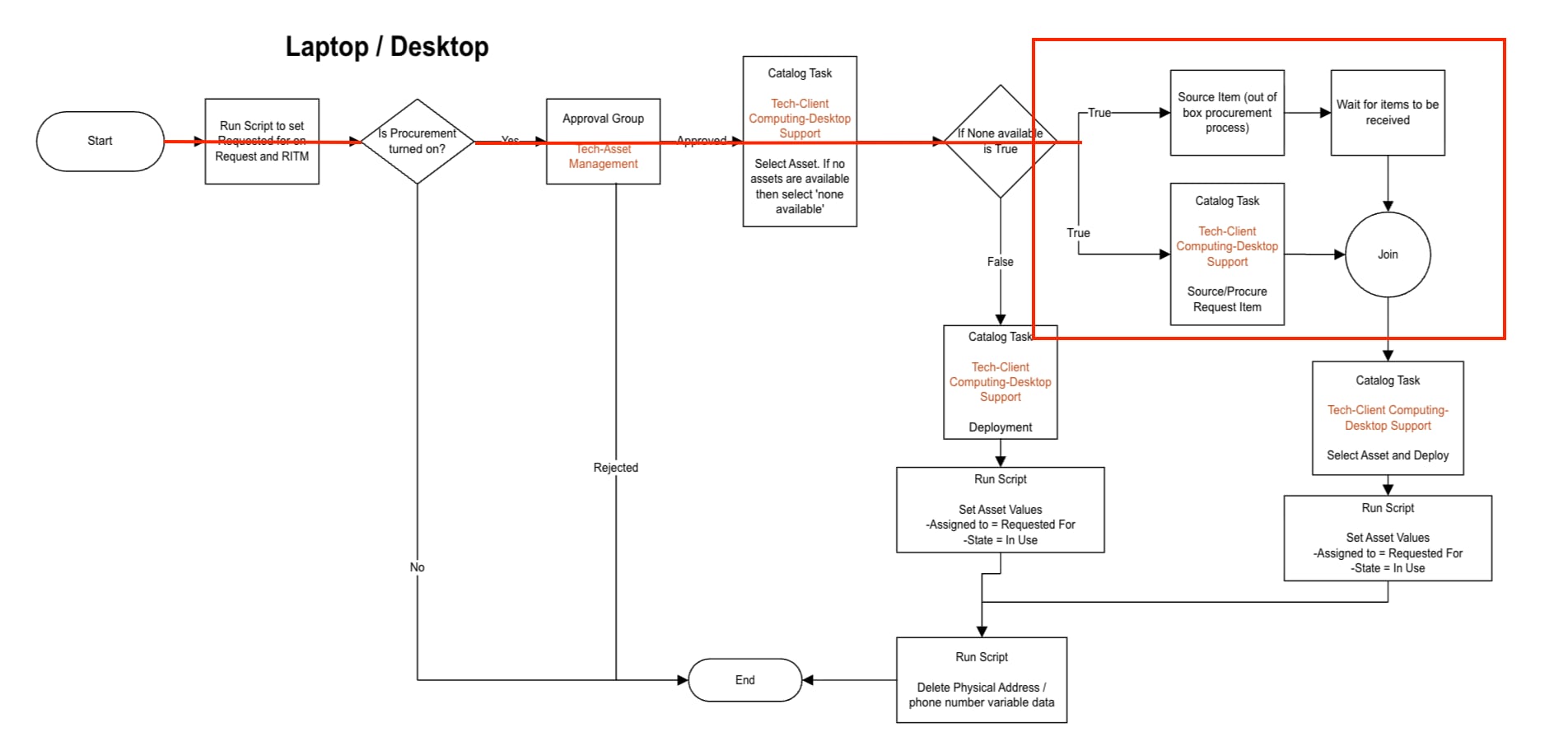
The other thing you can do if you want to use add to cart functionaity is simply leave the sourcing task assignment group empty. In this case what you will do is create a task on the procurement workflow (the one that runs on the RITM) with instructions in that task to source the workflow as needed. You could use the same logic as above to set the assignment group of your task and then within this task you will have instructions to go to the sourcing task and ONLY source the item that the RITM is referencing. Hopefully this makes sense... When two items such as a laptop and server are ordered using add to cart it results in one request, but two separate RITM's. So the idea is that in each RITM work stream there will be a task to go and source that individual RITM's item. So if the computer gets sourced first, then the Sourcing task found under the Request will still stay open until the Server gets sourced as well. At that time it will auto close out. I am attaching an image of a visio flow for a modified version of the out of box procurement workflow. Follow the red line to the box and the logic I am referring to will be found there. The same time the out of box sourcing task is happening there will also be a task created (as discussed above) to actually source the item.

- Mark as New
- Bookmark
- Subscribe
- Mute
- Subscribe to RSS Feed
- Permalink
- Report Inappropriate Content
01-08-2026 09:12 AM
Thank you for the response!
It makes total sense, and I was thinking about it the same way. It's sort of a design limitation by ServiceNow OOB. Things may get a bit more trickier when a user orders 10 different items for one team and another 5 different items for another team. Ideally, we'd want it to create 2 catalog tasks so that those teams can source all items using 1 task each (versus having to use 10 and 5 tasks each if we create source request tasks on RITM level). I can probably script it out and make it work that way, but I wanted to keep it as close to OOB as possible.
- Mark as New
- Bookmark
- Subscribe
- Mute
- Subscribe to RSS Feed
- Permalink
- Report Inappropriate Content
01-08-2026 09:16 AM
* Also, I'd need to use 'Add to cart' functionality because we'll probably add around 500 items for office supplies and it won't make much sense to have users submit multiple requests for office supplies. The limitations to edit the final 'delivery instructions' popup (in 2 step checkout process) is another design limitation by ServiceNow.