- Mark as New
- Bookmark
- Subscribe
- Mute
- Subscribe to RSS Feed
- Permalink
- Report Inappropriate Content
05-04-2020 05:43 AM
Dear Community Members,
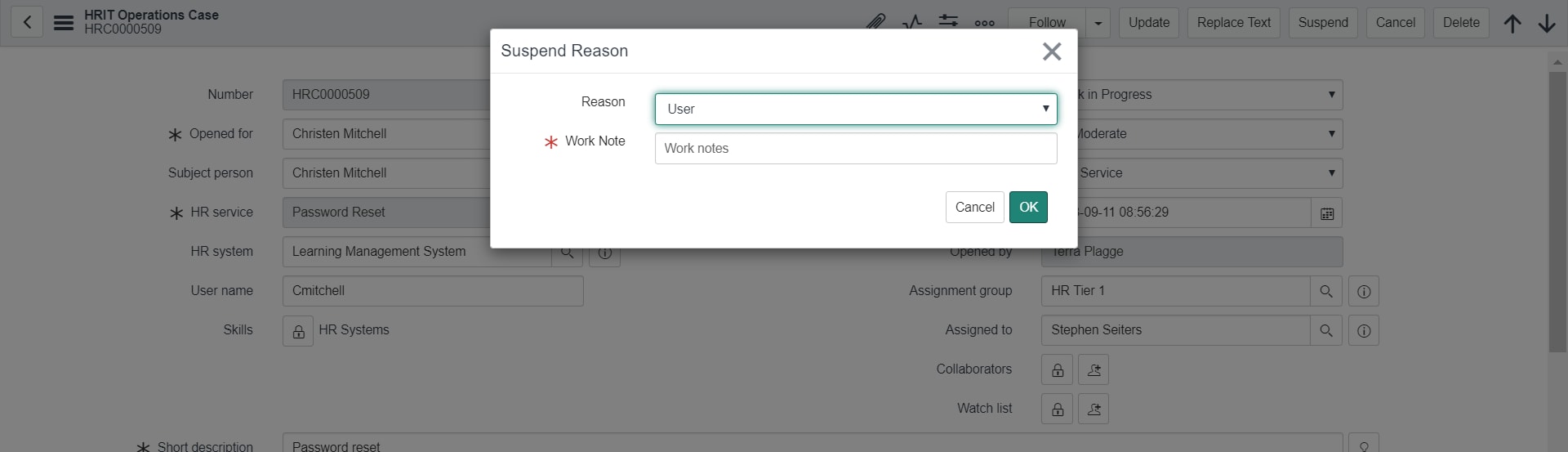
I have a requirement where I need to make Suspend Reason mandatory which pops up when clicked on suspend case button. How can I do that?
Another requirement is to make a value as default one. For example I have item1 to item 4, I want item 3 to be selected by default.
How can I do that?
Solved! Go to Solution.
- Labels:
-
HR Service Delivery


- Mark as New
- Bookmark
- Subscribe
- Mute
- Subscribe to RSS Feed
- Permalink
- Report Inappropriate Content
05-05-2020 01:00 AM
Hi Peeyush,
I updated in my instance and it now shows Group as default but shows in order correctly
script updated below
<select id="suspend_reason" class="form-control" name="suspend_reason">
	<j:while test='${reasons.next()}'>
		<j:if test="${reasons.getValue('value') == suspension_type}">
			<option value="${reasons.getValue('value')}" selected='selected'>${reasons.getValue('label')}</option>
		</j:if>
		<j:if test="${reasons.getValue('value') != suspension_type}">
			<j:if test="${reasons.getValue('value') == 'group'}">
				<option value="${reasons.getValue('value')}" selected='selected'>${reasons.getValue('label')}</option>
			</j:if>
			<j:if test="${reasons.getValue('value') != 'group'}">
				<option value="${reasons.getValue('value')}">${reasons.getValue('label')}</option>
			</j:if>
		</j:if>
	</j:while>
</select>


Mark ✅ Correct if this solves your issue and also mark 👍 Helpful if you find my response worthy based on the impact.
Thanks
Ankur
Ankur
✨ Certified Technical Architect || ✨ 10x ServiceNow MVP || ✨ ServiceNow Community Leader

- Mark as New
- Bookmark
- Subscribe
- Mute
- Subscribe to RSS Feed
- Permalink
- Report Inappropriate Content
05-04-2020 07:13 AM
Hi Peeyush,
Look for UI Page: HR Suspend Dialog. You can go through the script it has reason & worknotes that are available & made mandatory on the dialog box.
- Mark as New
- Bookmark
- Subscribe
- Mute
- Subscribe to RSS Feed
- Permalink
- Report Inappropriate Content
05-04-2020 07:32 AM

- Mark as New
- Bookmark
- Subscribe
- Mute
- Subscribe to RSS Feed
- Permalink
- Report Inappropriate Content
05-04-2020 08:06 AM

- Mark as New
- Bookmark
- Subscribe
- Mute
- Subscribe to RSS Feed
- Permalink
- Report Inappropriate Content
05-04-2020 10:40 AM
Hi Peeyush,
Follow below steps.
1. Open UI Page: HR Suspend Dialog
2. In the HTML part of the code replace
<div class="form-group has-error row">with
<div class="form-group is-required row">Also,
<label class="col-sm-3 control-label" style="text-align:right" for="suspend_reason">
${gs.getMessage('Reason')}</label>
with
<label class="col-sm-3 control-label" style="text-align:right" for="suspend_reason">
<span class="required-marker"></span>${gs.getMessage('Reason')}</label>
Follow link & replace yourisntancename in the URL & change the sequence for the choices. If sequence column is not present on the list you can add it from List Layout.
- Mark as New
- Bookmark
- Subscribe
- Mute
- Subscribe to RSS Feed
- Permalink
- Report Inappropriate Content
05-04-2020 11:19 PM
Hi Jaspal,
Thanks, the mandatory thing worked like a charm.
But to make a value default, what should I do?
Requirement is choice list should be in alphabatic in order say A, B, C, D and E but B should be default value in Dialogue box reason.
Dictionary override is not working in Dialogue box. Any solution for this please?
Regards,
Peeyush Jaroli