- Mark as New
- Bookmark
- Subscribe
- Mute
- Subscribe to RSS Feed
- Permalink
- Report Inappropriate Content
04-10-2020 12:41 PM
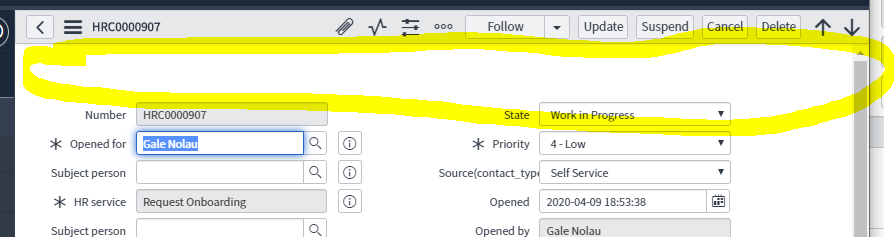
Just started looking into Orlando - the HR Lifecycle Activity Set Progress Bar is not rendered on the UI16 case form, even though it's there. Anybody else noticed that (and has a solution)?
It's configured on the form:

But not displaying:

Solved! Go to Solution.


- Mark as New
- Bookmark
- Subscribe
- Mute
- Subscribe to RSS Feed
- Permalink
- Report Inappropriate Content
04-10-2020 02:29 PM
Regards,
Mike
- Mark as New
- Bookmark
- Subscribe
- Mute
- Subscribe to RSS Feed
- Permalink
- Report Inappropriate Content
04-10-2020 02:51 PM

- Mark as New
- Bookmark
- Subscribe
- Mute
- Subscribe to RSS Feed
- Permalink
- Report Inappropriate Content
04-10-2020 02:58 PM
So - I guess my problem and the issue is that I used the "Clone Lifecycle Event" action. I noticed that the field is mandatory in the cloned activity sets but could not be bothered to put something in 😉 The clone action did not populate them.