How do I make a catalog item variable (type = URL) unlocked (always visible) in the Service Portal?

- Mark as New
- Bookmark
- Subscribe
- Mute
- Subscribe to RSS Feed
- Permalink
- Report Inappropriate Content
03-10-2021 09:55 PM
I have a catalog item in the Service Portal that has a variable with type = URL.
The URL defaults to locked. I want it to always be unlocked, so the users never have to click to unlock it. I was able to do this in the native ui. But in the Service Portal it still shows as locked.
Is there a way to make it always "unlocked" in the Service Portal?
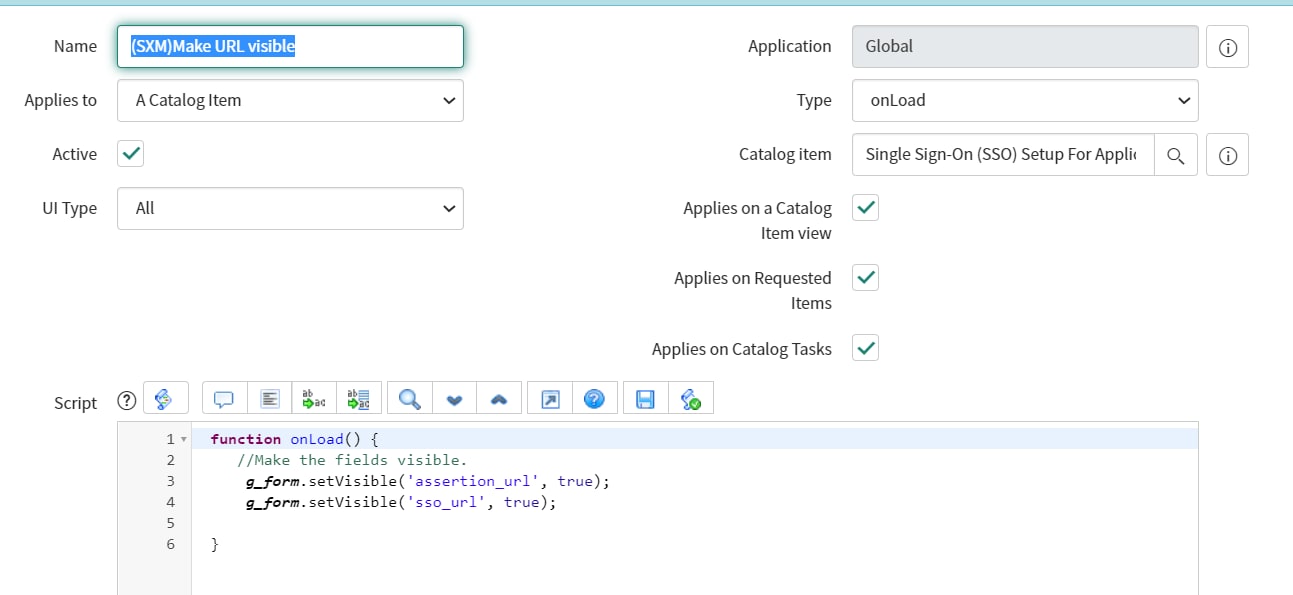
What I did that worked for native ui only, was to create a Catalog Client Script:


- Mark as New
- Bookmark
- Subscribe
- Mute
- Subscribe to RSS Feed
- Permalink
- Report Inappropriate Content
03-10-2021 10:12 PM
Hi psenkow,
Try to uncheck "Unlock empty URL fields on form load" on UI Properties.
Maybe this can solve your problem.
For your reference: https://community.servicenow.com/community?id=community_question&sys_id=68129321db101fc01dcaf3231f96199a
Best regards,
Leo


- Mark as New
- Bookmark
- Subscribe
- Mute
- Subscribe to RSS Feed
- Permalink
- Report Inappropriate Content
03-10-2021 10:27 PM
there is no direct solution for this
But you need to use DOM manipulation which is not recommended
Lock/Unlock glide_list and URL Fields With Client Scripts
Regards
Ankur
Ankur
✨ Certified Technical Architect || ✨ 10x ServiceNow MVP || ✨ ServiceNow Community Leader