- Mark as New
- Bookmark
- Subscribe
- Mute
- Subscribe to RSS Feed
- Permalink
- Report Inappropriate Content
02-09-2022 04:26 AM
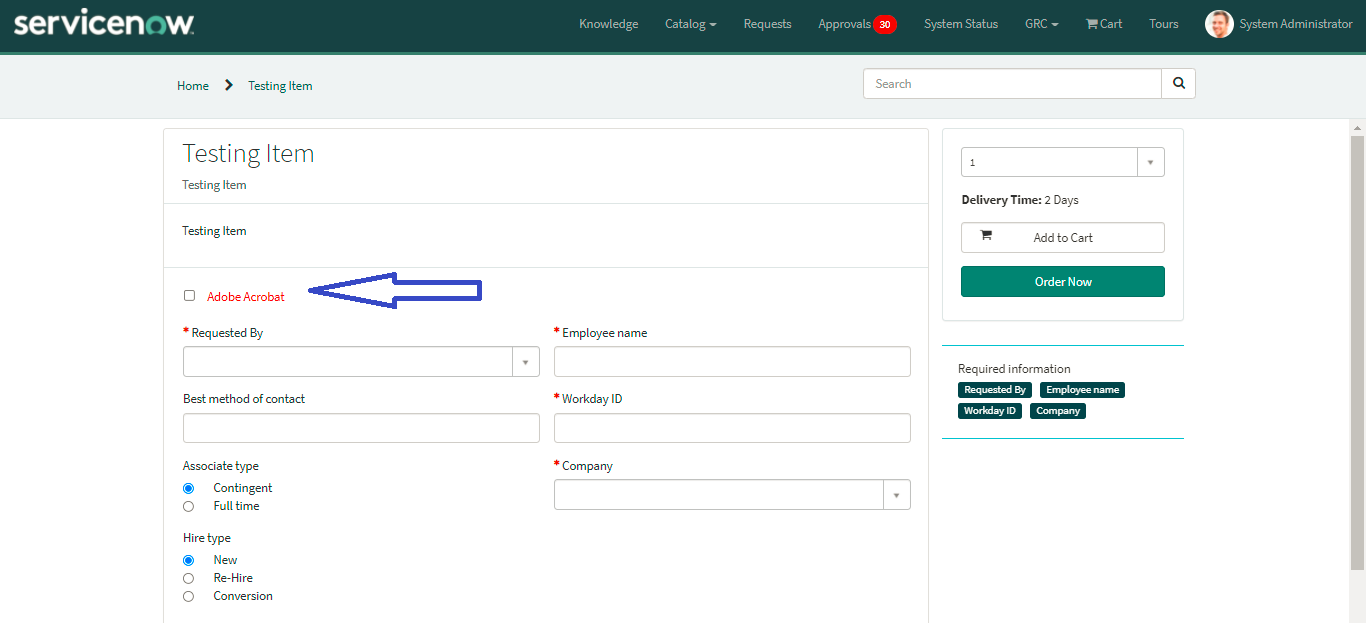
How to add color to Check Box "Text" -> Adobe Acrobat in service catalog
As im not having Macros
Any ideas
Thanks
Mounish

Solved! Go to Solution.
- Labels:
-
Service Catalog


- Mark as New
- Bookmark
- Subscribe
- Mute
- Subscribe to RSS Feed
- Permalink
- Report Inappropriate Content
02-09-2022 06:18 AM
this worked for me in Native + Portal
Remember this uses DOM which is not recommended.
Ensure Isolate Script = False for this
Client Script: Isolate Script False
function onLoad(){

	setTimeout(function(){
		if(window != null){
			// native
			var z = document.getElementsByClassName("checkbox-label");
			for (k = 0; k < z.length; k++) {
				if(z[k].innerHTML == 'Adobe Acrobat'){
					z[k].style.color = 'red';
				}
			}
		}
		else{
			// portal
			var aTags = this.document.getElementsByClassName("ng-binding");
			var searchText = "Adobe Acrobat";
			for (var i = 0; i < aTags.length; i++) {
				if (aTags[i].textContent.toString() == searchText) {
					aTags[i].style.color = 'red';
					break;
				}
			}
		}
	}, 3000);
}

Output: Native

Output: Portal

Please mark my response as correct and helpful to close the thread so that it benefits future readers.
Regards
Ankur
Ankur
✨ Certified Technical Architect || ✨ 10x ServiceNow MVP || ✨ ServiceNow Community Leader
- Mark as New
- Bookmark
- Subscribe
- Mute
- Subscribe to RSS Feed
- Permalink
- Report Inappropriate Content
02-09-2022 06:18 AM
this worked for me in Native + Portal
Remember this uses DOM which is not recommended.
Ensure Isolate Script = False for this
Client Script: Isolate Script False
function onLoad(){

	setTimeout(function(){
		if(window != null){
			// native
			var z = document.getElementsByClassName("checkbox-label");
			for (k = 0; k < z.length; k++) {
				if(z[k].innerHTML == 'Adobe Acrobat'){
					z[k].style.color = 'red';
				}
			}
		}
		else{
			// portal
			var aTags = this.document.getElementsByClassName("ng-binding");
			var searchText = "Adobe Acrobat";
			for (var i = 0; i < aTags.length; i++) {
				if (aTags[i].textContent.toString() == searchText) {
					aTags[i].style.color = 'red';
					break;
				}
			}
		}
	}, 3000);
}
Output: Native
Output: Portal
Please mark my response as correct and helpful to close the thread so that it benefits future readers.
Regards
Ankur
Ankur
✨ Certified Technical Architect || ✨ 10x ServiceNow MVP || ✨ ServiceNow Community Leader
- Mark as New
- Bookmark
- Subscribe
- Mute
- Subscribe to RSS Feed
- Permalink
- Report Inappropriate Content
02-09-2022 06:56 AM
Hi
Its working as expected, can i have the text in color only for Acrobat for that check Box - Text
please let me know
Thanks
Mounish
- Mark as New
- Bookmark
- Subscribe
- Mute
- Subscribe to RSS Feed
- Permalink
- Report Inappropriate Content
02-09-2022 07:15 AM
you can manipulate it.
if you want text color for Acrobat to be red then update as this
function onLoad(){
setTimeout(function(){
if(window != null){
// native
var z = document.getElementsByClassName("checkbox-label");
for (k = 0; k < z.length; k++) {
if(z[k].innerHTML == 'Acrobat'){
z[k].style.color = 'red';
}
}
}
else{
// portal
var aTags = this.document.getElementsByClassName("ng-binding");
var searchText = "Acrobat";
for (var i = 0; i < aTags.length; i++) {
if (aTags[i].textContent.toString() == searchText) {
aTags[i].style.color = 'red';
break;
}
}
}
}, 3000);
}
Regards
Ankur
Ankur
✨ Certified Technical Architect || ✨ 10x ServiceNow MVP || ✨ ServiceNow Community Leader
- Mark as New
- Bookmark
- Subscribe
- Mute
- Subscribe to RSS Feed
- Permalink
- Report Inappropriate Content
02-09-2022 07:20 AM
I had given that but it didn't work
- Mark as New
- Bookmark
- Subscribe
- Mute
- Subscribe to RSS Feed
- Permalink
- Report Inappropriate Content
02-09-2022 08:15 AM
when I gave the text as Adobe Acrobat it worked for me
try to debug and enhance.
Regards
Ankur
Ankur
✨ Certified Technical Architect || ✨ 10x ServiceNow MVP || ✨ ServiceNow Community Leader