How to add sn_hr_core.admin role to admin role?

- Mark as New
- Bookmark
- Subscribe
- Mute
- Subscribe to RSS Feed
- Permalink
- Report Inappropriate Content
08-31-2017 10:43 PM
Hi,
While testing roles, I accidentally removed sn_hr_core.admin from admin role as admin.
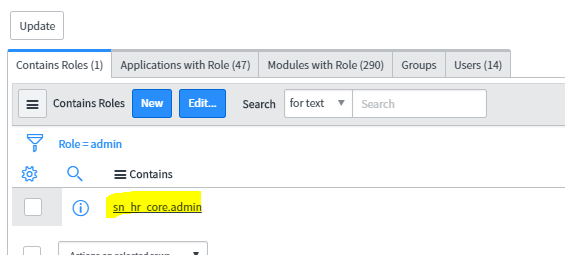
Please find the below screen shot admin role with sn_hr_core.admin

Now, when I try to add the sn_hr_core.admin as admin, I do not find the role name in the available roles list.

When I try to retrieve the role information from sys_user_roles, this row is removed by security constraints.

Can anyone tell me how to add the sn_hr_core.admin role back to admin role?


- Mark as New
- Bookmark
- Subscribe
- Mute
- Subscribe to RSS Feed
- Permalink
- Report Inappropriate Content
09-01-2017 11:32 AM
Hello Sateesh,
If you have this role->user mapping on another instance, then you can export and import the XML file. I think that should work. If not please raise an HI ticket. Customer support can help you out with this issue.
- Mark as New
- Bookmark
- Subscribe
- Mute
- Subscribe to RSS Feed
- Permalink
- Report Inappropriate Content
09-01-2017 11:50 AM
Thank you Pradeep.
I will try that.
On Fri, Sep 1, 2017 at 1:33 PM, pradeepksharma <


- Mark as New
- Bookmark
- Subscribe
- Mute
- Subscribe to RSS Feed
- Permalink
- Report Inappropriate Content
09-01-2017 11:39 AM
Hi Sateesh,
Please check System Definition->Deleted Record. The deleted record should be there and you should be able to restore it.
- Mark as New
- Bookmark
- Subscribe
- Mute
- Subscribe to RSS Feed
- Permalink
- Report Inappropriate Content
06-16-2025 10:29 AM
How do I add sn_hr_core.admin role to my profile if I never had it but like the above screenshots show, it is not appearing/visible to me from the Roles list?
