How to re-trigger Flow/Approvals on RITM without manual state change or new flow?

Options
- Mark as New
- Bookmark
- Subscribe
- Mute
- Subscribe to RSS Feed
- Permalink
- Report Inappropriate Content
03-26-2026 12:52 AM
Hi everyone,
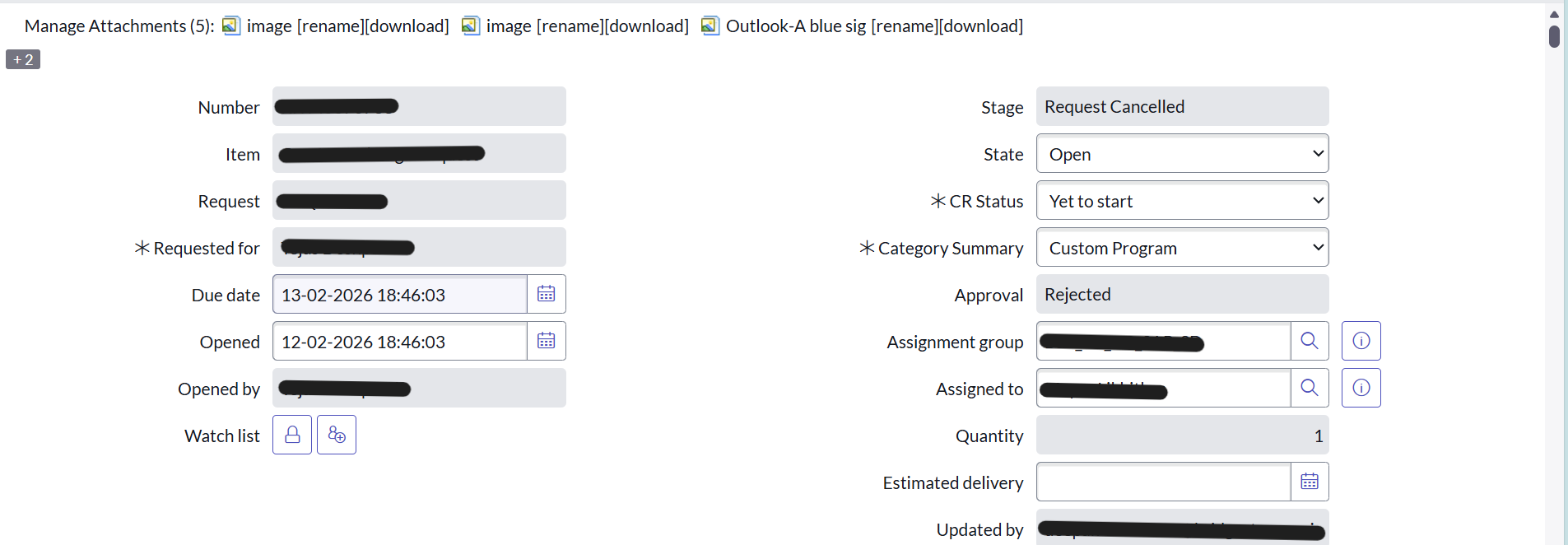
I’m working on a scenario in ServiceNow where a Flow is handling approvals and updating a Requested Item (RITM).
Current situation:
- The Flow triggered approval activities correctly.
- One of the approvers did not approve, so the request moved to Cancelled state.
- The record updates (stage, approval, etc.) were executed as expected.
Now, I want to re-test the same Flow logic by bringing the RITM back to a previous “Approved/In Progress” state and re-triggering the process.
However, I want to avoid:
- Manually changing the state and fields
- Creating a separate Flow just for testing
- Cloning/recreating the RITM
- Manually changing the Request state and testing the flow
My question:
Is there any recommended approach to:
- Reset/replay the Flow execution on the same RITM?
- Re-trigger approvals and downstream tasks without creating new records or flows?
- Possibly use Flow Designer execution context, rollback, or any system-level mechanism?
I also checked Flow Context, but looking for a more controlled or reusable way to simulate/restart the process.
Any suggestions or best practices would be really helpful.
Thanks in advance!
1 REPLY 1


Options
- Mark as New
- Bookmark
- Subscribe
- Mute
- Subscribe to RSS Feed
- Permalink
- Report Inappropriate Content
03-26-2026 03:12 AM
Hi @RitheshB
I’m not sure if you’ve tried the Test option in the flow.
Try testing the flow by passing the RITM number and clicking Test.
This will re-trigger the flow.
Regards,
Siva
Try testing the flow by passing the RITM number and clicking Test.
This will re-trigger the flow.
Regards,
Siva