- Mark as New
- Bookmark
- Subscribe
- Mute
- Subscribe to RSS Feed
- Permalink
- Report Inappropriate Content
10-04-2018 05:11 PM
Does anyone know how to use Reply, Reply all and Forward (glide.ui16.emailStreamResponseActions = true) with HTML formatting? We are very email dependent right now.
My users (IT, HR and Facilities) want to be able to reply to a received email in the Activity log and have the original HTML formatted email populate in the ServiceNow email client. However, I haven't found a way to get it to show up with HTML instead of plain text. Does anyone know how to do this?
Solved! Go to Solution.
- Labels:
-
Incident Management


- Mark as New
- Bookmark
- Subscribe
- Mute
- Subscribe to RSS Feed
- Permalink
- Report Inappropriate Content
10-04-2018 05:34 PM
I have done similar implementation for my client
Below thread should give you the solution
https://community.servicenow.com/community?id=community_blog&sys_id=df609af8dbbbdb405ed4a851ca961928
- Mark as New
- Bookmark
- Subscribe
- Mute
- Subscribe to RSS Feed
- Permalink
- Report Inappropriate Content
10-04-2018 05:34 PM
I have done similar implementation for my client
Below thread should give you the solution
https://community.servicenow.com/community?id=community_blog&sys_id=df609af8dbbbdb405ed4a851ca961928
- Mark as New
- Bookmark
- Subscribe
- Mute
- Subscribe to RSS Feed
- Permalink
- Report Inappropriate Content
10-05-2018 11:05 AM
Thank you Sanjiv. That doesn't answer my exact case, but it gives me a few ideas on how to achieve it.
Also, that's a wonderful article that I wish had been available when I first implemented ServiceNow. 🙂
-Amanda
- Mark as New
- Bookmark
- Subscribe
- Mute
- Subscribe to RSS Feed
- Permalink
- Report Inappropriate Content
10-05-2018 11:13 AM
Thanks you
Following two sections should solve both the use case you mentioned.
Receive Emails in HTML format
Auto-populate Email Body using Email Script
- Mark as New
- Bookmark
- Subscribe
- Mute
- Subscribe to RSS Feed
- Permalink
- Report Inappropriate Content
10-05-2018 05:14 PM
For those who are curious as to what I did, here are the steps I followed:
- First, I set the System Property 'glide.ui16.emailStreamResponseActions' to true.
- This makes the Reply, Reply All and Forward buttons show up in the Activity Log.
- Second, I created the mail script
- Name: get_journal_email_html
Script:
(function runMailScript(current, template, email, email_action, event) {
var html_str = current.body.replace('[code]','');
html_str = html_str.replace('[/code]','');
template.print(html_str);
})(current, template, email, email_action, event);
- Name: get_journal_email_html
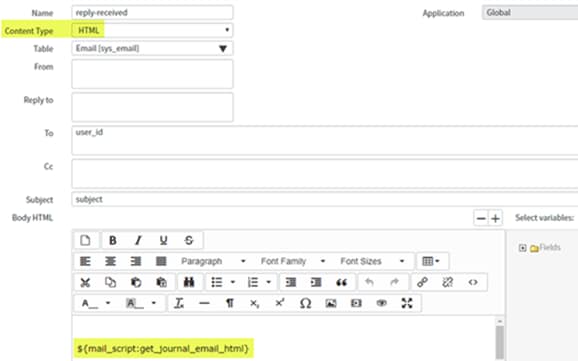
- Third, I updated the 3 email Client Templates. I had to go into each one and delete the Plain Text mail scripts, change it to HTML and then paste the mail script into the Body HTML field: ${mail_script:get_journal_email_html}
-