- Mark as New
- Bookmark
- Subscribe
- Mute
- Subscribe to RSS Feed
- Permalink
- Report Inappropriate Content
07-21-2020 08:49 AM
I have a requirement to restrict a date field. This is for a Service Catalog Item. The variable is target_date. We need to set it up so that the target date selected cannot be in the past and needs to be 30 days or greater from the current date.
I have found some solutions on here but not are working.
Solved! Go to Solution.
- Labels:
-
Service Catalog


- Mark as New
- Bookmark
- Subscribe
- Mute
- Subscribe to RSS Feed
- Permalink
- Report Inappropriate Content
07-21-2020 09:41 AM
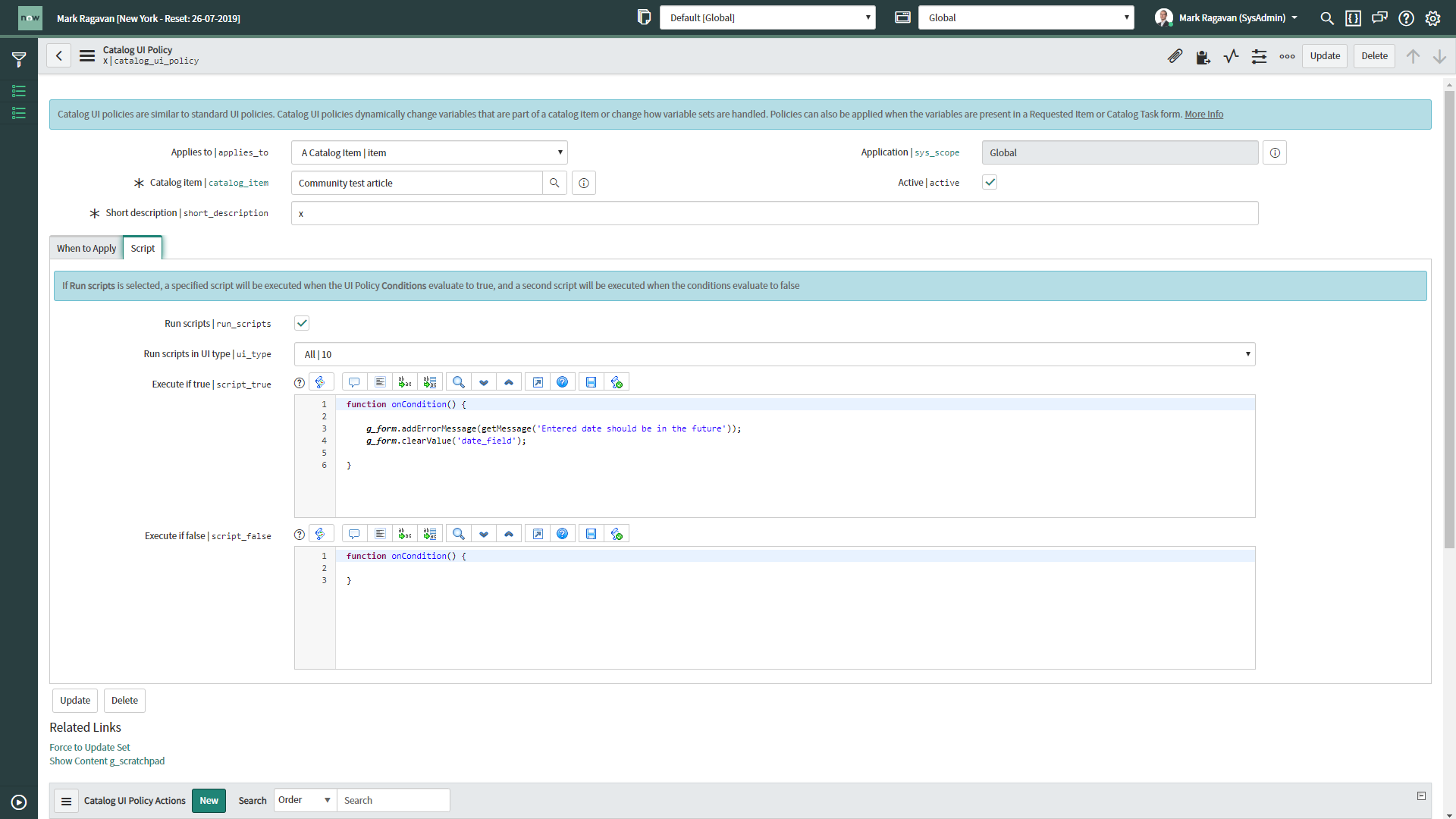
That's mentioned in the article, something like this would give you a message:

If my answer helped you in any way, please then mark it as helpful.
Kind regards,
Mark
2020 ServiceNow Community MVP
2020 ServiceNow Developer MVP
---
LinkedIn
Community article list
Kind regards,
Mark Roethof
Independent ServiceNow Consultant
10x ServiceNow MVP
---
~444 Articles, Blogs, Videos, Podcasts, Share projects - Experiences from the field


- Mark as New
- Bookmark
- Subscribe
- Mute
- Subscribe to RSS Feed
- Permalink
- Report Inappropriate Content
07-21-2020 08:50 AM
Hello Rachel,
Can you please share the script which is not working?
- Pradeep Sharma
- Mark as New
- Bookmark
- Subscribe
- Mute
- Subscribe to RSS Feed
- Permalink
- Report Inappropriate Content
07-21-2020 09:02 AM
I tried this as a test (this is for 5 days - I need 30 - I tried changing the values but it still allowed me to select any date:
function onChange(control, oldValue, newValue, isLoading, isTemplate) {
if (isLoading || newValue === '') {
return;
}
var cdt = g_form.getValue('target_date'); //First Date/Time field
var ajax = new GlideAjax('ClientDateTimeUtils');
ajax.addParam('sysparm_name','getNowDateTimeDiff');
ajax.addParam('sysparm_fdt', cdt);
ajax.getXML(doSomething);
function doSomething(response){
var answer = response.responseXML.documentElement.getAttribute("answer");
//5 days out
if (answer > 431000)
{
alert('The lead time to process this request is 5 days.' + '\n' + 'If this is an urgent request please contact the Service Desk for assistance escalating this request.');
//alert('The date value cannot be before 5 days into the future. Please correct.');
//g_form.clearValue("target_date");
}
}
}

- Mark as New
- Bookmark
- Subscribe
- Mute
- Subscribe to RSS Feed
- Permalink
- Report Inappropriate Content
07-21-2020 09:06 AM
Hi Rachel,
I worked on a similar requirement not so long ago, see the code below. There are two parts required for this, a Script Include and a Catalogue Client Script. The example below is checking if the selected date is 48hours from the current date.
Client Script
function onChange(control, oldValue, newValue, isLoading) {

    if (newValue != '') {
        var ga = new GlideAjax('global.DateTimeAjaxUtils');
        ga.addParam('sysparm_name', 'dateValidation');
        ga.addParam('sysparm_date', newValue);
        ga.getXML(CallBack);
    }
}

function CallBack(response) {
    var answer = response.responseXML.documentElement.getAttribute("answer");
    if (answer == 'true') {
        alert("Check-in date must be 48 hours from now.");
        g_form.setValue('check_in_date', '');
    }
}
Script Include Function
dateValidation: function() {
        return (gs.dateDiff(gs.nowDateTime(), new GlideDateTime(this.getParameter('sysparm_date')), true) / 3600 < 48);
    },
For your use case, you could just replace the "3600 < 48" part of the script inlcude function and replace it with the below to calculate 30 days in the future.
dateValidation: function() {
        return (gs.dateDiff(gs.nowDateTime(), new GlideDateTime(this.getParameter('sysparm_date')), true) / 3600 < 720);
    },
Hope this helpful!
Kind Regards,
Ethan
- Mark as New
- Bookmark
- Subscribe
- Mute
- Subscribe to RSS Feed
- Permalink
- Report Inappropriate Content
07-21-2020 09:33 AM