SCTask Requested for unable to "read only"

- Mark as New
- Bookmark
- Subscribe
- Mute
- Subscribe to RSS Feed
- Permalink
- Report Inappropriate Content
03-30-2022 07:20 AM


- Mark as New
- Bookmark
- Subscribe
- Mute
- Subscribe to RSS Feed
- Permalink
- Report Inappropriate Content
03-30-2022 07:42 AM
The Requested For field comes from the Request(sc_request).
The field you are seeing is dot walked to the sc_task.
Try this in your client script:
g_form.setReadonly('request.requested_for');- Mark as New
- Bookmark
- Subscribe
- Mute
- Subscribe to RSS Feed
- Permalink
- Report Inappropriate Content
03-30-2022 07:44 AM
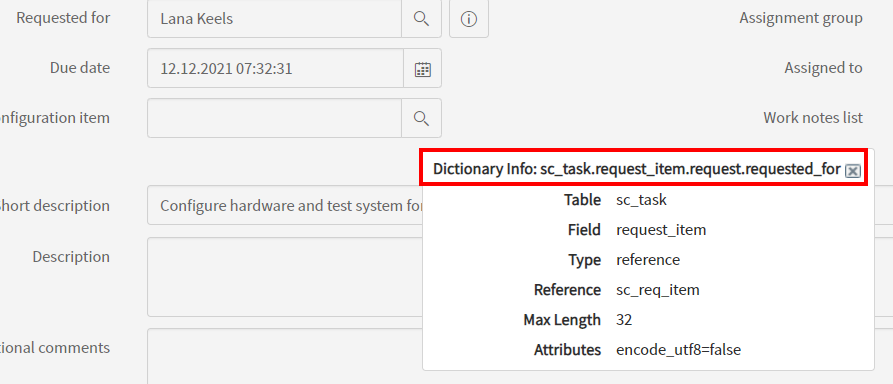
Right-click on the Requested For field and click Show - 'requested_for'
The top-most line should give you a hint where the field comes from


- Mark as New
- Bookmark
- Subscribe
- Mute
- Subscribe to RSS Feed
- Permalink
- Report Inappropriate Content
03-30-2022 08:04 AM
Hi
you were on the right path with your UI Policy, but in your case it is a bit tricky as the field "Requested for" is a dot-walk field over several levels (right click on the label and then "Show - 'requested_for'):

This path has to be selected at field selector:

And this will lead to a read-only field

Kind regards
Maik
- Mark as New
- Bookmark
- Subscribe
- Mute
- Subscribe to RSS Feed
- Permalink
- Report Inappropriate Content
03-30-2022 06:20 PM
Hi, thanks for all the prompt help, i have tried it didn't work either. However, let me give a better view. The requested_for is inside Variables of the catalog item.
There's also a weird behavior that when the state is Not 'Closed Complete' it was read-only. But when state is 'Closed Complete' it become editable.
Sadly i can't right click to do a UI Debug on this catalog item variables.
Any ideas pelase?