- Mark as New
- Bookmark
- Subscribe
- Mute
- Subscribe to RSS Feed
- Permalink
- Report Inappropriate Content
02-24-2021 08:48 PM
Hi,
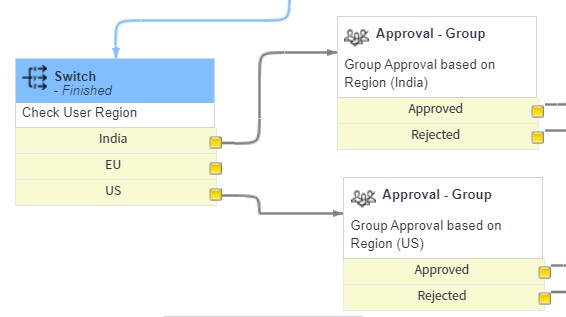
I have created a workflow using a switch block and the variable used inside the switch condition is a single line text. I see the switch block is stuck and does not move to the next block.

In the logs created through workflow see the typeof variable passed is object but when i log the variable single line text on the catalog it gives me as string. I am using activity.result == 'IN' in the switch conditions as per the regions.
Solved! Go to Solution.


- Mark as New
- Bookmark
- Subscribe
- Mute
- Subscribe to RSS Feed
- Permalink
- Report Inappropriate Content
02-24-2021 09:17 PM
Hi Hemanth,
You cannot access workflow scratchpad inside switch activity
alternative here
Access Scratchpad from Switch Core Activity -Kingston
Regards
Ankur
Ankur
✨ Certified Technical Architect || ✨ 10x ServiceNow MVP || ✨ ServiceNow Community Leader
- Mark as New
- Bookmark
- Subscribe
- Mute
- Subscribe to RSS Feed
- Permalink
- Report Inappropriate Content
02-24-2021 08:58 PM
Hi,
please share image of switch activity
Regards
Ankur
Ankur
✨ Certified Technical Architect || ✨ 10x ServiceNow MVP || ✨ ServiceNow Community Leader
- Mark as New
- Bookmark
- Subscribe
- Mute
- Subscribe to RSS Feed
- Permalink
- Report Inappropriate Content
02-24-2021 09:17 PM
Hi Hemanth,
You cannot access workflow scratchpad inside switch activity
alternative here
Access Scratchpad from Switch Core Activity -Kingston
Regards
Ankur
Ankur
✨ Certified Technical Architect || ✨ 10x ServiceNow MVP || ✨ ServiceNow Community Leader
- Mark as New
- Bookmark
- Subscribe
- Mute
- Subscribe to RSS Feed
- Permalink
- Report Inappropriate Content
02-27-2021 12:56 AM
Hope you are doing good.
Did my reply answer your question?
If so, please mark appropriate response as correct & helpful so that the question will appear as resolved for others who may have a similar question in the future.
Thanks!
Ankur
Ankur
✨ Certified Technical Architect || ✨ 10x ServiceNow MVP || ✨ ServiceNow Community Leader
- Mark as New
- Bookmark
- Subscribe
- Mute
- Subscribe to RSS Feed
- Permalink
- Report Inappropriate Content
02-24-2021 08:59 PM
make sure you selected the correct variable and delete the switch and publish the workflow and then checkout and create the switch again and try.