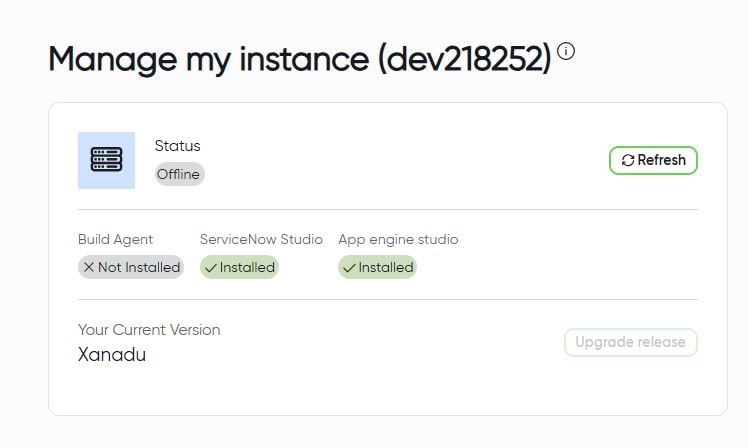
Instance Offline

- Mark as New
- Bookmark
- Subscribe
- Mute
- Subscribe to RSS Feed
- Permalink
- Report Inappropriate Content
12-09-2025 07:50 AM

- Mark as New
- Bookmark
- Subscribe
- Mute
- Subscribe to RSS Feed
- Permalink
- Report Inappropriate Content
12-09-2025 12:22 PM
Hi @AnuradhaV,
this is nothing uncommon, PDIs are being hibernating after a particular period of inactivity to save the operational costs.
As per your screenshot taken from https://developer.servicenow.com/dev.do#!/manage-instance - click the refresh button and give it a couple of minutes to wake up:

it will soon be available again. If you don't want to wait, oyu need to login every day :))
✂-----Cutting-out-the---✦AI-noise✦---All-replies-written-and-vouched-for-by-GlideFather---


- Mark as New
- Bookmark
- Subscribe
- Mute
- Subscribe to RSS Feed
- Permalink
- Report Inappropriate Content
12-09-2025 03:55 PM
Hi @AnuradhaV
I've been using PDI without any issues since this morning, but I've noticed several posts in the community about PDI being offline. Here are some points to consider:
- There is no support available for PDI.
- If you can wait, let's wait a bit longer.
- You can release this instance and start a new one, but you will lose your previous data. To avoid losing update sets in the future, make sure to take regular backups of your PDI.
There have been 3-4 posts in the community today about PDI failures or unavailability. Based on the responses, you might need to wait 1-2 days and hopefully, the PDI will be back online.
Regards
Dr Atul G. - Learn N Grow Together ServiceNow Techno - Functional Trainer
LinkedIn: https://www.linkedin.com/in/dratulgrover
YouTube: https://www.youtube.com/@LearnNGrowTogetherwithAtulG
******************************************************************************************

- Mark as New
- Bookmark
- Subscribe
- Mute
- Subscribe to RSS Feed
- Permalink
- Report Inappropriate Content
12-09-2025 04:21 PM
Hi @AnuradhaV
You can try the following steps:
- Go to the ServiceNow Developer Site
- Click Manage My Instance button (on top right):

- Click the “Refresh” button and wait for some minutes:

This usually wakes up the hibernated or offline instance.
If it still doesn’t work, and the instance isn’t critical or has no important data, you can release the current PDI and request a new one, it’ll be much faster and smoother.
Hope this helps!
If my response helped, please mark it as the accepted solution so others can benefit as well.
Muhammad Iftikhar
If my response helped, please mark it as the accepted solution so others can benefit as well.