Change of colors in Now Mobile app

- Mark as New
- Bookmark
- Subscribe
- Mute
- Subscribe to RSS Feed
- Permalink
- Report Inappropriate Content
04-08-2022 02:48 AM
Hello,
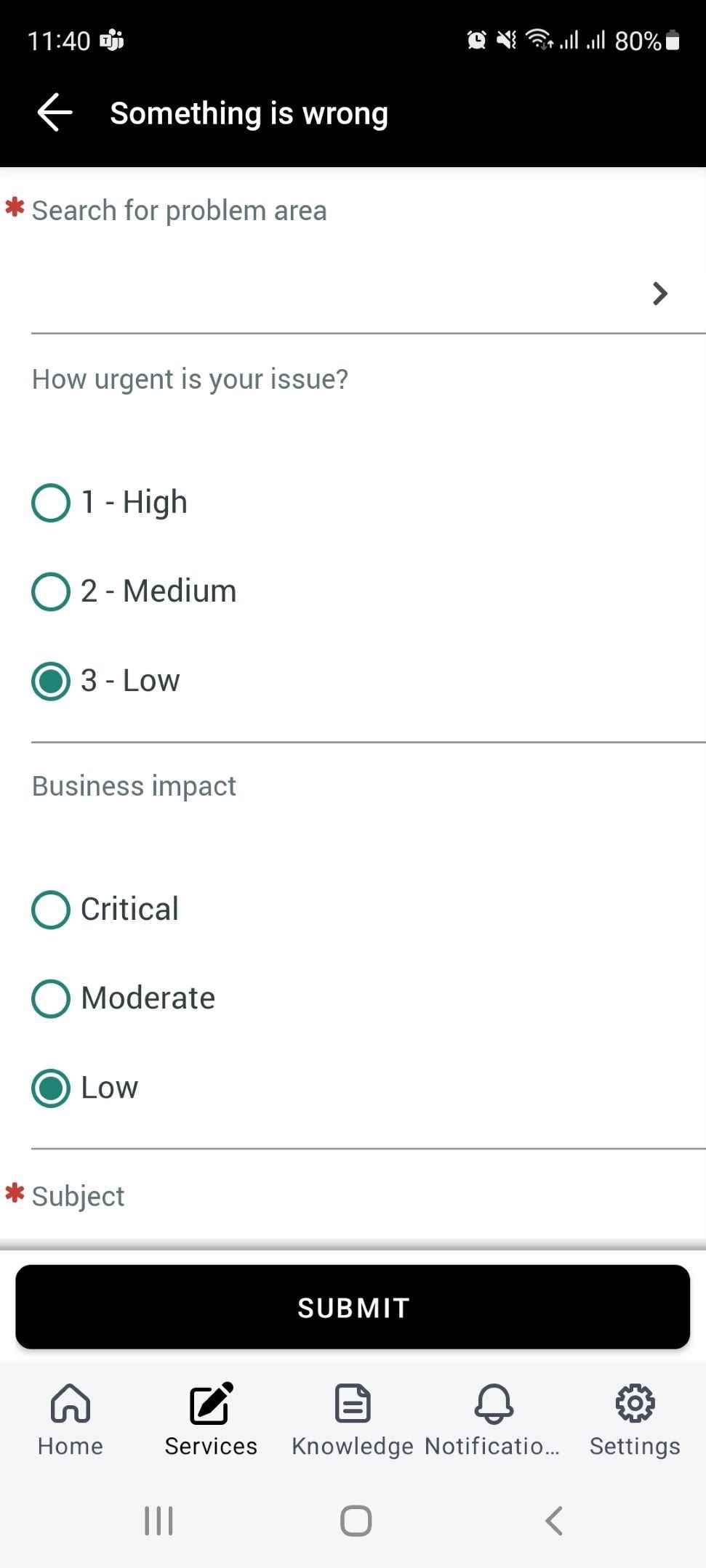
I'm trying to change the color of some things in the Now Mobile app. I've changed the Mobile theme and the glide.sc_mobile.primary_color property but still a few icons show in purple or green instead of black - are there more places to change the colors?
It's when I want to submit a new incident ticket in my app: then the attachment icon and the radio buttons for urgency are in green.

Also if I look at the Knowledge (Information) page, the number of views are displayed in purple.
Thank you in advance,
Ulrika
- Labels:
-
Mobile app configuration
-
Now Mobile
- Mark as New
- Bookmark
- Subscribe
- Mute
- Subscribe to RSS Feed
- Permalink
- Report Inappropriate Content
04-08-2022 02:56 AM
This colors is in MESP CSS, you can view in sp_css table and you can overwrite with mesp-styling-overrides.css
- Mark as New
- Bookmark
- Subscribe
- Mute
- Subscribe to RSS Feed
- Permalink
- Report Inappropriate Content
04-08-2022 03:12 AM
Thank you so much, I will try this!
- Mark as New
- Bookmark
- Subscribe
- Mute
- Subscribe to RSS Feed
- Permalink
- Report Inappropriate Content
04-08-2022 04:06 AM
Hi again,
The attachment icon was successfully changed in the css file, I'm so glad for this! However, the radio buttons and the number of views for a knowledge article won't change 🙂
The radio buttons should be under the block .type-multiple_choice, right? I've changed almost everything to black but still the radio buttons are in green and the KB views still in purple, I must have missed something.


- Mark as New
- Bookmark
- Subscribe
- Mute
- Subscribe to RSS Feed
- Permalink
- Report Inappropriate Content
04-08-2022 06:00 AM
Button are imbibed color from secondary color. What is your secondary color from your themes? check that once.
I am sure you have gone through this link, check the screen templete topic, it shows,
\https://docs.servicenow.com/bundle/sandiego-mobile/page/administer/tablet-mobile-ui/reference/sg-theme-colors.html
Also, I have tagged David HA video explaining how to change color on Buttons,
https://www.youtube.com/watch?v=5EteWjSI8wE&list=PLkGSnjw5y2U5bf79MQ1BPDk6hwOjXY54D&index=15
This will allow you to change the colors for elements such as headers, links, buttons (primary, secondary, destructive), and icons
Regards,
Paul
PaulSylo
To be is to do. To do is to be.