Change of colors in Now Mobile app

- Mark as New
- Bookmark
- Subscribe
- Mute
- Subscribe to RSS Feed
- Permalink
- Report Inappropriate Content
04-08-2022 02:48 AM
Hello,
I'm trying to change the color of some things in the Now Mobile app. I've changed the Mobile theme and the glide.sc_mobile.primary_color property but still a few icons show in purple or green instead of black - are there more places to change the colors?
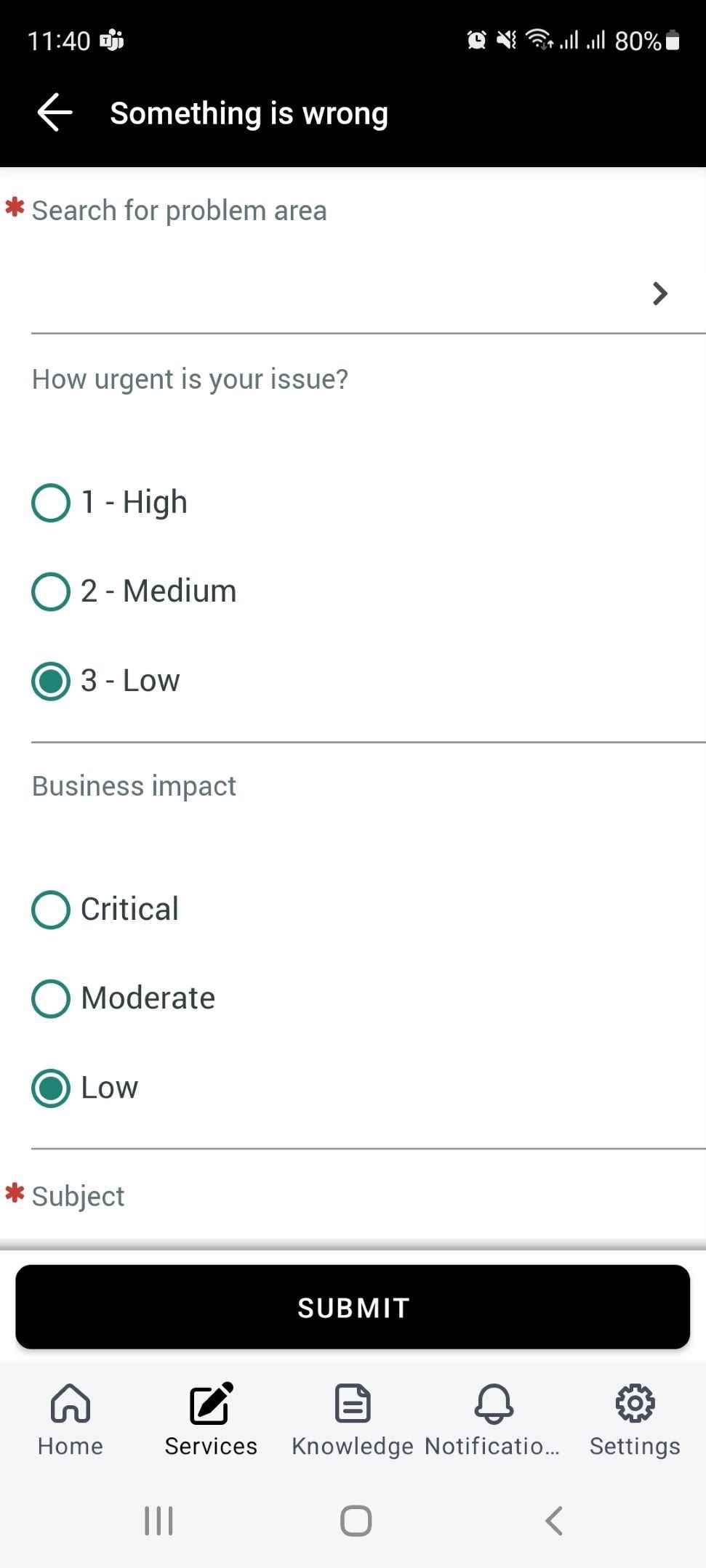
It's when I want to submit a new incident ticket in my app: then the attachment icon and the radio buttons for urgency are in green.

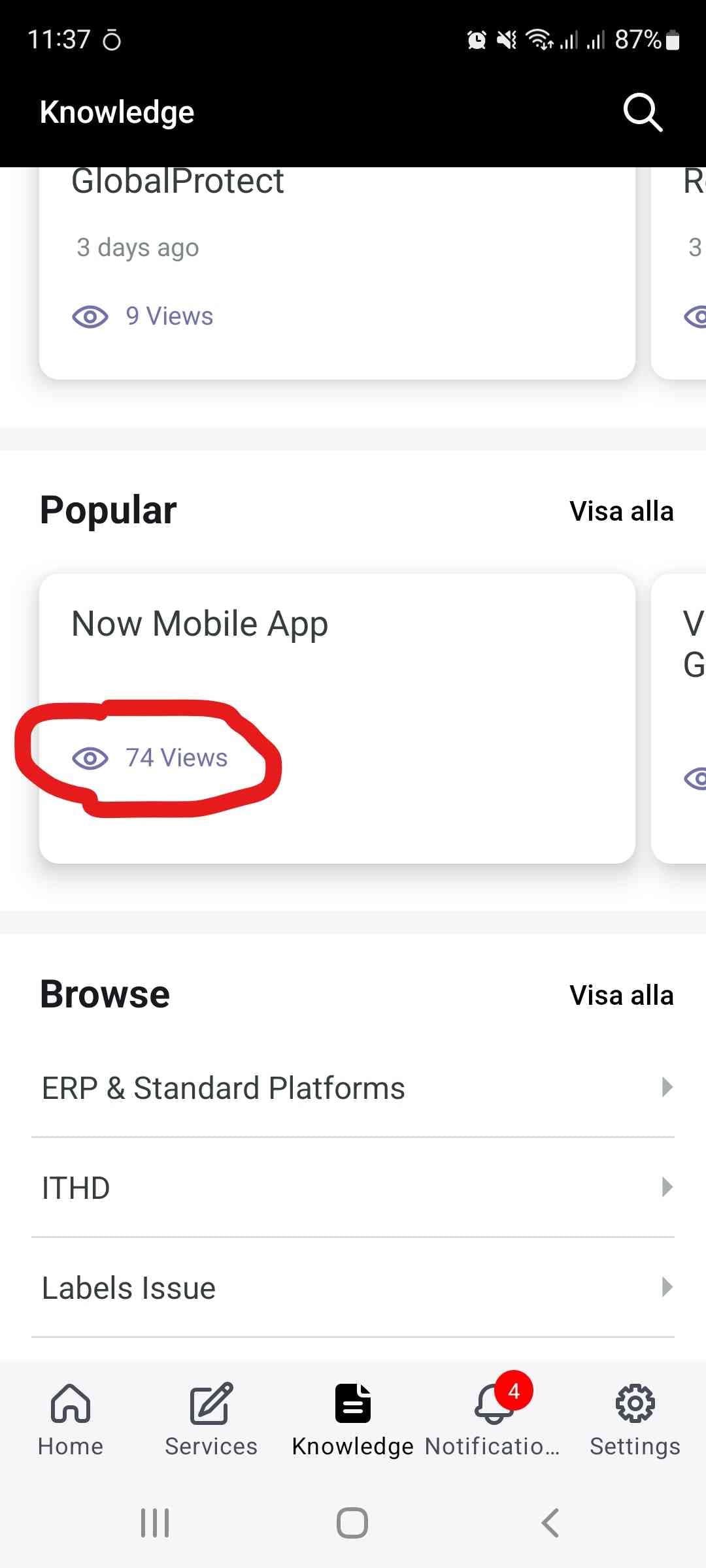
Also if I look at the Knowledge (Information) page, the number of views are displayed in purple.
Thank you in advance,
Ulrika
- Labels:
-
Mobile app configuration
-
Now Mobile
- Mark as New
- Bookmark
- Subscribe
- Mute
- Subscribe to RSS Feed
- Permalink
- Report Inappropriate Content
04-08-2022 06:29 AM


- Mark as New
- Bookmark
- Subscribe
- Mute
- Subscribe to RSS Feed
- Permalink
- Report Inappropriate Content
04-08-2022 06:36 AM
Sure ! Try that video, it will help you.
Incase you find this helpful, you can "Mark as helpful" or if solves your question, "Mark as Solved"
Regards,
Paul
PaulSylo
To be is to do. To do is to be.
- Mark as New
- Bookmark
- Subscribe
- Mute
- Subscribe to RSS Feed
- Permalink
- Report Inappropriate Content
04-10-2022 09:29 PM
Unfortunately the video didn't help completely. The Secondary color doesn't seem to change the radio button color (although a lot of other colors). I will continue checking out the mesp css as I believe the answer is in it 🙂
Thank you all again.
- Mark as New
- Bookmark
- Subscribe
- Mute
- Subscribe to RSS Feed
- Permalink
- Report Inappropriate Content
04-11-2022 02:06 AM
Radio buttons: try with .checkbox and set color with !important property
About KB, can you paste a screenshot? I want to see if you are in sp page or mesp page. Maybe you only need a :
a {
color: #yourcolor;
}
In any case, there are many things that change color with the OOTB configuration, you need to open the MESP page in a browser and see what class or id is.
for example for a date picker (in the other css):
  .glyphicon-calendar {
    color: #yourcolor;
    font-size: 24px;
    left : 2px
}- Mark as New
- Bookmark
- Subscribe
- Mute
- Subscribe to RSS Feed
- Permalink
- Report Inappropriate Content
04-11-2022 03:22 AM
Thank you! Sorry but I'm quite a newbie...:)
do you mean this part under "Adjust field styles" in the mesp-styling-overrides.css:
.radio, .checkbox {
margin: 0;
margin-left: 16px;
min-height: 40px;
&:last-of-type {
box-shadow: 0px 1px 0px 0px $mesp-input-border !important;
padding-bottom: 20px;
}
}
Tried to add
color: $black !important;
But no change unfortunately.
Regarding the KB, it's both the icon and the actual "views" text I would like to change, see screen shot.