Created interactive filter that selects agents (assigned to) data based on the manager

- Mark as New
- Bookmark
- Subscribe
- Mute
- Subscribe to RSS Feed
- Permalink
- Report Inappropriate Content
02-10-2022 01:47 AM
Hello everyone,
I am trying to show data for Agents that are assigned to cases. For simplicity let's just say I want to display how many cases an Agent is assigned to which is simple enough by itself. However instead of creating an 'Assigned to' interactive filter to select individual agents I would like to just be able to create a an interactive filter to just select their manager and the agents are selected based on the manager.
I made some screenshots (in Excel) what I would like to do below as that is probably easier to see.
So I want an interactive filter that looks a bit like this when selecting Manager A as an example.

To get results like this:

Just to emphasize I know how to get the simplified results output on the bottom as this is super simple. I just don't know how to select the Agents based on their manager in an interactive filter.
Hope someone knows a solution for this. I am fairly new to the dashboards so this may not even be possible.
Thanks.
- Labels:
-
Multiple Versions

- Mark as New
- Bookmark
- Subscribe
- Mute
- Subscribe to RSS Feed
- Permalink
- Report Inappropriate Content
02-10-2022 04:04 AM

- Mark as New
- Bookmark
- Subscribe
- Mute
- Subscribe to RSS Feed
- Permalink
- Report Inappropriate Content
02-11-2022 01:08 AM
Thank you very much olgaredkina for getting back to me so quickly. I think I should have mentioned that this is exactly what I had tried (reference filter) where I got stuck in the first place.
Let me show you my settings. Perhaps you can spot something easily. I have highlighted all the parts where I have made changes. Hope the screenshot is easily visible.

So you can see I picked the USER (sys_user) table as reference. I selected the 3 Managers as conditions but in the 'available field' it only shows the 'Agents' and I am assuming what ever is shown in there is shown in the final dropdown filter.
For the Interactive Filter reference on the bottom I used the 'table' that has all the case details stored such as case number, created on etc. Here I use the reference field 'Assigned_to' as I want my chart output in my dashboard related the agents that are assigned to them.
After all these settings my final filter looks like this:

So the drop down does have the Agents in there I can select but as I mentioned I want the Managers of the Agents in there instead.
Desired Filter.

Just so you know the reason for this all. There are like >40 Agents but only 3 Managers so if I could select just the manager it would be so much easier and quicker.
I hope this explains everything in detail that I have done so far.
Thanks again!
- Mark as New
- Bookmark
- Subscribe
- Mute
- Subscribe to RSS Feed
- Permalink
- Report Inappropriate Content
02-11-2022 03:46 AM
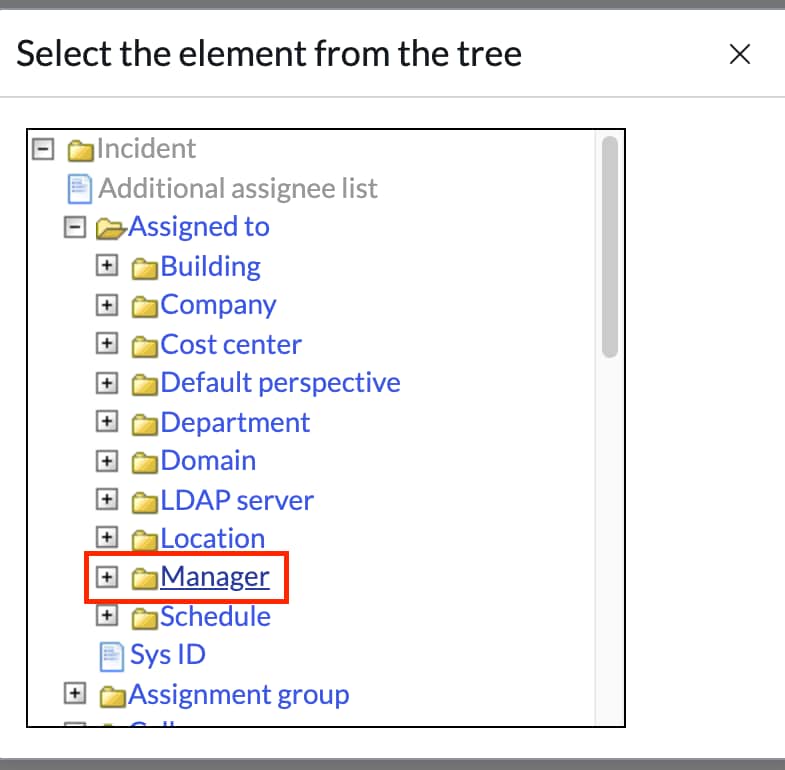
In your "Interactive filter reference" tab you link/map filter it to reference field "Assigned to", while instead you should link to assigned to.manager (so manager of assigned to). You can click on plus button next to assigned to when you select the field to see associated fields.

- Mark as New
- Bookmark
- Subscribe
- Mute
- Subscribe to RSS Feed
- Permalink
- Report Inappropriate Content
02-11-2022 06:29 AM
Hello again olgaredkina. Happy Friday.
Yes, you are correct. I can change the reference field so when I chose 'Assigned to' => 'Manager' it looks like this below.

However dropdown filter still only shows a list of the agents as before.
If you have another idea let me know but don't worry too much as it won't be the end of the world. More of a 'nice to have'
Have a great weekend.