Ghost Text Aren't working on SOW workspace but working on Core UI

- Mark as New
- Bookmark
- Subscribe
- Mute
- Subscribe to RSS Feed
- Permalink
- Report Inappropriate Content
07-29-2026 11:08 PM
As a worker I want a form to help me in filling in the correct values and understand better what I need to enter and why.
ServiceNow fields can have hints on the form, another feature is to show a text which automatically disappears when you start typing (aka ghost text)
Fields that need additional guidance:
Planned start date
Planned end date
On hold reason
Close notes
Additional comments (no ghost text possible)
Work notes (no ghost text possible)
Reopen popup - work note (not sure if this is possible)
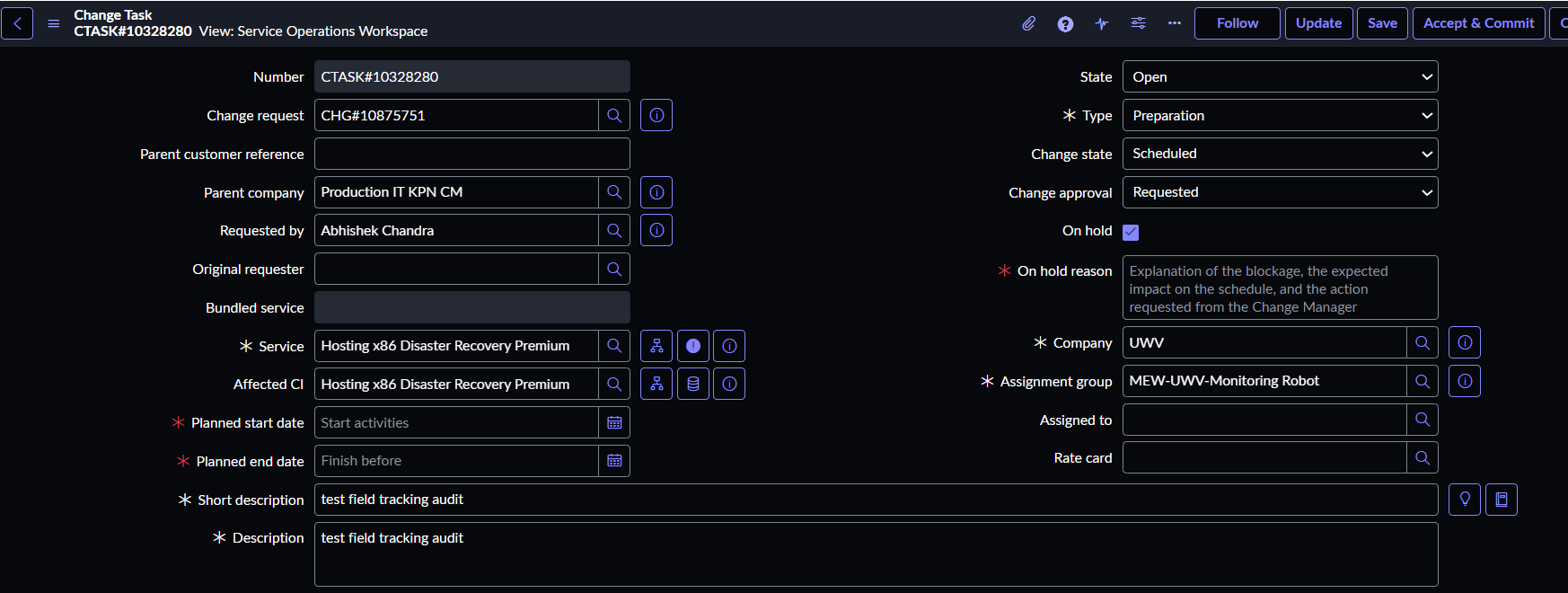
But when i added the ghost text on the SOW workspace , It isn't working for the Planned start and End date as we have a DD:MM:YYYY format placeholder by default and not able to override it , So if it possible to guide us ,What exactly needs to be done for the existing Placeholder to be replaced by the Placeholder provided by the Business and they are in Dutch and English language (Placeholder needs to be according to the User language).
Also for the Work UI it is working when tried via Client script (attached image).
But for SOW it is not working even the view is SOW


- Mark as New
- Bookmark
- Subscribe
- Mute
- Subscribe to RSS Feed
- Permalink
- Report Inappropriate Content
07-29-2026 11:41 PM
how is the client script doing this?
may be that g_form method is not supported for Date fields in SOW
Also check this, seems that placeholder method doesn't work for Date in Workspace
Placeholder Text on Service Operations Workspace
I tried for String field and it worked in SOW

💡 If my response helped, please mark it as correct ✅ and close the thread 🔒— this helps future readers find the solution faster! 🙏
Ankur
✨ Certified Technical Architect || ✨ 10x ServiceNow MVP || ✨ ServiceNow Community Leader
- Mark as New
- Bookmark
- Subscribe
- Mute
- Subscribe to RSS Feed
- Permalink
- Report Inappropriate Content
07-30-2026 08:54 PM
Just following up to see whether my suggested solution worked for you.
If you're still facing any issues, I'd be happy to help further.
Ankur
✨ Certified Technical Architect || ✨ 10x ServiceNow MVP || ✨ ServiceNow Community Leader