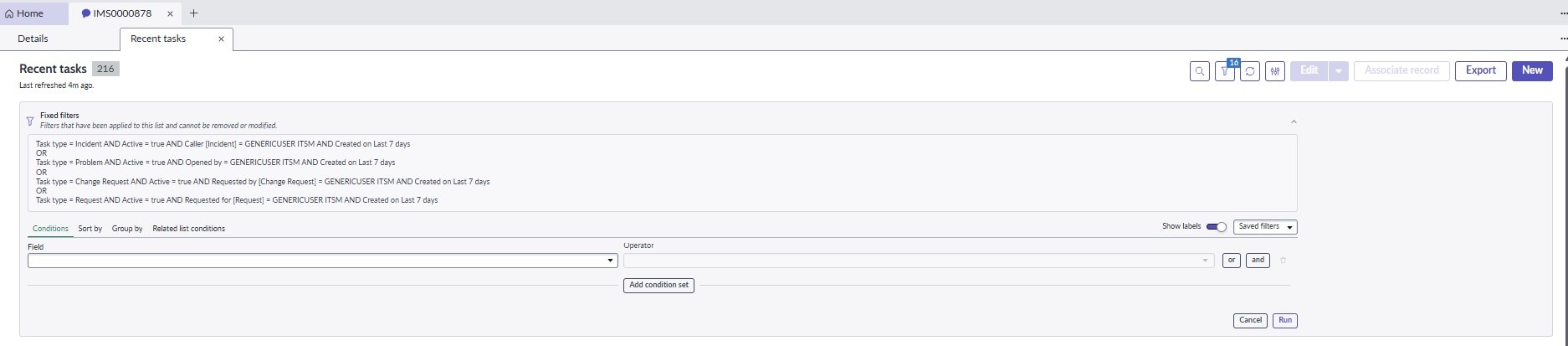
How to Modify this filter in UI Builder.

- Mark as New
- Bookmark
- Subscribe
- Mute
- Subscribe to RSS Feed
- Permalink
- Report Inappropriate Content
12-08-2025 12:34 PM
- Mark as New
- Bookmark
- Subscribe
- Mute
- Subscribe to RSS Feed
- Permalink
- Report Inappropriate Content
12-08-2025 08:49 PM
Hello @Ashish Kathait ,
This solution i found in one document. Let me know if it work
Go to:
UI Builder → Open the Service Operations Workspace experience
(sys_ux_experience.list)
On that page, locate the “Recent Tasks” (or “Recent Records”) component in the sidebar region.
Select the component and check the Data Resources section.
You will typically see something like:
Data resource: recent_records
Parameter: days_ago = 7
Change 7 → 30, then publish.
Important:-
This cannot be changed via a system property.
It is not a query on the Interaction table.
It is component-level configuration inside the Workspace experience.


- Mark as New
- Bookmark
- Subscribe
- Mute
- Subscribe to RSS Feed
- Permalink
- Report Inappropriate Content
12-08-2025 09:34 PM - edited 12-08-2025 09:34 PM
Please try this:
- Navigate to All → Service Operations Workspace → Configurations.

- In the Configurations tab, select Interaction Management from the sidebar.
- Update the Number of days value from 7 to 30 and save the changes.

Hope this helps!
"If you found my answer helpful, please like and mark it as an "accepted solution". It helps future readers to locate the solution easily and supports the community!"
Thank You
Juhi Poddar
Juhi Poddar
- Mark as New
- Bookmark
- Subscribe
- Mute
- Subscribe to RSS Feed
- Permalink
- Report Inappropriate Content
12-09-2025 02:11 PM
Thanks Juhi but it is not working at all.