- Mark as New
- Bookmark
- Subscribe
- Mute
- Subscribe to RSS Feed
- Permalink
- Report Inappropriate Content
04-25-2017 07:53 AM
We are upgrading from Social IT to Connect Support, but i am unable to see where is the chat history is now logged?
It used to be under the chat_message table, please can someone advise where this is recorded.
Thanks in advance.
Solved! Go to Solution.
- Mark as New
- Bookmark
- Subscribe
- Mute
- Subscribe to RSS Feed
- Permalink
- Report Inappropriate Content
08-31-2017 12:45 AM
I found chat_queue_entry was the best place, you can them identify them by assignment group.
- Mark as New
- Bookmark
- Subscribe
- Mute
- Subscribe to RSS Feed
- Permalink
- Report Inappropriate Content
04-25-2017 08:17 AM
Hi,
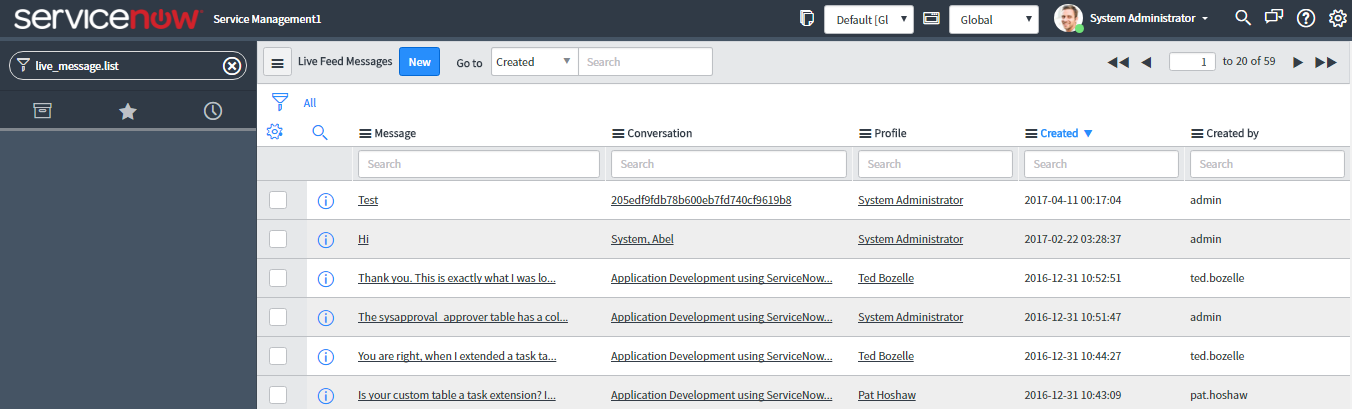
With Connect the chat history gets saved in the Table Live Feed Message(live_message.LIST). You can type live_message.LIST from Application Navigator search to open the table. Below is the screen shot for the same:

Hope this helps.Mark the answer as correct/helpful based on impact.
Regards,
Shloke
Regards,
Shloke
- Mark as New
- Bookmark
- Subscribe
- Mute
- Subscribe to RSS Feed
- Permalink
- Report Inappropriate Content
04-26-2017 01:04 AM
Hi shlokesrivastava,
Thanks for this, that's a great start. BUT how do i identify Connect Chat from Connect Support Chats. I also need to be able to identify Connect Support Chats in different groups e.g. Service Desk & HR. I don't see any such fields to identify these things.


- Mark as New
- Bookmark
- Subscribe
- Mute
- Subscribe to RSS Feed
- Permalink
- Report Inappropriate Content
05-03-2017 05:36 AM
You can try filtering [live_message] lists by the conversation->type. Conversation is a [live_group_profile] record created for the chat, which has a 'type' field (ex: connect, support, etc...)
- Mark as New
- Bookmark
- Subscribe
- Mute
- Subscribe to RSS Feed
- Permalink
- Report Inappropriate Content
08-31-2017 12:45 AM
I found chat_queue_entry was the best place, you can them identify them by assignment group.