
- Mark as New
- Bookmark
- Subscribe
- Mute
- Subscribe to RSS Feed
- Permalink
- Report Inappropriate Content
04-19-2019 10:24 AM
Hello,
Is there a way to add a banner image to all outbound emails, without having to add it manually to each email notification?
Thanks,
Laurie
Solved! Go to Solution.
- Labels:
-
Notifications

- Mark as New
- Bookmark
- Subscribe
- Mute
- Subscribe to RSS Feed
- Permalink
- Report Inappropriate Content
04-25-2019 09:37 AM
You can use a Before Insert/Update Business Rule to accomplish that:

The Script would be:
(function executeRule(current, previous) {
	//add a note to the top of the message with a customizable Message record
	var prefixMessage = gs.getMessage("u_notification_prefix").replace("u_notification_prefix", "");
	//update the current email message
	current.body = prefixMessage + current.getValue("body");

})(current, previous);
I actually use a Message record to control the contents of the prefix:

The Message field can contain whatever HTML you might need. You can also just put it into the Business Rule if you would rather keep everything together. I use the Message record because I have a prefix and suffix and a few other things in the Business Rule. I just included a simplified version of the BR above.
So that BR will now include the prefix into every single email that goes out of your instance.

- Mark as New
- Bookmark
- Subscribe
- Mute
- Subscribe to RSS Feed
- Permalink
- Report Inappropriate Content
04-25-2019 09:15 AM
Do you have any update on this?
If this solved your query would you mind closing this thread by marking the response as correct
Cheers
Prateek kumar
- Mark as New
- Bookmark
- Subscribe
- Mute
- Subscribe to RSS Feed
- Permalink
- Report Inappropriate Content
04-25-2019 09:37 AM
You can use a Before Insert/Update Business Rule to accomplish that:
The Script would be:
(function executeRule(current, previous) {
	//add a note to the top of the message with a customizable Message record
	var prefixMessage = gs.getMessage("u_notification_prefix").replace("u_notification_prefix", "");
	//update the current email message
	current.body = prefixMessage + current.getValue("body");

})(current, previous);
I actually use a Message record to control the contents of the prefix:
The Message field can contain whatever HTML you might need. You can also just put it into the Business Rule if you would rather keep everything together. I use the Message record because I have a prefix and suffix and a few other things in the Business Rule. I just included a simplified version of the BR above.
So that BR will now include the prefix into every single email that goes out of your instance.
- Mark as New
- Bookmark
- Subscribe
- Mute
- Subscribe to RSS Feed
- Permalink
- Report Inappropriate Content
04-25-2019 09:50 AM
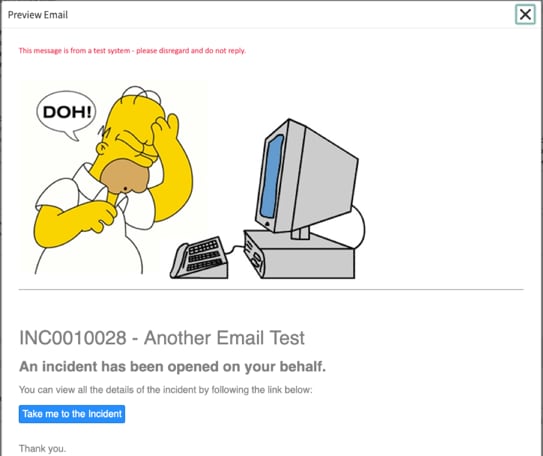
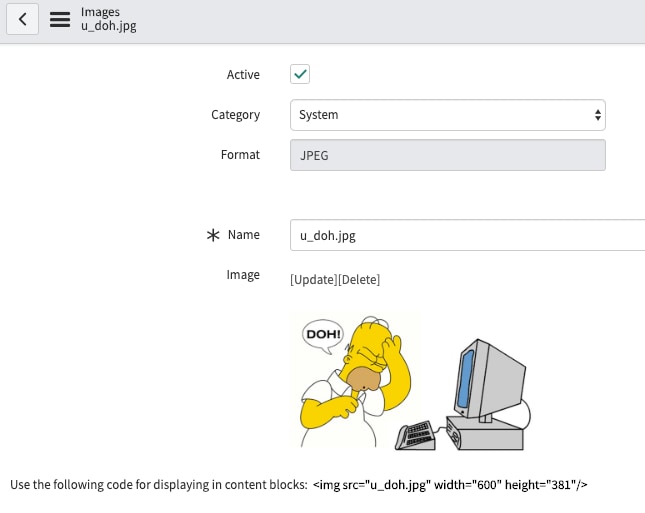
And if you want to include an image, you can upload the file with the "System UI \ Images" Module:

...use the code displayed in the form in the BR or Message record:
<div style='font-family:Calibri,Arial,sans-serif;font-size:10.0pt;color:#EF2C4E'>
This message is from a test system - please disregard and do not reply.<br/>
<img src="u_doh.jpg" width="600" height="381"/>
</div><hr/><br/><br/>
...and your email will end up looking like this:



- Mark as New
- Bookmark
- Subscribe
- Mute
- Subscribe to RSS Feed
- Permalink
- Report Inappropriate Content
12-04-2021 11:12 PM
Hi Jim,
Hope you are well.
I have one similar situation. I would like to display the images that are attached in the incidents on the email body. Can you advise me on this please.
Regards,
Arun
- Mark as New
- Bookmark
- Subscribe
- Mute
- Subscribe to RSS Feed
- Permalink
- Report Inappropriate Content
04-25-2019 11:14 AM
Hi Jim,
Thank you for this information! I'm going to give this a try!
Thanks,
Laurie
